Podcast with celebrities
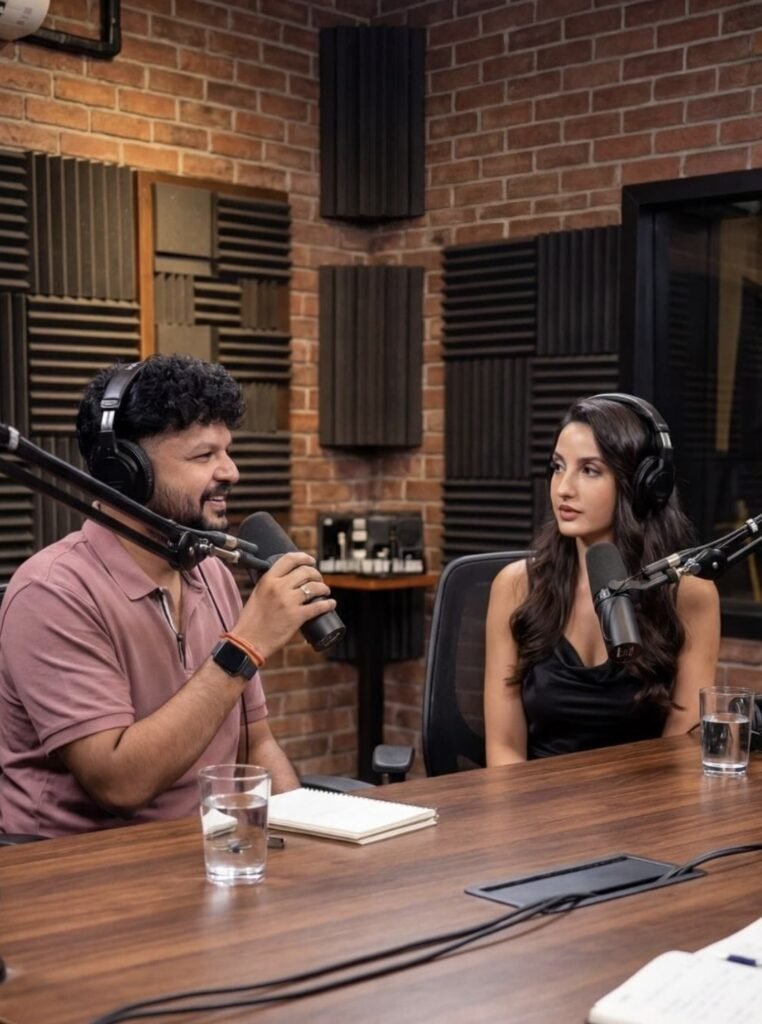
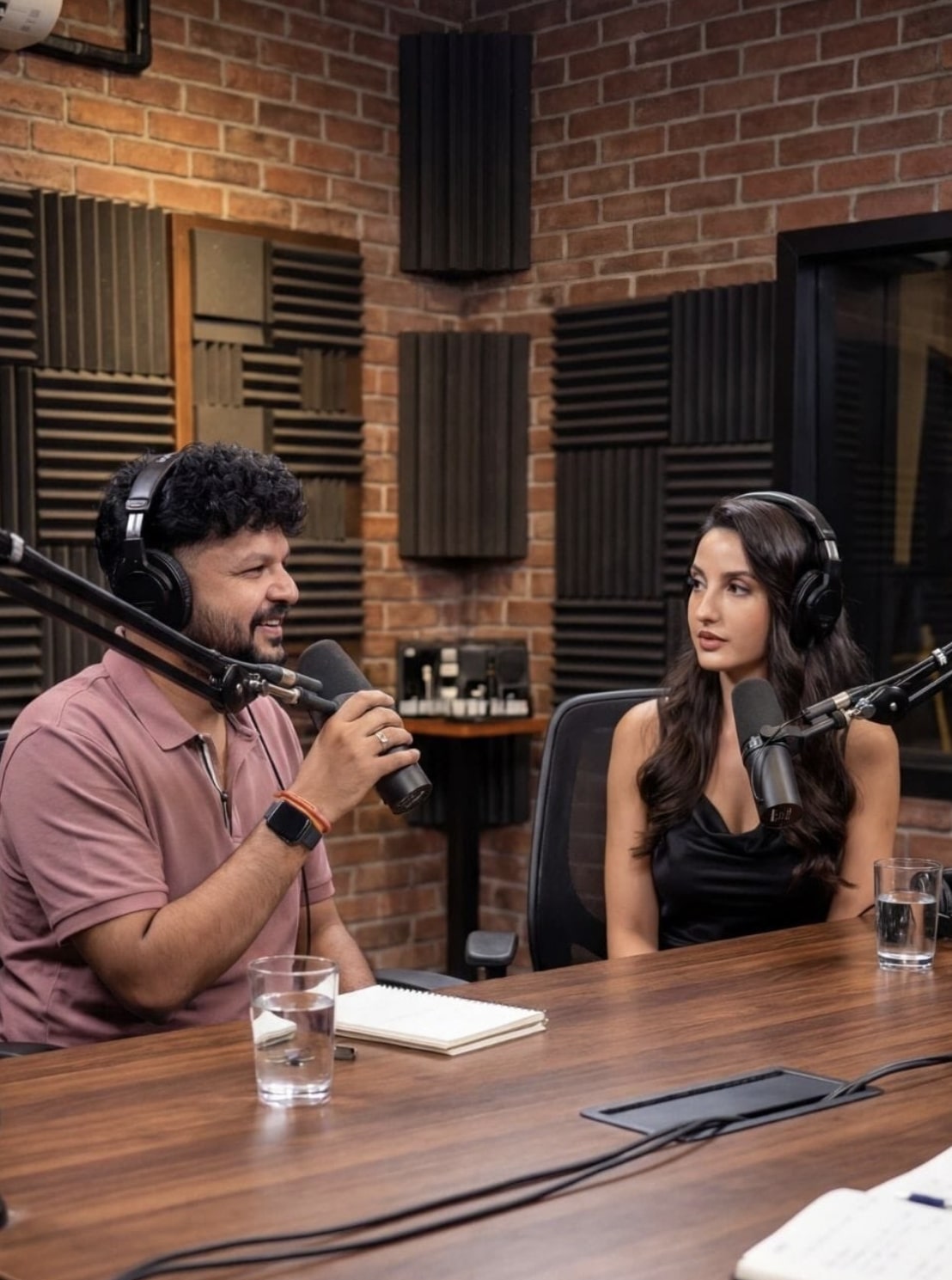
Podcast with Celebrities: Om Editing Top Style Ka Realistic Use Kya Hai?
Om Editing Top style ka ye concept un logon ke liye hai jo celebrity podcast, interview scene, ya social-media content ko ultra-realistic look dena chahte hain. Agar aap ek aisa visual banana chahte hain jisme do log table ke across baithe hon, one-on-one conversation ho, aur overall frame modern podcast studio jaisa lage, to ye prompt-style setup kaafi useful hota hai.
Read Also: cinematic-style realistic portrait | 2026 New Year
Is type ka edit especially content creators, thumbnail designers, meme page owners, fan editors, aur AI image users ke liye kaam aata hai. Isme focus usually face accuracy, natural body positioning, studio lighting, aur cinematic realism par hota hai. Result ek aisa image look hota hai jo social media par instantly attention grab kar sake.
Podcasts aur celebrity-based visuals ka appeal isliye strong hota hai kyunki audience ko instantly familiarity feel hoti hai. Jab framing professional ho, background clean ho, aur subject ka expression natural lage, to image ek real interview moment jaisi lagti hai. Isi wajah se Om Editing Top style content aajkal thumbnails aur creative posters me bahut popular hai.
This Style Podcast Style Me Aapko Kya Visual Result Milta Hai?
Is prompt-style edit ka main output ek hyper-realistic podcast scene hota hai. Usually composition me do people ek table ke opposite side baithe hote hain, jahan ek person host jaisa feel deta hai aur dusra guest ya celebrity. Scene ka mood polished, professional, aur high-production value wala hota hai.
Lighting generally soft aur balanced hoti hai, jisse skin tones natural lagen aur facial details clear dikhें. Background me studio elements, microphones, desk setup, aur subtle depth of field image ko cinematic banate hain. Color palette mostly clean aur rich hoti hai, jaise black, grey, warm skin tones, aur controlled highlights.
Ye style un users ke liye best hota hai jo realism ke saath social-media appeal chahte hain. Agar face accuracy strong ho aur pose stable ho, to final image ek legit podcast still jaisi feel deti hai. Isme over-editing se bachna zaroori hota hai, warna output artificial lag sakta hai.
- Lighting: Soft studio light, no harsh shadows, clean highlights
- Mood: Professional, serious, premium, interview-like
- Colours: Neutral background with natural skin tone balance
- Composition: Table-over conversation framing, medium shot, balanced spacing
- Realism: Face details, hand placement, and posture should look natural
This Style Prompt Kaise Use Karein: Step-by-Step Beginner Guide
Agar aap mobile se kaam kar rahe hain, to is style ko use karna simple hai bas aapko reference photo aur prompt format ko sahi tarike se handle karna hota hai. Best result tab milta hai jab aap clear image, proper cropping, aur accurate subject selection use karte hain. Ye process beginners ke liye bhi easy hai.
Sabse pehle ek high-quality photo choose karein jisme face clearly visible ho. Phir us photo ko aise tool me upload karein jo image-generation ya AI-edit support karta ho. Prompt box me instruction ko carefully set karein, aur output ratio ko mobile-friendly frame ke hisaab se adjust karein.
Agar aap first time use kar rahe hain, to ek simple workflow follow karna helpful hota hai. Isse aapko understand ho jayega ki kaunsi photo best perform karti hai aur kis type ki lighting image ko aur realistic banati hai. Below steps ko follow karke aap professional-looking result tak pahunch sakte hain.
- Apni ya celebrity reference photo ko select karein, jisme face clear aur front-facing ho.
- Image ko mobile par open karke crop karein, taaki unnecessary background remove ho jaye.
- AI image tool ya editing app me photo upload karein.
- Prompt style me podcast setup, table placement, aur realistic studio look apply karein.
- Ratio ko vertical format me rakhein agar social media post ya reel-style image chahiye.
- Generate hone ke baad face accuracy, hands, and posture check karein.
- Final image me agar koi distortion ho, to prompt ko thoda more specific karke dobara try karein.
Kaunsi Photos This Style Podcast Style Ke Liye Sabse Best Rehti Hain?
Is type ke podcast visuals ke liye photo quality sabse important factor hota hai. Agar input image blurry, low-light, ya side-angle me hai, to final result utna natural nahi lagega. Best output ke liye aapko clean, well-lit, aur sharp reference image chahiye.
Angle ka role bahut strong hota hai. Front-facing ya slightly angled portrait shots zyada kaam karte hain kyunki AI ko facial structure samajhne me aasani hoti hai. Background bhi simple hona chahiye, taaki subject clearly separate dikhe aur studio scene me blend ho sake.
Clothing selection bhi final mood ko affect karta hai. Solid colors, formal shirts, plain tees, ya muted tones podcast environment me better fit hote hain. Bahut busy prints ya extreme contrast kabhi-kabhi output ko visually noisy bana dete hain.
- Resolution: High-resolution image use karein, preferably sharp and clear
- Angle: Front or slightly side-facing portrait best rehta hai
- Lighting: Natural daylight ya soft indoor light use karein
- Background: Plain, uncluttered, and non-distracting background choose karein
- Clothing: Solid colors, simple shirts, and clean casual/formal wear
- Expression: Neutral or confident expression zyada realistic lagta hai
Pro Tips for the Best Results with Om Editing Top
अगर आप Om Editing Top style output को ज्यादा realistic और professional बनाना चाहते हैं, तो सबसे पहले composition पर ध्यान दें। Subject placement, table angle, और seating distance सही होना चाहिए ताकि podcast scene natural लगे. अगर दोनों लोगों के बीच eye contact और balanced framing रहेगी, तो image instantly more believable लगेगी.
Lighting भी बहुत बड़ा role play करता है। Soft studio light, subtle shadows, और clean background podcast setup को premium look देते हैं. Face accuracy और realistic skin texture के लिए expressions को natural रखना बहुत जरूरी है, क्योंकि overdone poses image को artificial बना सकते हैं.
Best results के लिए नीचे दिए गए points follow करें:
- Subject faces को clear और front-facing रखें, ताकि identity accuracy बनी रहे.
- Table height और mic placement को realistic podcast layout के हिसाब से set करें.
- Background में unnecessary clutter avoid करें, जिससे focus सिर्फ subjects पर रहे.
- Pink shirt वाले person की position anchor या interviewer जैसी रखें, ताकि scene readable लगे.
- 8K quality, sharp details, और clean depth effect को prioritize करें.
- Vertical 9:16 framing use करें, खासकर Instagram और reels-friendly output के लिए.
Common Mistakes to Avoid in This Style
सबसे common mistake होता है faces को too much edit करना. जब facial features unnatural blur, mismatch, या distortion के साथ आते हैं, तो celebrity podcast image की realism कम हो जाती है. इसलिए facial structure को consistent रखना output quality के लिए essential है.
दूसरी गलती है scene elements का imbalance. अगर table, chair, mic, या body posture awkward दिखे, तो पूरा podcast setup fake लगने लगता है. इसी तरह wrong lighting, harsh contrast, और extra background objects भी final visual को weak कर सकते हैं.
- Over-editing से बचें, क्योंकि इससे face accuracy खराब हो सकती है.
- Too many props डालने से focus टूट जाता है और scene crowded लगता है.
- Uneven shadows image को low-quality और inconsistent बना सकती हैं.
- Incorrect seating angle podcast vibe को natural नहीं रहने देता.
- Unclear expressions से image में बातचीत वाला real feel नहीं आता.
Best Use Cases and Ideas for Podcast with Celebrities
यह type का Om Editing Top content कई creative platforms पर use किया जा सकता है. Instagram posts, reels covers, and thumbnail designs में यह style काफी eye-catching लगता है, especially जब celebrity podcast atmosphere clean और cinematic हो. ऐसे visuals audience को instantly curiosity create करते हैं.
Creators इसे profile pictures, fan edits, YouTube thumbnails, or promotional posters में भी use कर सकते हैं. अगर आपका page entertainment, celebrity culture, or AI art edits पर based है, तो यह style engagement बढ़ाने में helpful हो सकता है. Realistic podcast setup content को modern और premium appearance देता है.
- Instagram posts: bold and engaging feed content के लिए.
- Profile pictures: creative creator identity दिखाने के लिए.
- YouTube thumbnails: high-click visual story बनाने के लिए.
- Reels covers: short-form content को polished look देने के लिए.
- Portfolio edits: AI editing skills showcase करने के लिए.
Variations You Can Try with This Style
अगर आप अलग-अलग moods test करना चाहते हैं, तो podcast scene में छोटे creative changes बहुत बड़ा difference ला सकते हैं. For example, warm studio lighting image को friendly feel देती है, जबकि cooler tones इसे more serious और professional look देते हैं. Same concept को different aesthetics में use करके आप multiple versions बना सकते हैं.
Seasonal or thematic variations भी काफी useful होती हैं. Winter-toned backgrounds, neon studio glow, minimal desk setup, or luxury talk-show vibe — ये सब scene को नया identity दे सकते हैं. Aap चाहें तो outfit color, seating style, और background texture बदलकर multiple content pieces बना सकते हैं without changing the core idea of this style.
- Mood variations: serious, friendly, energetic, luxury, or cinematic.
- Colour variations: warm beige, cool blue, black studio, or soft grey.
- Setting variations: modern podcast room, dark studio, creative office, or glam setup.
- Seasonal variations: festive tones, winter light, summer brightness, or moody evening look.
- Style variations: ultra realistic, editorial, social-media-friendly, or premium portrait vibe.
Conclusion: Try This Style for a Strong Celebrity Podcast Look
अगर आप cinematic, realistic, और attention-grabbing celebrity podcast visuals बनाना चाहते हैं, तो this prompt एक strong choice है. सही composition, clean lighting, and natural expressions के साथ यह style बहुत polished और professional result दे सकता है.
अब आप अलग-अलग moods, colors, और framing options test करके अपने content को और बेहतर बना सकते हैं. चाहे Instagram हो, thumbnail हो, या portfolio edit, this look आपको flexible and premium visual direction देता है — so try different variations and see what works best.
FAQ: Podcast with celebrities
How do I use the "Podcast with celebrities" prompt?
Copy the prompt above, open Gemini or ChatGPT, upload a clear photo of yourself and paste the prompt. Generate the image and adjust the outfit or background if you want a variation.
Is this prompt free?
Yes. This prompt is free to copy and use for Instagram, reels, WhatsApp DP and profile pictures.
Which photo works best?
A sharp, front-facing, well-lit photo with no filter. A clear face helps the AI keep your identity in the final image.
Last updated: 17 August 2026
💬 Comments