pixel stretch artwork trend
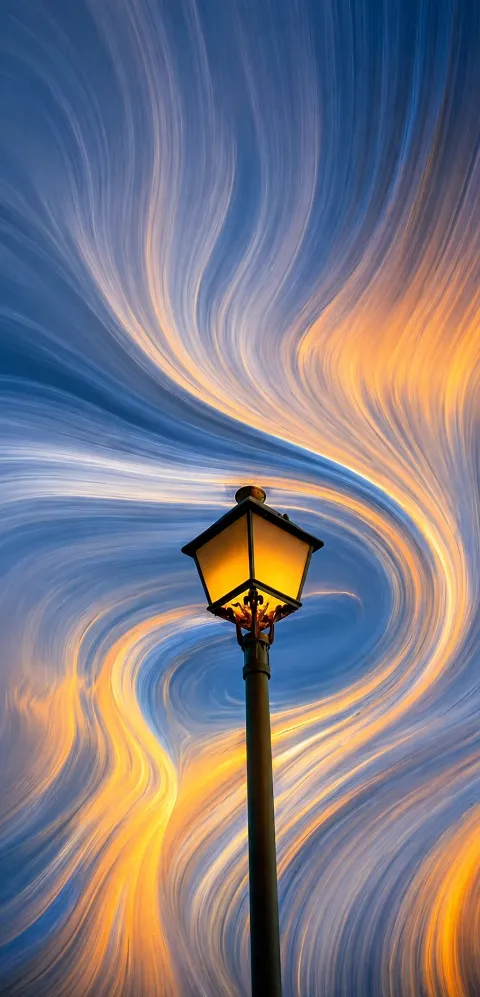
Pixel Stretch Artwork Trend क्या है और यह किसके लिए है?
Pixel stretch artwork trend आज के समय में digital art, social media design और photo editing lovers के बीच काफी popular style बन चुका है। इसमें subject को sharp और clear रखा जाता है, जबकि image के कुछ हिस्सों को pixels की flowing ribbons में stretch करके एक futuristic, cinematic look बनाया जाता है।
Read Also: cinematic-style realistic portrait | 2026 New Year
यह style उन लोगों के लिए खास तौर पर useful है जो अपनी photos को सामान्य edit से आगे ले जाकर artistic, eye-catching और premium feel देना चाहते हैं। चाहे आप Instagram post, profile image, poster design, music cover, thumbnail, या concept art बना रहे हों, pixel stretch effect आपकी image को instantly standout करा सकता है।
इस trend की सबसे बड़ी खासियत यह है कि यह real photo और abstract digital art के बीच एक balance बनाता है। Main subject recognizable रहता है, लेकिन background या sides में stretched color trails, smooth motion lines, और glossy textures एक modern visual identity create करते हैं।
Pixel Stretch Artwork Style आपको क्या देता है?
यह prompt-style edit सिर्फ pixels को खींचने भर तक limited नहीं है; यह image को a cinematic and luxury digital art look देता है। Proper lighting, balanced shadows, and rich color harmony के साथ stretched elements silky और organic लगते हैं, जैसे कोई paint, light stream, या energy wave subject से निकल रही हो।
Visual result अक्सर clean, sharp, and high-end लगता है। Subject का face, outfit, product, या main object crisp रहता है, जबकि stretched areas में smooth curves और motion create होती है। यही contrast इस style को modern, aesthetic, और social-media-ready बनाता है।
इस तरह के edit में आमतौर पर ये visual qualities देखने को मिलती हैं:
- Sharp subject detail: Main object साफ और realistic दिखता है
- Fluid stretched pixels: Colors और textures soft ribbons की तरह फैलते हैं
- Cinematic contrast: Highlights और shadows image को depth देते हैं
- Vibrant but controlled colors: Hues bold रहते हैं, लेकिन messy नहीं लगते
- Modern minimalist composition: Frame clutter-free और premium feel देता है
Pixel Stretch Artwork Trend को कैसे Use करें: Beginner-Friendly Guide
अगर आप mobile से edit कर रहे हैं, तो इस style को use करना इतना मुश्किल नहीं है जितना पहली नज़र में लगता है। आपको बस सही photo, सही composition, और effect के placement पर ध्यान देना होता है। सबसे पहले ऐसी image चुनें जिसमें subject clearly visible हो और edges ज्यादा noisy न हों।
इसके बाद editing app या AI-based tool में photo upload करें और pixel stretch effect को subject के side, background, या one-direction motion area में apply करें। कोशिश करें कि main subject के face, product label, या important details untouched रहें, ताकि image clean और recognizable बनी रहे।
Beginner के लिए simple step-by-step process:
- एक clear photo चुनें जिसमें subject center या slightly off-center हो।
- Image को mobile editor या trend-based design tool में open करें।
- Pixel stretch effect को background या one side पर apply करने के लिए select करें।
- Stretch direction को smooth curve या diagonal motion में set करें।
- Main subject को sharp रखने के लिए detail protection या mask का use करें।
- Color harmony check करें ताकि stretched area subject के tones से match करे।
- Final image को zoom करके देखें कि edges harsh या broken तो नहीं लग रहे।
- High resolution में export करें ताकि social media पर quality maintain रहे।
अगर आप पहली बार ऐसा edit कर रहे हैं, तो एक simple background वाली photo से शुरुआत करें। Busy background पर pixel stretch effect कभी-कभी messy दिख सकता है, जबकि clean image में result much more polished आता है।
कौन-सी Photos Pixel Stretch Artwork के लिए सबसे बेहतर रहती हैं?
इस trend में photo selection बहुत important है, क्योंकि हर image इस effect के लिए suitable नहीं होती। सबसे अच्छे results तब मिलते हैं जब subject clearly separated हो और उसके आसपास enough visual space available हो। Portraits, fashion shots, single objects, cars, sneakers, gadgets, और music-themed visuals इस style में बहुत अच्छे लगते हैं।
Angle भी matter करता है। Front-facing या slightly angled shots ज्यादा balanced रहते हैं, क्योंकि stretch effect को clean direction मिल जाती है। बहुत ज्यादा tilted या crowded composition में effect uneven लग सकता है। इसी तरह lighting भी natural या studio-style होनी चाहिए ताकि subject की sharpness बनी रहे।
Best photo conditions के लिए यह practical checklist follow करें:
- Resolution: High-resolution image लें, ideally sharp and detailed
- Lighting: Soft daylight, studio light, या balanced indoor light best रहता है
- Background: Simple, uncluttered, and clean background चुनें
- Subject placement: Center, side-center, या rule-of-thirds composition बेहतर रहती है
- Clothing/objects: Solid colors, defined textures, and clear outlines ज्यादा effective होते हैं
- Face/detail clarity: Eyes, logo, product edges, या main features sharp होने चाहिए
- Color contrast: Subject और background में थोड़ा contrast हो तो stretch effect और अच्छा दिखता है
अगर आपकी photo में motion blur, harsh shadows, या too many distractions हैं, तो pixel stretch artwork उतना clean नहीं लगेगा। इसलिए शुरुआत में ऐसी image use करें जिसमें subject already strong हो, क्योंकि effect उसी को और ज्यादा premium, futuristic, and artistic बना देगा।
Pro Tips for the Best Results with Om Editing Top
To get the most out of Om Editing Top in the pixel stretch artwork trend, start with a clean, high-quality base image. A sharp subject with good lighting gives the stretched pixels more texture to work with, which makes the final artwork look more polished and premium.
When you plan the edit, think about motion first and decoration second. The best results usually come from images where the stretch feels like it is flowing naturally from the subject, instead of looking randomly placed. That balance is what makes Om Editing Top edits feel modern, cinematic, and social-media ready.
- Use a clear subject with strong edges so the main focal point stays crisp.
- Choose colors that already match the mood you want, because the stretch will amplify them.
- Keep the background simple if you want the pixel stretch effect to stand out more.
- Ask for smooth transitions between the original subject and the extended ribbon-like areas.
- Try portrait images, fashion shots, or close-up photos for a more premium Om Editing Top look.
Another useful tip is to test different framing styles. Centered compositions feel clean and bold, while off-center subjects can create a more dynamic stretched movement. If you want your Om Editing Top design to look more artistic, add contrast between sharp details and soft flowing extensions.
Common Mistakes to Avoid in This Style
One of the biggest mistakes is using a low-resolution image. If the base photo is blurry, the pixel stretch artwork trend can lose detail quickly, and the final output may look muddy instead of smooth and luxury-inspired. A strong source image makes a huge difference.
Another common issue is overdoing the stretch effect. Too much distortion can hide the main subject and make the artwork feel messy. With Om Editing Top, the goal is to keep the subject recognizable while the stretched areas add motion, color, and visual energy.
- Do not use dark, noisy images if the subject needs to stay detailed and sharp.
- Avoid stretching every part of the image equally, because it weakens the focal point.
- Do not create harsh edges around the stretched pixels, as they break the smooth flow.
- Avoid clashing colors that fight with the subject instead of complementing it.
- Do not overcrowd the composition, since minimal layouts often look better for this trend.
It also helps to avoid random effects that do not match the visual style. The Om Editing Top look works best when the stretch feels deliberate, elegant, and connected to the original subject. When the motion, lighting, and color harmony all work together, the result feels much more professional.
Best Use Cases and Ideas for This Style
This style style is perfect for social media images that need instant attention. It works especially well for Instagram posts, profile pictures, and story covers because the stretched pixel ribbons create a bold first impression. The mix of sharp detail and smooth motion gives the artwork a trendy, high-impact appearance.
You can also use this style for thumbnails and reels covers, where visual clarity matters a lot. The main subject remains easy to recognize, while the dynamic stretch adds excitement and helps the image stand out in crowded feeds. That is why this trend is popular for creators who want a modern digital-art identity.
- Instagram posts: ideal for eye-catching grid aesthetics and stylized portraits.
- Profile pictures: great for a bold, futuristic, and polished personal brand.
- Thumbnails: useful when you want strong visual contrast and motion.
- Reels covers: helps content look more premium and click-worthy.
- Portfolio pieces: suitable for showcasing creative editing and digital design skills.
Beyond social media, this prompt can also work as a concept for posters, banner art, and creative branding visuals. If you are building a portfolio, these edits can show your ability to blend minimal composition with expressive movement. That makes the style useful not only for fun posts, but also for professional presentation.
Variations You Can Try with This Style
One of the best things about this look is how easy it is to experiment with different moods. You can keep the same stretch structure but change the atmosphere by adjusting colors, lighting, and background tone. This gives every edit a new personality without losing the core trend style.
For a cooler and more futuristic feel, use blue, silver, or neon tones. If you want something richer and more luxurious, go for gold, purple, or deep red shades. Warm tones can make the stretch feel energetic and glowing, while soft pastel colors can give the artwork a cleaner, dreamy look.
- Moody version: dark backgrounds, deep shadows, and dramatic contrast.
- Bright version: vibrant colors, clean highlights, and a glossy finish.
- Minimal version: simple backdrop with controlled stretch and subtle motion.
- Luxury version: metallic tones, cinematic lighting, and polished details.
- Seasonal version: winter blues, summer neons, autumn oranges, or festive golds.
You can also try changing the feeling of the motion itself. Some edits can look silky and smooth, while others can feel sharper and more energetic. By experimenting with different settings, you can turn yeh style idea into a style that matches your personal taste, brand, or content theme.
Conclusion: Try This Style for a Fresh Pixel Stretch Artwork Look
This edit is a smart way to explore the pixel stretch artwork trend while keeping the subject clear, stylish, and visually powerful. It combines sharp details, flowing color, and smooth movement into one modern design that works beautifully for social media and creative portfolios.
If you want your edits to look trendy, polished, and eye-catching, this style is definitely worth trying. Experiment with different moods, colors, and compositions, and let this style help you create a standout digital artwork that feels fresh, dynamic, and memorable.
FAQ: pixel stretch artwork trend
How do I use the "pixel stretch artwork trend" prompt?
Copy the prompt above, open Gemini or ChatGPT, upload a clear photo of yourself and paste the prompt. Generate the image and adjust the outfit or background if you want a variation.
Is this prompt free?
Yes. This prompt is free to copy and use for Instagram, reels, WhatsApp DP and profile pictures.
Which photo works best?
A sharp, front-facing, well-lit photo with no filter. A clear face helps the AI keep your identity in the final image.
Last updated: 17 August 2026
test
test22