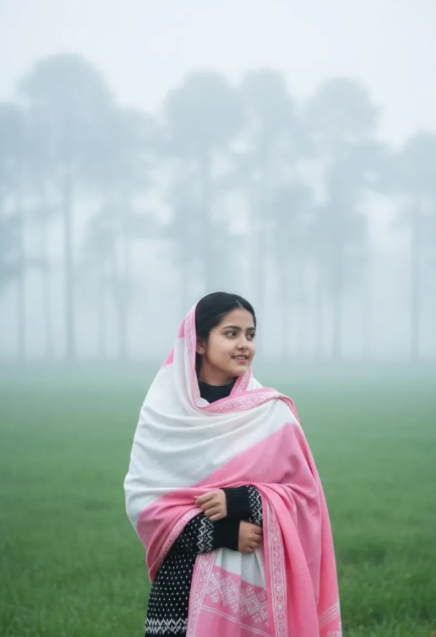
Morning Fog in Village
Morning Fog in Village: Ek Cinematic, Realistic Portrait Style Jo Logon Ko Bohat Pasand Aata Hai
Morning Fog in Village style un users ke liye perfect hai jo apni ordinary photo ko ek dreamy, cinematic aur hyper-realistic village portrait look dena chahte hain. Is tarah ka edit subah ki soft haze, green field backdrop, aur natural calm mood ko ek saath capture karta hai, jisse photo zyada premium aur story-like lagti hai.
Read Also: cinematic-style realistic portrait | 2026 New Year
Yeh style special isliye hai kyunki isme face ko natural rakhte hue poora scene ek polished visual frame mein convert kiya jata hai. Jo log social media profile, WhatsApp DP, Instagram post, ya creative portrait ke liye ek unique countryside atmosphere chahte hain, unke liye Om Editing Top ka yeh look kaafi useful ho sakta hai.
Is photo style mein focus sirf background par nahi hota, balki subject ki expression, pose, outfit, aur foggy light ka balance bhi important hota hai. Jab ye sab elements properly match karte hain, tab result ek realistic yet cinematic image ban jata hai jo dekhne mein soft, calm aur highly detailed lagti hai.
Morning Fog in Village Prompt Style Aapko Kya Result Deta Hai?
Is style ka sabse bada advantage yeh hota hai ki final image mein natural morning atmosphere create hota hai. Early fog light ko soften karta hai, jis se skin tones smooth lagte hain aur background ki harsh details kam ho jati hain. Is wajah se portrait ek peaceful aur elegant feel deta hai.
Colour palette aam tor par green, grey, black, aur muted natural tones par based hoti hai. Green field freshness show karti hai, fog depth add karta hai, aur dark clothing subject ko background se clearly separate karti hai. Ye combination image ko visually balanced aur premium look deta hai.
Composition bhi is style ka important part hota hai. Subject ko aksar frame ke center ya slightly side mein rakhkar blurred trees, open field, aur misty distance se cinematic depth create ki jati hai. Is se image simple snapshot ki bajaye ek film still jaisi lagti hai.
- Lighting: Soft morning light, no harsh shadows, gentle contrast
- Mood: Calm, thoughtful, peaceful, slightly dreamy
- Colours: Natural greens, foggy greys, black outfit accents, muted whites
- Composition: Subject focused, background slightly blurred, depth visible
- Realism: Face natural, hair detail clean, fabric texture visible
Jo log photorealistic editing, cinematic portrait prompt, ya foggy village aesthetic dhoondh rahe hain, unhe is style mein ek balanced combination milta hai. Yeh over-edited look nahi deta, balki aisa lagta hai jaise photo asli subah ke waqt capture ki gayi ho.
Morning Fog in Village Photo Edit Kaise Use Karein: Beginner-Friendly Step-by-Step Guide
Agar aap mobile par editing ya AI image generation kar rahe hain, to sabse pehle apni best clear photo select karein. Face seedha ya thoda side angle mein ho sakta hai, lekin expression calm aur natural hona chahiye. Blurry ya low-light photo use karne se result utna strong nahi aayega.
Uske baad style prompt ko proper editing tool ya image generator mein use karein. Agar platform photo-based editing allow karta hai, to apni image upload karke prompt box mein village fog, cinematic portrait, aur realistic morning field jaise visual instructions apply karein. Mobile users ke liye yeh process simple hota hai, bas sahi image aur clean framing choose karna zaroori hai.
Best results ke liye output ko ek baar sirf generate karke accept na karein. Agar face sharp nahi lag raha, pose unnatural hai, ya fog zyada heavy hai, to prompt ko thoda refine karein. Usually 2-3 tries mein image ka balance sahi ho jata hai.
- Apni clear aur high-quality photo select karein.
- Image ko aise choose karein jisme face visible ho aur expression natural ho.
- Editing app ya AI generator mein photo upload karein.
- Style prompt ko apply karein aur output ratio 9:16 ya portrait rakhein.
- Generate karne ke baad face, outfit, fog, aur background details check karein.
- Agar zarurat ho to light, blur, ya composition ko adjust karke dobara try karein.
Mobile par use karte waqt internet stable hona chahiye, kyunki portrait generation ke dauran image processing thodi heavy ho sakti hai. Saath hi, crop karne se pehle original photo save zaroor karein taaki agar result pasand na aaye to aap dubara try kar saken.
Kaun Si Photos Is Style Ke Liye Sabse Best Kaam Karti Hain?
Is type ki edit ke liye aisi photos best hoti hain jisme subject ka face clearly visible ho aur body posture relaxed ho. Agar aap side gaze, standing pose, ya simple hands-clasped type pose use karte hain, to result aur bhi natural aur expressive lagta hai. Busy background wali photos se bachna chahiye.
Resolution jitni achhi hogi, final output utna realistic aayega. High-resolution selfie ya portrait photo face details ko preserve karti hai, jisse AI ya editing tool ko skin, hair, aur expression ko clean tarike se map karne mein help milti hai. Low-resolution images mein blur aur distortion aa sakta hai.
Lighting aur clothing bhi outcome ko kaafi affect karte hain. Agar original photo mein soft daylight ho aur outfit simple, dark, ya contrast-friendly ho, to morning fog look easily enhance hota hai. Background plain ya lightly natural ho to subject ko replace ya blend karna easy hota hai.
- Angle: Front-facing ya slight side angle sabse better
- Resolution: High-resolution, sharp face details ke saath
- Lighting: Natural daylight ya soft indoor light
- Background: Plain, clean, ya lightly blurred background
- Clothing: Simple, dark, or neutral tone outfits better blend karte hain
- Pose: Calm standing pose, relaxed hands, natural expression
Agar aap apni photo ko village morning atmosphere mein convert karna chahte hain, to subject ke around negative space hona faydemand hota hai. Is se fog aur distant trees jaise elements add karne ke liye enough room milta hai aur composition zyada cinematic dikhta hai.
Pro Tips For Best Om Editing Top Results
अगर आप Om Editing Top style में morning fog village portrait को और ज्यादा natural और cinematic बनाना चाहते हैं, तो सबसे पहले image alignment पर ध्यान दें। Face, hairstyle, posture, and outfit details जितने accurately preserved होंगे, final edit उतना ही believable लगेगा. Background में early morning fog soft होना चाहिए, ताकि subject clearly stand out करे और overall scene में depth बनी रहे.
Lighting भी बहुत important है। Foggy village look में harsh shadows नहीं, बल्कि soft diffused light सबसे अच्छा काम करती है. जब आप subtle contrast, muted colors, और clean edge detailing use करते हैं, तो portrait premium लगता है. खासकर अगर image Instagram या profile use के लिए है, तो smooth skin tones और balanced tones result को और polished बना देते हैं.
बेहतर output के लिए नीचे दिए गए practical points follow करें:
- Subject के face proportions और hairstyle को consistent रखें, ताकि identity distortion न हो.
- Black shawl और patterned sweater की textures साफ़ रखें, क्योंकि यही image को authentic feel देते हैं.
- Background में trees को overly sharp न बनाएं; blur and fade effect natural लगना चाहिए.
- Fog को very thick नहीं, बल्कि soft layered रखें, ताकि field और distance का sense बना रहे.
- Color grading में green, grey, and black tones को balanced रखें for a cinematic village mood.
Common Mistakes To Avoid In Om Editing Top
सबसे common mistake है over-editing. जब fog, sharpness, saturation, या contrast बहुत ज्यादा हो जाता है, तो photo का realistic feel टूट जाता है. Om Editing Top style में beauty इसी बात में है कि edit subtle रहे, लेकिन details strong दिखें. अगर face पर unnatural smoothing या background पर extra glow आ जाए, तो image artificial लग सकती है.
दूसरी गलती है outfit and background mismatch. Village fog scene में black shawl, white border patterns, and muted surroundings एक clean harmony बनाते हैं. लेकिन अगर colors randomly bright कर दिए जाएं, तो peaceful morning mood खराब हो सकता है. इसी तरह, hands, eyes, and posture को ignore करने से portrait awkward दिखता है, इसलिए body language को always natural रखना चाहिए.
इन mistakes से बचना जरूरी है:
- Too much sharpening use करना, जिससे fog का softness effect खत्म हो जाता है.
- Colors को oversaturate करना, जिससे early morning calm vibe disturb हो जाती है.
- Face details को warp करना, जिससे same face and hairstyle consistency टूट जाती है.
- Background trees को too busy बनाना, जिससे subject focus कम हो जाता है.
- Lighting को inconsistent रखना, जिससे image का cinematic realism weak पड़ता है.
Best Use Cases For Om Editing Top Images
यह style सिर्फ एक portrait edit नहीं है, बल्कि कई जगहों पर use किया जा सकता है. Om Editing Top images खास तौर पर उन लोगों के लिए useful हैं जो social media पर soft cinematic aesthetic चाहते हैं. Morning fog village theme peaceful, classy, and attention-grabbing लगता है, इसलिए यह profile visuals और storytelling posts दोनों में अच्छा perform करता है.
Instagram profile pictures में यह look बहुत strong impression देता है, क्योंकि subject calm और elegant दिखता है. Reel covers और thumbnails में भी foggy background curiosity create करता है, जिससे लोग content पर click करने के लिए attracted होते हैं. अगर किसी portfolio, mood board, या creative gallery में natural portrait styles दिखाने हैं, तो यह image perfect choice बन सकती है.
आप इसे इन जगहों पर use कर सकते हैं:
- Instagram posts and profile pictures for a cinematic personal brand.
- YouTube thumbnails जहां soft village aesthetic चाहिए.
- Reels covers for emotional or nature-based content.
- Digital portfolios for portrait editing and AI art presentation.
- Wallpaper-style creative posts for aesthetic feeds.
Variations You Can Try With Om Editing Top
अगर आप एक ही base look को different moods में बदलना चाहते हैं, तो Om Editing Top style में कई creative variations try कर सकते हैं. Morning fog village theme flexible होता है, इसलिए आप season, color mood, outfit tone, या background density change करके multiple versions बना सकते हैं. इससे same portrait अलग-अलग audience के लिए fresh लगता है.
For example, cooler tones image को more dramatic बना सकते हैं, जबकि warm golden hints इसे soft and dreamy feel देते हैं. Similarly, हल्का fog mysterious vibe देता है, और dense fog more cinematic depth create करता है. अगर आप social media series बना रहे हैं, तो same subject के साथ different moods test करना बहुत effective रहता है.
कुछ useful variations ये हैं:
- Winter mood: Cooler grey-blue tones with heavier fog and a more emotional atmosphere.
- Autumn feel: Muted earthy colors with soft mist and slightly warmer background hues.
- Golden morning: Gentle sunrise light with fog glowing softly around the field.
- Monochrome cinematic: Black, white, and grey balance for a dramatic editorial look.
- Deep green village: Rich field tones with blurred trees for a fresh natural setting.
आप expression और pose में भी small shifts try कर सकते हैं, जैसे side gaze को थोड़ा softer रखना, hands को relaxed रखना, या background distance को more open बनाना. ये छोटे बदलाव image की storytelling को मजबूत करते हैं और Om Editing Top output को repetitive नहीं लगने देते.
Conclusion: Try Om Editing Top For A Cinematic Village Portrait
Om Editing Top style morning fog village portrait को एक peaceful, realistic, and cinematic mood देता है. Same face and hairstyle को preserve करते हुए natural fog, soft lighting, and balanced colors use करने से final image बहुत premium दिखती है. यह look simple भी है और visually powerful भी, इसलिए social media और creative projects दोनों के लिए useful है.
अगर आप अपने edits को next level पर ले जाना चाहते हैं, तो इस style को अलग-अलग moods, seasons, and color tones के साथ experiment करें. सही balance रखने पर Om Editing Top आपको ऐसे portraits देगा जो calm, elegant, and memorable feel होंगे. अब इसे try करके देखें और अपने village fog edit को truly cinematic बनाएं.
💬 Comments