Men In hat winter
Men In hat winter ke liye Om Editing Top style kya hai?
Om Editing Top type winter photo edit ek aisa creative portrait style hai jo simple photo ko cinematic, high-detail aur premium outdoor look mein badal deta hai. Isme focus hota hai winter fashion, snow environment, close-up realism aur ek strong mood create karne par. Agar aap social media ke liye standout profile photo, AI-style portrait, ya stylish winter poster banana chahte ho, to ye look kaafi useful hai.
Read Also: cinematic-style realistic portrait | 2026 New Year
Ye style un logon ke liye best hai jo apni normal photo ko ek polished, dramatic aur cold-weather aesthetic dena chahte hain. Men in hat winter edit mein usually fur hat, oversized winter outfit, snow background aur sharp facial detail use hoti hai. Result ek aisa image hota hai jo natural bhi lagta hai aur visually very premium bhi.
Is type ke edit ka main aim sirf winter clothes dikhana nahi hota, balki poore frame mein mood banana hota hai. Snowy light, blue sky, clean mountain surroundings aur low-angle portrait composition milkar image ko cinematic feel dete hain. Isi wajah se Om Editing Top prompt style ko beginners se le kar advanced editors tak pasand karte hain.
Is prompt/style se aapko kya visual result milta hai?
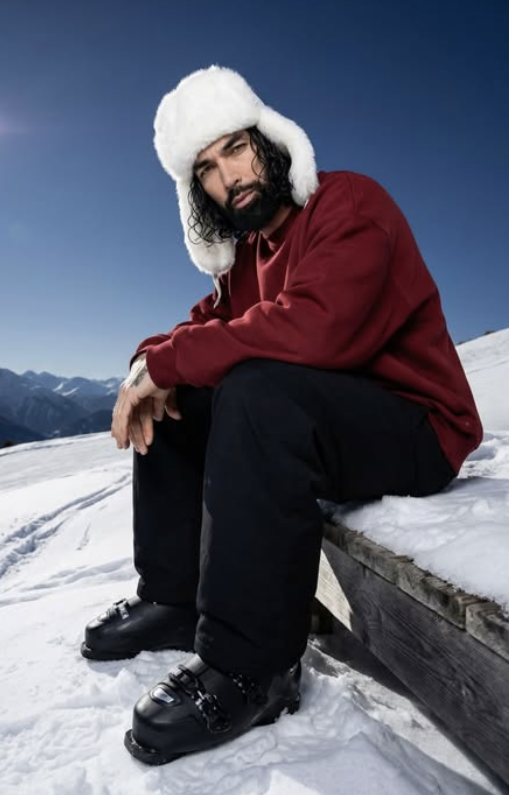
Men In hat winter style ka output usually ultra-realistic portrait hota hai jisme skin detail, fabric texture aur snow environment sab clearly dikhte hain. White faux-fur hat face ko frame karta hai, dark red sweatshirt warm contrast deta hai, aur black pants plus ski boots image ko grounded aur rugged winter look dete hain. Ye combination subject ko snow background mein strong aur stylish banata hai.
Lighting is style ka sabse important part hai. Bright daylight, soft natural shadows aur clear sky milkar subject ko crisp, fresh aur high-end look dete hain. Snow reflection wajah se face par gentle brightness aati hai, jisse image harsh nahi lagti. Composition bhi carefully set hoti hai: subject low angle par, knees camera ki taraf, aur head slightly tilted — isse portrait more intimate aur expressive dikhta hai.
Overall mood clean, calm aur cinematic hota hai. Distant mountains, open snow slope aur clutter-free background image ko premium feel dete hain. Ye style especially tab achha lagta hai jab aapko realistic winter fashion photo, editorial portrait, ya AI-generated outdoor poster jaisa result chahiye.
- Lighting: Bright natural daylight, soft contrast, snow reflection
- Colors: White snow, deep blue sky, dark red outfit, black boots
- Mood: Calm, cold, cinematic, premium, realistic
- Composition: Low-angle front view, centered subject, clean background
- Detail level: Sharp face, visible clothing texture, realistic hair and fabric
This Style ko mobile par kaise use karein?
Agar aap beginner ho, to is style ko use karna utna complicated nahi hai jitna lagta hai. Sabse pehle apni ek suitable photo select karo, phir usko editing app ya AI image generator mein upload karo. Mobile par kaam karte waqt sabse important hai ki aap image ko crop aur align sahi tarah karo, taaki final portrait ka angle aur framing natural lage.
Uske baad style settings ya prompt guidance ko follow karte hue winter elements apply karo. Hat, sweatshirt, pants, boots aur snowy background ka look maintain karna zaroori hai. Agar app customization allow karti hai, to face details, hair texture aur pose ko preserve karne ki setting ON rakho. Isse output distort nahi hota aur subject original photo jaisa hi rehta hai.
Final step mein image preview ko carefully check karo. Dekho ki hat face ko properly cover kar raha hai ya nahi, snow background clean hai ya nahi, aur subject ka posture natural lag raha hai ya nahi. Agar shadows too dark ya colors too flat lag rahe ho, to light aur contrast ko thoda adjust karo. Simple mobile workflow mein bhi achha result mil sakta hai agar aap framing aur detail par dhyan do.
- Apni best photo choose karo: Clear face wali image lo, jisme expression visible ho.
- Photo upload karo: Editing app ya AI tool mein image add karo.
- Winter look apply karo: Hat, outfit aur snowy scene wala style select karo.
- Pose and angle check karo: Low-angle front view aur seated composition match karo.
- Background clean rakho: Clutter, crowd aur extra objects avoid karo.
- Preview inspect karo: Hair, face, hands aur clothing distortion dekh lo.
- Final export karo: High quality mein save karke share karo.
Kaunsi photos is style ke liye sabse achhi rehti hain?
Is type ke Om Editing Top winter edit ke liye aisi photo best hoti hai jisme face clear ho aur subject ka posture edit-friendly ho. Front-facing ya slightly angled portrait images zyada achhi kaam karti hain, kyunki unme hat aur winter outfit naturally fit ho sakte hain. Agar photo mein face blur hai ya light bahut weak hai, to final result उतना sharp nahi aayega.
Resolution bhi important hai. High-resolution image use karne se facial detail, hair texture aur clothing folds better preserve hote hain. Clean daylight photo ya soft outdoor light wali image sabse useful hoti hai, kyunki winter theme ke saath ye look naturally blend hota hai. Very dark indoor photos mein snow effect aur winter mood achieve karna mushkil ho sakta hai.
Background simple hona chahiye. Busy wall, crowd, indoor objects ya strong colors final winter composition ko distract karte hain. Clothing bhi plain aur fitted ho to better hota hai, kyunki edit mein oversized sweatshirt aur ski outfit ka effect aur strong dikhta hai. Agar aapki original photo mein shoulders and upper body clear hain, to output aur bhi realistic lagega.
- Angle: Front view ya slight side angle, face clearly visible ho
- Resolution: High-resolution photo, blurry image avoid karo
- Lighting: Natural daylight ya soft outdoor light best hai
- Background: Simple, clean, non-distracting background
- Clothing: Plain top, clear body outline, strong upper-body visibility
- Face quality: Sharp eyes, visible hair, no heavy motion blur
Pro tips for the best Om Editing Top results
To get the most polished Om Editing Top output, start by keeping your subject details clear and consistent. The strongest edits usually come from prompts that describe the outfit, pose, background, and lighting in a simple, organized way. If the reference photo already has a strong face angle or hairstyle, mention that you want those features preserved so the final image feels natural and realistic.
It also helps to think in layers: first define the character, then the environment, and finally the mood. For example, a winter portrait works better when you specify the snow setting, clothing texture, and sky color together instead of listing only one element. This gives the edit more direction and usually results in cleaner composition, better depth, and a more balanced visual style.
Here are some practical do’s for better results with Om Editing Top:
- Keep the face, hair, and body proportions consistent with the original image.
- Use clear clothing descriptions so the winter outfit looks intentional and styled.
- Mention the angle and pose to control how cinematic or natural the final shot appears.
- Describe the background with simple location details like snow slope, mountains, or blue sky.
- Ask for clean surroundings if you want a minimal, distraction-free image.
- Use mood words such as calm, premium, dramatic, or soft to guide the final atmosphere.
If you want the best face edit or portrait-style output, avoid overloading the prompt with too many conflicting details. One strong concept is better than five weak ones. For winter fashion edits, balance is key: a warm hat, heavy layers, and snowy scenery should all work together without making the image feel crowded or unnatural. That is where Om Editing Top becomes especially useful for creating a professional-looking result.
Common mistakes to avoid in This edits
One common mistake is adding too many instructions that fight each other. When the prompt asks for multiple poses, too many outfit changes, or contradictory lighting directions, the output can become messy or inconsistent. In image editing, clarity almost always performs better than complexity.
Another mistake is ignoring proportions and perspective. If the camera angle is not described properly, the character may look awkwardly placed in the frame or disconnected from the background. For winter edits, this can make the snow scene feel fake. A good Om Editing Top prompt should guide the camera position, body posture, and environment in a way that feels physically believable.
- Do not overload the prompt with unnecessary style words, because it can reduce focus on the main subject.
- Do not change the face or hairstyle too much if the goal is to keep the original identity intact.
- Do not forget background consistency, because a winter outfit needs a matching snowy setting to look convincing.
- Do not use vague pose instructions, because unclear body placement often creates unnatural results.
- Do not mix unrelated season cues, because summer elements can break the winter atmosphere.
- Do not ignore clean composition, because clutter in the frame can weaken the overall visual impact.
It also hurts the output when users expect the edit to do everything at once. A better approach is to define the hero element first, then add supporting details. For example, if the main focus is a winter portrait, keep the face, hat, outfit, and snow background as the core priorities. This simple structure helps the model stay focused and gives Om Editing Top a much stronger final look.
Best use cases for These images
There are many places where an Om Editing Top style image can be used effectively. Winter portrait edits are especially popular for social media because they look clean, premium, and eye-catching. A sharp, snow-themed character image works well when you want a strong personal post or a stylish profile upgrade.
This type of image is also a great choice for creators who need a cinematic thumbnail or a bold cover image. The combination of winter clothing, close-up framing, and dramatic natural background creates instant visual interest. If you want an image that feels fashionable and emotional at the same time, this style edits can be adapted for many digital formats.
- Instagram posts: Great for aesthetic winter portraits and fashionable visual updates.
- Profile pictures: Useful when you want a clean, stylish, and memorable avatar.
- Thumbnails: Works well for content that needs a strong human subject and clear mood.
- Portfolios: Helpful for showcasing editing style, character design, or portrait concepts.
- Reels covers: Ideal for grabbing attention with a bold, polished winter look.
These images are also useful for themed campaigns, personal branding, and seasonal content. If you are building a page around fashion, travel, or photography inspiration, a winter portrait can support the overall aesthetic. With the right framing and background, this prompt edits can feel both artistic and practical.
Variations you can try with This Style
One of the best things about this look is that you can experiment with different moods without changing the core idea. A winter portrait does not have to look the same every time. Small changes in colour, lighting, and atmosphere can create a completely different emotional effect while keeping the subject strong and recognizable.
You can start by adjusting the mood. For a calm and premium feel, use soft light and minimal shadows. For a more dramatic look, try deeper contrast and a colder background tone. If you want something fashion-forward, add bolder clothing colours or a more stylized snow environment. These variations help the edit stay fresh and reusable across multiple posts.
- Mood variations: calm, cinematic, moody, premium, bold, dreamy.
- Colour variations: deep red, black, white, muted grey, icy blue, warm brown.
- Setting variations: alpine slope, snowy deck, mountain backdrop, open snowfield, forest edge.
- Seasonal variations: early winter, heavy snowfall, clear frost, sunset snow, bright midday snow.
- Style variations: clean portrait, fashion editorial, outdoor adventure, social media aesthetic.
You can also experiment with small pose changes to change the final vibe. A slight head tilt can feel thoughtful, while a straighter posture can look more confident. If you want a more relaxed feel, keep the body grounded and natural. These subtle adjustments make yeh style more flexible and help you create several unique outputs from the same base idea.
Conclusion: try This Style for your next winter edit
If you want a clean, stylish, and realistic winter portrait, this edit is a strong direction to follow. It works especially well when you combine a clear subject description, a believable snowy setting, and a simple cinematic pose. That balance is what makes the final image feel polished instead of random.
Whether you are making content for Instagram, a profile photo, a thumbnail, or a creative portfolio, this style can give your image a premium look. Try different moods, colours, and background settings to see what works best for your own project. With the right structure, this style can produce impressive results that stand out fast.
💬 Comments