Indian Flag
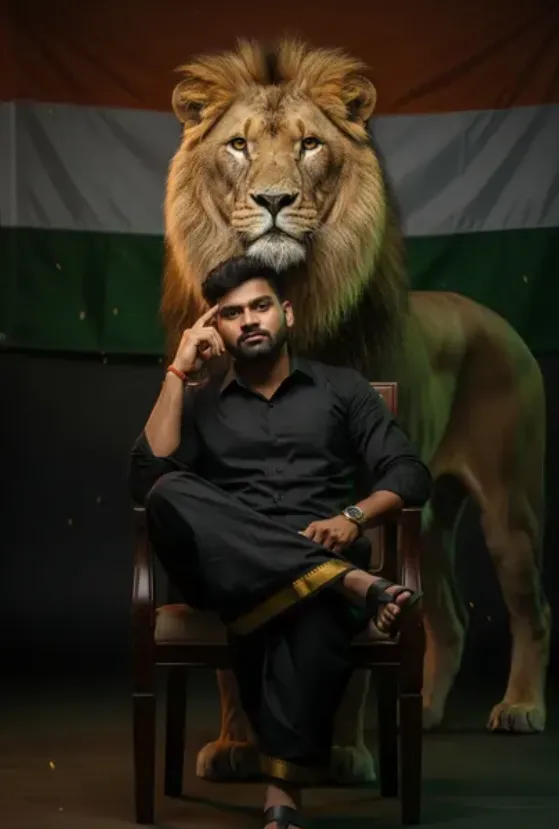
Om Editing Top के साथ Indian Flag स्टाइल पोर्ट्रेट क्या है?
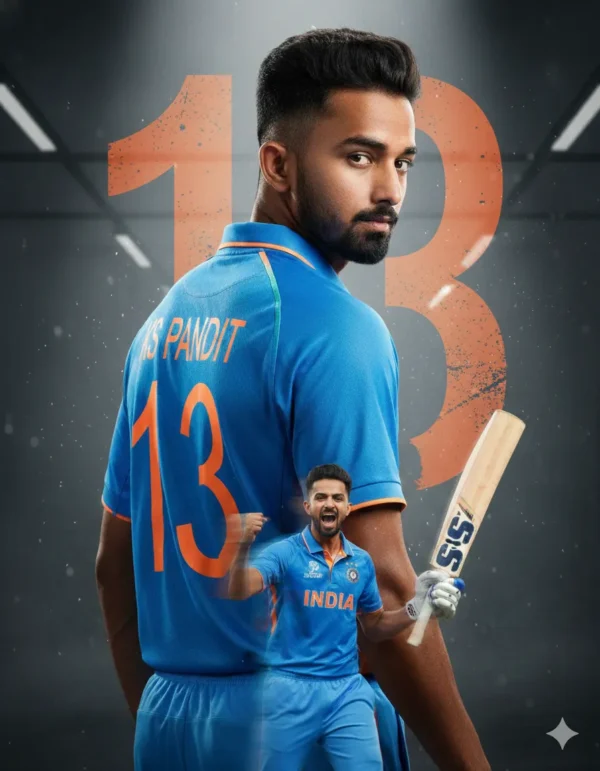
Om Editing Top जैसे AI photo editing style का इस्तेमाल करके आप एक ऐसा hyper-realistic portrait बना सकते हैं, जिसमें Indian Independence Day का proud, cinematic और premium look मिलता है। यह स्टाइल खास तौर पर उन users के लिए है जो अपनी normal photo को एक powerful patriotic portrait में बदलना चाहते हैं, बिना heavy manual editing के।
Read Also: cinematic-style realistic portrait | 2026 New Year
इस तरह के photo prompt में subject को confident, dignified और polished look दिया जाता है। Face details natural रहते हैं, लेकिन overall composition बहुत artistic लगती है। यही वजह है कि यह style Instagram reels, WhatsApp DP, Facebook post, thumbnail, banner, aur Independence Day themed profile picture के लिए बहुत useful है।
अगर आप beginner हैं, तो भी यह style simple तरीके से use किया जा सकता है। बस सही reference photo, clear face, aur proper pose selection की जरूरत होती है। इसके बाद AI tool subject ko festive, cinematic aur realistic Indian flag inspired output me transform kar deta hai.
यह photo style आपको क्या result देती है?
Om Editing Top type prompt का सबसे बड़ा फायदा यह है कि यह portrait को सिर्फ decorate नहीं करता, बल्कि एक strong visual story बनाता है। Indian patriotic theme में आमतौर पर vibrant saffron, white, green, aur golden tones का balance देखने को मिलता है, जो image को national pride वाला premium feel देता है।
Lighting usually dramatic aur soft-rim style की होती है, जिससे subject का face clear aur sharp दिखता है। Background cinematic हो सकता है, जिसमें tricolour mood, subtle textures, aur bold contrast elements image को depth देते हैं। Result ऐसा लगता है जैसे photo professionally shot aur edited की गई हो।
Realism इस style की सबसे important quality है। Face natural रहता है, skin texture visible रहती है, aur overall body proportions realistic लगते हैं। अगर prompt सही use किया जाए, तो output में clean composition, balanced shadows, aur high-detail finish मिलता है जो poster-quality feel देता है।
- Patriotic color palette with tricolour inspiration
- Cinematic lighting and strong contrast
- Realistic face details and natural skin texture
- Premium portrait composition for social media use
- Festive, confident, and powerful mood
This Style prompt को mobile पर कैसे use करें?
अगर आप मोबाइल से edit कर रहे हैं, तो सबसे पहले अपनी best reference photo choose करें। Face clearly visible होना चाहिए, क्योंकि AI उसी photo के आधार पर output generate करेगा। Blurry, dark, ya side-hidden face वाली photo से result weak आ सकता है।
इसके बाद जिस AI editor या photo generation tool में यह prompt use करना है, वहाँ image upload करें। फिर prompt box में दिए गए style instructions को add करें। अगर platform multiple settings देता है, तो realistic, portrait, high detail, aur cinematic mode जैसी options on रखें।
Beginner ke liye easiest method यह है:
- एक साफ और front-facing photo चुनें.
- Photo editor या AI image tool खोलें.
- Reference image upload करें.
- Style prompt paste करें.
- Generate button पर tap करें.
- Output check करें और जरूरत हो तो दूसरा version बनाएं.
अगर पहली बार में result perfect न आए, तो image quality improve करने के लिए same photo का sharper version use करें। कई बार सिर्फ better lighting या cleaner background से result बहुत ज्यादा polished हो जाता है।
कौन-सी photos इस style के लिए सबसे अच्छी रहती हैं?
इस तरह के Indian Flag inspired portrait के लिए सबसे अच्छा वही photo होता है जिसमें subject का face clearly visible हो, eyes sharp हों, और head angle ज्यादा tilted न हो। Front-facing या slight three-quarter angle वाली photo AI को facial structure समझने में मदद करती है।
Resolution भी important है। High-resolution photo output को crisp बनाती है, जबकि low-quality image में face distort हो सकता है। Natural daylight या soft indoor light वाली photo बेहतर रहती है, क्योंकि harsh shadow चेहरे के details को block कर सकती है।
Background simple होना चाहिए, ताकि AI easily subject को isolate कर सके। Plain wall, clean room, या lightly blurred background सबसे practical choice है। Clothing casual ho sakti hai, लेकिन साफ-सुथरी, plain, aur well-fitted photo ज्यादा professional result देती है।
- Face front ya slight angle me ho
- Photo sharp aur high-resolution ho
- Lighting soft aur even ho
- Background clutter-free ho
- Clothing simple, neat, aur visible हो
- Expression calm aur natural ho
Better output के लिए कौन-सी छोटी बातें ध्यान रखें?
Om Editing Top style में छोटे details बहुत फर्क डालते हैं। अगर आपकी photo में sunglasses, heavy blur, ya low light है, तो result उतना clean नहीं आएगा। कोशिश करें कि face पर कोई obstruction न हो और expression natural रहे।
यह भी ध्यान रखें कि AI जितना clear input पाएगा, उतना ही realistic output देगा। इसलिए upload करने से पहले photo crop करके unnecessary space हटाना, brightness थोड़ा balance करना, और face को center में रखना फायदेमंद होता है।
अगर आप patriotic portrait को post, profile photo, ya reel cover के लिए use करना चाहते हैं, तो square format काफी अच्छा रहता है। इससे subject centered रहता है और image more balanced दिखती है।
Pro Tips for the Best Results with This Style
Om Editing Top par best output tab milta hai jab aap prompt ko clear, specific, aur balanced rakhte ho. Is kind of Indian flag portrait editing me smallest details bhi final image ko bahut impact karte hain, especially face consistency, outfit clarity, aur background symbolism. Agar aap chahte ho ki result premium lage, to reference face ko stable rakho aur extra elements ko too much crowded mat karo.
Ek aur useful tip ye hai ki aap pose, lighting, aur mood ko simple but strong rakho. Hyper-realistic portrait me clean composition zyada professional lagta hai, aur Indian Independence Day theme ko strong banane ke liye color harmony bhi important hoti hai. Golden border, black outfit, regal background, aur patriotic feel — ye sab tabhi achha lagega jab overall image polished aur uncluttered ho.
- Face reference ko same rakhne ke liye prompt me consistency words use karo.
- Lighting ko soft yet dramatic rakho, taaki skin details natural dikhen.
- Outfit details ko clearly mention karo, especially fabric, color, aur border design.
- Background me symbolic elements add karo, but subject ko overpower mat hone do.
- Portrait framing close rakho agar Instagram ya profile picture style chahiye.
- High contrast aur balanced shadows use karo for a more cinematic look.
Common Mistakes to Avoid in This Style
Sabse common mistake hoti hai prompt ko overcomplicate kar dena. Jab aap bahut saare adjectives, extra props, ya mixed themes add kar dete ho, to output blurry, confusing, ya inconsistent ho sakta hai. Indian flag inspired images me identity, posture, and color palette already strong hoti hai, so unnecessary additions se image ki premium feel kam ho sakti hai.
Doosri common problem hai face distortion ya unwanted changes. Agar prompt me facial stability ka focus clear nahi hoga, to generated image original reference se deviate kar sakta hai. Isi tarah, outfit aur background agar too bright ya too busy ho, to subject ki presence weak ho jaati hai. Clean, precise direction dena hi Om Editing Top ka best use hai.
- Too many style changes: Isse output ka look inconsistent ho jata hai aur realism break hota hai.
- Face details ignore karna: Reference face same na raha to result original jaisa feel nahi karega.
- Overcrowded background: Extra elements subject ko hide kar dete hain aur focus disturb hota hai.
- Weak lighting description: Flat lighting se portrait dull dikhta hai aur premium depth miss ho jaati hai.
- Color mismatch: Patriotic theme ke colors agar balance me na ho to design odd lag sakta hai.
Best Use Cases and Ideas for This Style
Om Editing Top style images ka use aap multiple platforms par kar sakte ho, especially jab aapko bold, patriotic, aur cinematic portrait chahiye. Instagram par ye posts instant attention grab karte hain, because the subject looks powerful and visually refined. Profile picture ke liye bhi ye style useful hai, kyunki face clear rehta hai aur overall look impactful hota hai.
Thumbnails, reels covers, aur portfolio showcases ke liye bhi ye theme kaafi effective hoti hai. Agar aap content creator ho, designer ho, ya AI portrait experiments karte ho, to ye format aapke feed ko premium and thematic bana sakta hai. Independence Day campaigns, festival edits, or personal branding posts me bhi ye image style easily adapt ho sakta hai.
- Instagram post: Strong patriotic portrait ke liye.
- Profile picture: Clean face focus aur formal, confident vibe ke liye.
- YouTube thumbnail: Bold and clickable visual impact ke liye.
- Reels cover: Short-form content ko standout banane ke liye.
- Portfolio sample: AI editing skills showcase karne ke liye.
Variations You Can Try with This Style
Agar aap same base idea ko thoda different feel dena chahte ho, to mood, colour, aur setting ko adjust karke multiple variations bana sakte ho. This style me variation ka matlab sirf style change nahi, balki emotional tone change karna bhi hota hai. Aap image ko more royal, more minimal, ya more cinematic bana sakte ho depending on where you want to use it.
Seasonal variations bhi kaafi effective hoti hain. Independence Day theme ko warm sunrise background, dramatic evening light, ya even soft studio lighting ke saath experiment kiya ja sakta hai. Isi tarah, black outfit ke saath different textures, flag-inspired accents, ya subtle patriotic glow add karke image ko fresh banaya ja sakta hai.
- Mood variations: calm, powerful, royal, thoughtful, heroic.
- Colour variations: saffron glow, deep tricolor accents, golden highlights, muted cinematic tones.
- Setting variations: studio chair setup, open sky backdrop, flag-themed environment, heritage-inspired space.
- Seasonal variations: morning sunlight, monsoon drama, sunset warmth, night-time spotlight.
- Style variations: hyper-realistic, cinematic portrait, editorial look, premium poster style.
Conclusion: Try This Style for a Powerful Flag-Inspired Look
This prompt is a strong choice when you want a face-consistent, hyper-realistic, and visually striking portrait with Indian patriotic energy. Is style me elegance, symbolism, aur premium finish ka perfect mix milta hai, jo social media aur personal branding dono ke liye useful hai. Agar aap clear prompt structure aur balanced details use karte ho, to result aur bhi impressive aata hai.
Ab aap different moods, colours, aur backgrounds ke saath experiment karke apna best version try kar sakte ho. This look ko smartly use karo, aur apne Indian flag inspired edits ko next level par le jao.
FAQ: Indian Flag
How do I use the "Indian Flag" prompt?
Copy the prompt above, open Gemini or ChatGPT, upload a clear photo of yourself and paste the prompt. Generate the image and adjust the outfit or background if you want a variation.
Is this prompt free?
Yes. This prompt is free to copy and use for Instagram, reels, WhatsApp DP and profile pictures.
Which photo works best?
A sharp, front-facing, well-lit photo with no filter. A clear face helps the AI keep your identity in the final image.
Last updated: 17 August 2026
💬 Comments