Genration click
Om Editing Top: इस स्टाइल में क्या खास है?
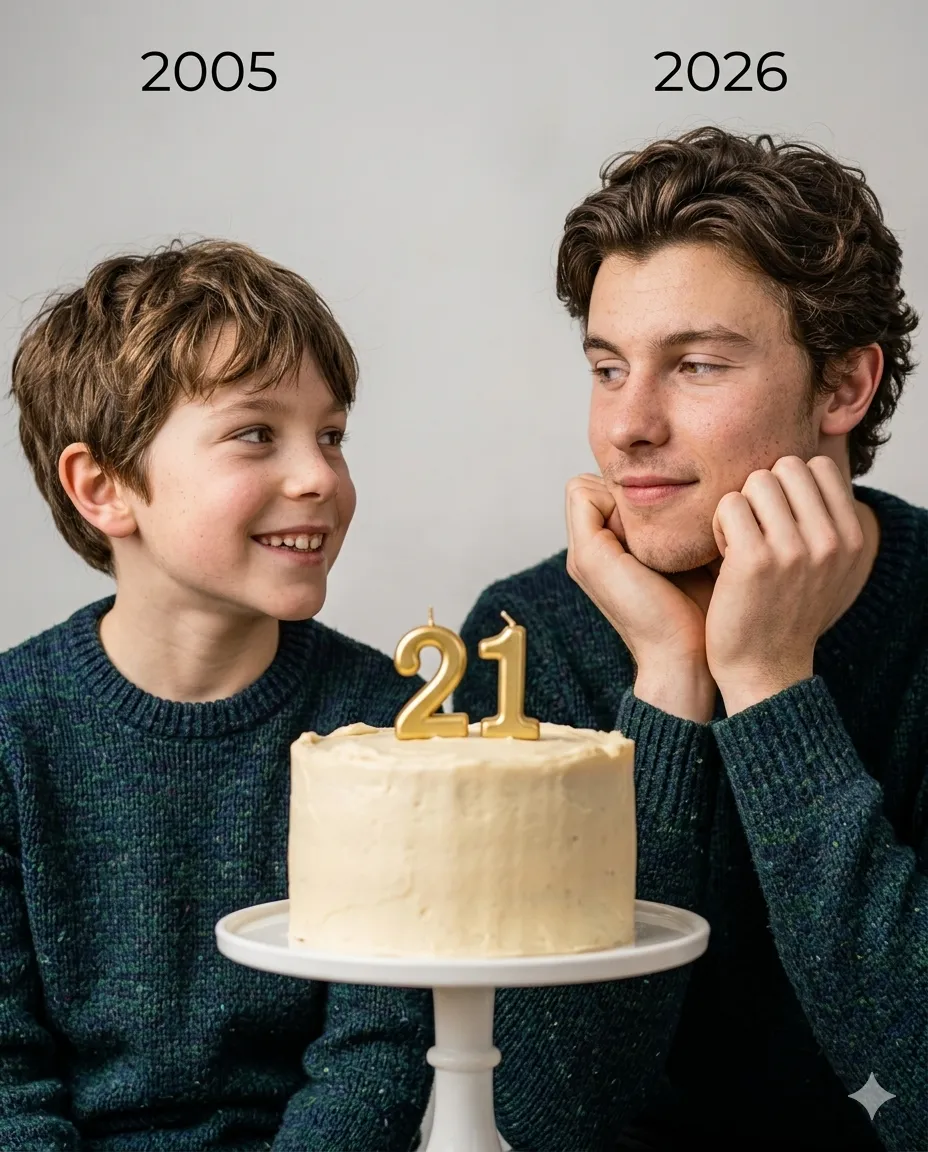
Om Editing Top जैसा फोटो-एडिटिंग स्टाइल उन लोगों के लिए है जो अपनी तस्वीरों में एक emotional, cinematic और realistic look चाहते हैं। इस तरह की editing में सिर्फ फोटो सुंदर नहीं दिखती, बल्कि उसमें एक कहानी भी नजर आती है। खास बात यह है कि इसमें childhood photo और present photo को एक ही frame में इस तरह जोड़ा जाता है कि देखने वाला तुरंत भावनात्मक जुड़ाव महसूस करे।
Read Also: cinematic-style realistic portrait | 2026 New Year
यह स्टाइल birthday, milestone, transformation, memory tribute और personal storytelling posts के लिए बहुत अच्छा माना जाता है। अगर आप social media पर ऐसी image बनाना चाहते हैं जो simple भी लगे और classy भी, तो Om Editing Top type composition आपके लिए perfect हो सकती है। इसमें soft studio background, warm lighting, और clean arrangement तस्वीर को premium feel देता है।
इस तरह की creative photo generation उन लोगों के लिए useful है जो अपनी old memories और current personality को एक artistic frame में दिखाना चाहते हैं। चाहे आप content creator हों, photo editor हों, या सिर्फ एक beautiful birthday concept बनाना चाहते हों, यह style emotional impact के साथ professional finish भी देता है।
This Style फोटो स्टाइल में आपको क्या मिलेगा?
Om Editing Top visual style की सबसे बड़ी खासियत इसका soft cinematic mood है। इसमें lighting बहुत gentle रहती है, जिससे चेहरा natural भी लगता है और polished भी। Warm tones image को cozy और heartfelt बनाते हैं, जबकि plain studio background ध्यान को main subjects पर रखता है। यही वजह है कि पूरा frame साफ, balanced और emotional दिखता है।
इस style में composition भी बहुत important होती है। Left side पर childhood version, right side पर present version, और बीच में cake या birthday element रखने से photo में symmetry और meaning दोनों आ जाते हैं। जब दोनों versions एक-दूसरे को देखते हैं, तो image में connection, growth और time travel जैसा effect बनता है।
Realism इस prompt-based editing की दूसरी बड़ी strength है। Face features को original रखने, natural skin texture बनाए रखने और lighting को photo-shoot जैसा बनाने से result artificial नहीं लगता। Color palette आमतौर पर soft beige, warm cream, light brown, subtle pink या muted studio tones के आसपास रखा जाता है, जिससे output elegant और emotional दोनों लगता है।
- Soft, warm, cinematic lighting
- Plain and elegant studio background
- Childhood और present version का balanced frame
- Natural facial features और realistic skin tone
- Minimal, emotional, premium-looking composition
This Style कैसे use करें: Beginner के लिए step-by-step guide
अगर आप बिल्कुल beginner हैं, तो भी इस style को use करना आसान है। सबसे पहले आपको अपनी childhood photo और recent photo तैयार रखनी होगी। कोशिश करें कि दोनों तस्वीरें साफ हों, face clearly visible हो, और photo cropped या blurry न हो। Mobile पर काम कर रहे हैं तो पहले दोनों images को gallery में select करके ready रखें ताकि editing process smooth रहे।
इसके बाद जिस tool या app में आप image generation/editing कर रहे हैं, उसमें photos upload करें। अगर platform multiple inputs लेता है, तो childhood image और present image को सही order में add करें। फिर style requirements को simple शब्दों में set करें: soft studio look, warm cinematic light, elegant birthday cake, emotional two-person composition, and realistic photoshoot feel. इससे output ज्यादा accurate आता है।
Final result आने के बाद image को carefully check करें। Face details, hands position, background softness, cake placement, और overall balance देखें। अगर photo बहुत dark, overexposed, या unnatural लगे, तो prompt को थोड़ा refine करके दोबारा try करें। Mobile users के लिए सबसे practical तरीका यही है कि first version को preview करके, फिर जरूरत के हिसाब से minor adjustments किए जाएं।
- अपनी childhood photo और recent photo चुनें।
- दोनों images की clarity और face visibility check करें।
- Editing app या AI tool में photos upload करें।
- Style direction में soft, emotional, cinematic look चुनें।
- Studio background और realistic photoshoot feel को specify करें।
- Generate करके result preview करें।
- अगर needed हो, तो brightness, crop, या composition adjust करें।
This Style के लिए कौन-सी photos सबसे अच्छी रहती हैं?
Best results के लिए photo selection बहुत मायने रखती है। Childhood image में चेहरा साफ दिखना चाहिए और expression innocent या natural होना चाहिए, ताकि present version के साथ contrast सुंदर लगे। Present photo में बैठी हुई pose, calm smile, और hands under chin जैसी relaxed body language इस style के लिए बहुत suitable रहती है।
Angle और lighting भी important हैं। Front-facing या हल्के three-quarter angle वाली photos सबसे बेहतर रहती हैं क्योंकि इनमें face details clear रहती हैं। Natural soft light, जैसे window light या mild indoor light, image को clean look देती है। बहुत harsh shadow, low-light blur, या over-filtered selfie से बचना चाहिए, क्योंकि इससे realistic photoshoot effect कमजोर पड़ सकता है।
Background और clothing को भी simple रखना बेहतर होता है। Plain background, neutral colors, और minimal prints वाले कपड़े edit को ज्यादा premium बनाते हैं। अगर outfit busy होगा या background बहुत cluttered होगा, तो final composition ध्यान भटका सकता है। इस style में simplicity ही elegance बनाती है।
- Clear face वाली childhood और recent photos चुनें
- Front या slightly angled portrait सबसे अच्छा रहता है
- Soft natural light वाली images use करें
- Plain background या clean studio-like photo बेहतर है
- Neutral, simple clothing composition को premium बनाती है
- Blurry, dark, या heavily filtered photos avoid करें
Pro Tips for the Best Results with Om Editing Top
To get the strongest result from Om Editing Top, start with high-quality reference photos. Clear facial features, good lighting, and a clean background help the final image look more natural and emotional. If your childhood photo is old or slightly faded, use the sharpest version available so the editing style can preserve the details properly.
It also helps to keep the pose contrast meaningful. For example, the younger version can look curious or innocent, while the present version can feel calm and reflective. That visual difference makes the concept more powerful and gives the composition a real storytelling feel. With Om Editing Top, the emotional connection matters as much as the technical setup.
- Choose photos where the face is clearly visible and not heavily shadowed.
- Use matching angles if possible so both versions feel naturally connected.
- Keep the background simple to support the studio-style look.
- Use soft, warm lighting for a more cinematic and intimate mood.
- Make sure the clothing and pose do not distract from the emotional concept.
- For birthday edits, keep the number, year, and cake placement balanced in the center.
Common Mistakes to Avoid in This Style
One common mistake is uploading blurry or low-resolution photos. When the source image is unclear, the output can lose facial detail and make the final edit feel less realistic. Since this style is often used for emotional portrait concepts, sharp source images are important for keeping the “real photoshoot” effect strong.
Another mistake is overcrowding the frame with too many visual elements. The idea works best when the left, center, and right sections are easy to understand at a glance. If the background, props, or colors become too busy, the emotional message can get lost.
- Avoid mismatched lighting between the childhood and present photos because it can break the natural flow.
- Do not use overly dramatic filters that hide skin texture or facial expression.
- Skip cluttered backgrounds, since they weaken the clean studio look.
- Don’t place the cake or year text too close to the faces, or the layout may feel cramped.
- Avoid changing the original look too much, especially when the goal is to keep the person recognizable.
It’s also important not to force too many editing styles into one image. This prompt works best when the design is focused, emotional, and visually balanced. A simple composition often looks more premium than an overloaded one.
Best Use Cases and Creative Ideas for This Style
This look is a great choice for birthday posts, memory edits, and emotional transformation concepts. Because the composition compares a childhood version with a present-day version, it naturally fits milestone celebrations and personal storytelling. The result feels meaningful and shareable, which makes it especially useful for social media.
This style also works well for profile pictures, reels covers, and celebratory posts on Instagram. If you want a design that immediately stands out in a feed, the soft studio look and symbolic setup help it feel premium and personal at the same time. The same concept can also be adapted for family memories, achievement posts, or special anniversary-style visuals.
- Instagram posts: ideal for birthday announcements and emotional before-and-after stories.
- Profile pictures: useful when you want a personal, polished, and memorable look.
- Thumbnails: works well for video content about growth, memory, or life transitions.
- Portfolios: a good addition for editors showcasing creative portrait transformation work.
- Reels covers: helps your content look organized, attractive, and instantly clickable.
You can also use this style for tribute posts, throwback edits, or “then and now” concepts. The emotional structure gives you many ways to present the same idea in a fresh and meaningful format.
Variations You Can Try with This Style
One of the best things about yeh style is how easily you can experiment with different moods. A warm golden tone creates a soft and loving feel, while cooler tones can make the image more reflective and elegant. If you want the edit to feel more nostalgic, try subtle sepia-inspired colors or a gentle vintage touch.
You can also change the atmosphere through small details. A birthday cake can make the image feel celebratory, while a simple table and minimal props can make it look more timeless and emotional. By adjusting the background color, clothing style, and lighting softness, you can create a wide range of results from the same basic concept.
- Mood variations: emotional, nostalgic, elegant, dreamy, or celebratory.
- Colour variations: warm beige, soft pink, creamy white, cinematic gold, or muted studio tones.
- Setting variations: plain studio background, soft gradient backdrop, or minimal portrait setup.
- Seasonal variations: birthday-themed, festive, winter-soft, or summer-bright styling.
- Style variations: realistic photo look, gentle artistic portrait, or modern social-media edit.
If you want more impact, you can also experiment with facial direction and hand placement. Small changes like where the younger version is looking, or how the older version rests her hands, can completely change the emotion of the final image. That flexibility makes this edit very useful for creative editing experiments.
Conclusion: Try This Style for a Meaningful Portrait Edit
This style is a simple but powerful way to turn two photos into one emotional story. With the right lighting, clean composition, and thoughtful pose balance, the final image can look realistic, beautiful, and deeply personal. It is especially effective when you want a birthday edit or a “then and now” concept that feels cinematic and heartfelt.
If you want a polished result that keeps the original features and preserves the emotion of both versions, this prompt is a great choice to try. Use the ideas above, test a few variations, and create a portrait edit that feels memorable, natural, and uniquely yours.
💬 Comments