FRONT OF THE EIFFEL TOWER
Om Editing Top में Front of the Eiffel Tower लुक क्या है?
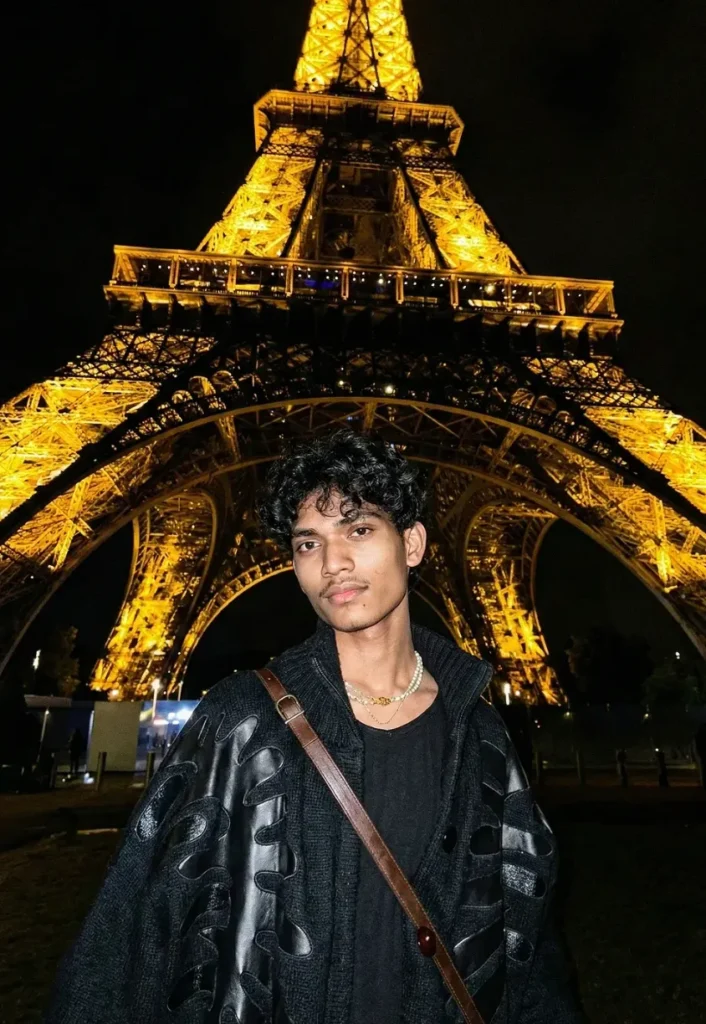
Om Editing Top स्टाइल में Front of the Eiffel Tower जैसा एडिट उन लोगों के लिए बनाया जाता है जो अपने फोटो को cinematic, luxurious और travel-inspired look देना चाहते हैं। यह खास तौर पर उन users के लिए useful है जो mobile से एक ऐसा portrait बनाना चाहते हैं जिसमें subject भी sharp दिखे और background में iconic Paris vibe भी साफ महसूस हो।
Read Also: cinematic-style realistic portrait | 2026 New Year
इस तरह का edit आमतौर पर stylish portrait lovers, Instagram creators, AI photo editing users और उन लोगों के लिए होता है जो अपने normal selfies को premium night-city aesthetic में बदलना चाहते हैं। इसमें focus सिर्फ face पर नहीं, बल्कि पूरे scene के mood, lighting, outfit feel और landmark presence पर भी रहता है, जिससे फोटो ज्यादा realistic और dramatic लगता है।
अगर आपका goal है एक ऐसा image result जो देखने में movie still जैसा लगे, तो यह style बहुत काम आता है। इसमें आमतौर पर dark background, glowing tower lights, confident pose, और high-contrast composition का blend मिलता है, जो photo को instantly eye-catching बनाता है।
इस फोटो style में आपको क्या मिलता है?
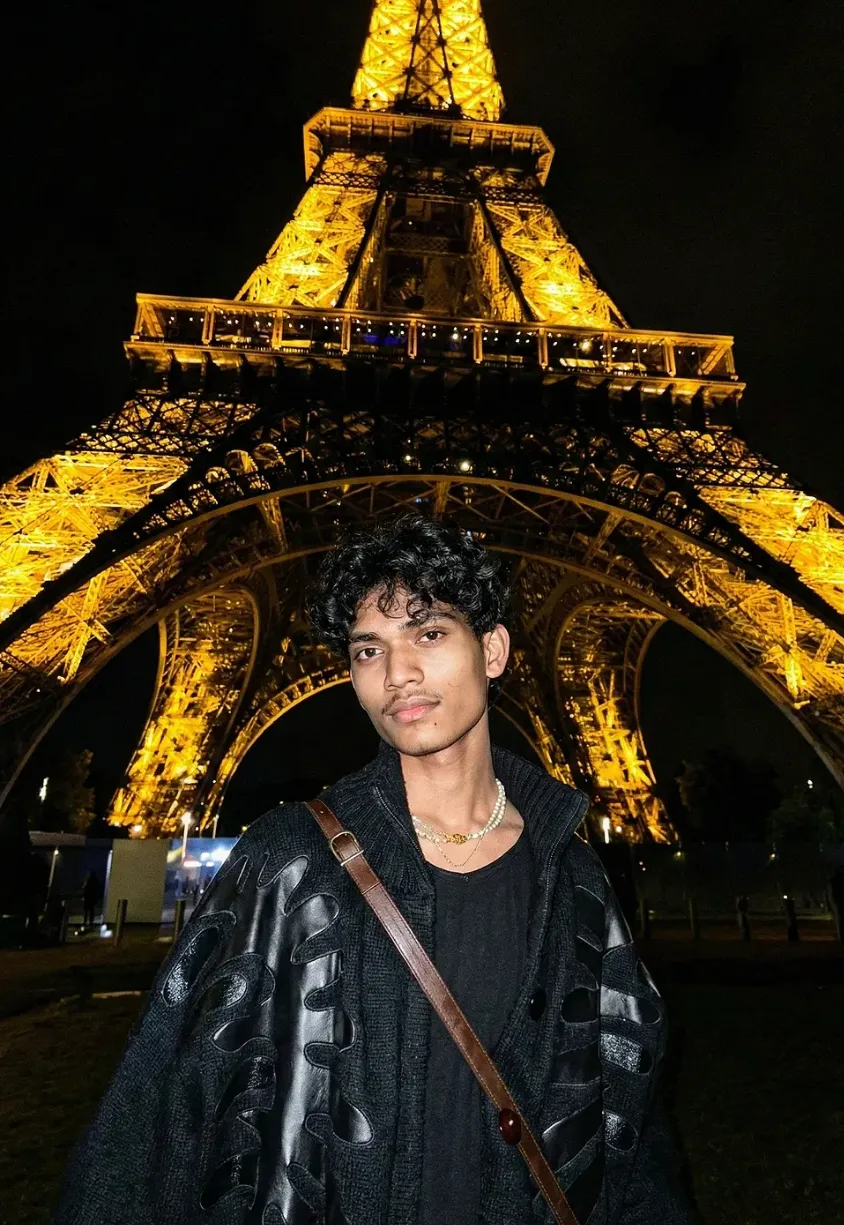
Front of the Eiffel Tower edit की सबसे बड़ी खासियत इसका cinematic night atmosphere है। Eiffel Tower को usually warm golden-yellow light में दिखाया जाता है, जिससे पूरी scene में rich glow आता है और subject के face पर soft highlights बनती हैं। यह lighting फोटो को flat नहीं रहने देती, बल्कि उसे depth और luxury feel देती है।
इस style में mood अक्सर contemplative, stylish और slightly dramatic रखा जाता है। Background dark होता है, sky almost black feel देता है, और subject को सामने से clearly separate करता है। यही contrast image को realistic और premium बनाता है, खासकर तब जब clothing dark tones में हो और portrait medium shot में लिया गया हो।
Composition की बात करें तो low-angle framing बहुत important होती है। इससे Eiffel Tower विशाल और majestic दिखता है, जबकि subject confident और centered लगता है। Wide-angle feel, clean facial detail, textured jacket, subtle accessories, और realistic skin tones मिलकर एक ऐसा output देते हैं जो social media profile picture, reel cover, या poster-style edit के लिए perfect बन सकता है।
- Warm golden tower light for premium night look
- Dark sky and dark ground for strong contrast
- Low-angle framing for a majestic landmark effect
- Realistic face detail with cinematic portrait feel
- Stylish outfit and accessories to enhance fashion appeal
- High clarity and sharp subject separation from background
This Style में इसे मोबाइल पर कैसे इस्तेमाल करें?
अगर आप beginner हैं, तो भी इसे मोबाइल पर use करना आसान है। सबसे पहले अपनी best portrait photo select करें, फिर उसे उस editing tool या AI generator में upload करें जहाँ Om Editing Top style apply किया जाता है। कोशिश करें कि image साफ हो, face visible हो और background ज्यादा cluttered न हो, ताकि final output ज्यादा natural बने।
इसके बाद prompt style या template choose करें और subject details को photo के साथ match होने दें। अगर tool settings देता है, तो portrait realism, face fidelity, lighting intensity और background detail को balanced रखें। बहुत ज्यादा effect लगाने से face artificial लग सकता है, इसलिए natural look को priority देना बेहतर रहता है।
Mobile users के लिए step-by-step process simple रखना सबसे अच्छा है। नीचे basic flow दिया गया है जिसे कोई भी follow कर सकता है:
- अपनी clear front-facing या slight side-angle portrait फोटो चुनें।
- Photo को editor या AI app में upload करें।
- Om Editing Top style/template open करें।
- Reference look के अनुसार cinematic night portrait option select करें।
- Lighting और realism settings को medium पर रखें।
- Generate या apply button दबाकर output देखें।
- अगर जरूरत हो तो brightness, contrast या face sharpness थोड़ा adjust करें।
- Final photo को export करके gallery में save करें।
अगर result first try में perfect न आए, तो अलग photo try करें या settings को हल्का बदलें। कई बार सिर्फ बेहतर source image से output काफी improve हो जाता है। इसलिए patience और सही photo choice बहुत important है।
कौन-सी photos इस style के लिए सबसे अच्छी रहती हैं?
इस edit के लिए सबसे अच्छे photos वे होते हैं जिनमें face साफ दिखे और subject का pose controlled हो। Front-facing या थोड़ा low-angle portrait often बेहतर काम करता है, क्योंकि यह Eiffel Tower जैसे tall landmark के साथ natural harmony बनाता है। बहुत ज्यादा cropped या blurred image से detailed result नहीं मिलता।
Lighting भी बहुत important है। Soft daylight या evenly lit indoor portrait अच्छा base देता है, क्योंकि इससे face details सुरक्षित रहती हैं। बहुत harsh shadow, overexposed highlights या extreme filter वाली photo में AI realism कम हो सकता है। Background simple हो तो final image में landmark placement ज्यादा convincing लगता है।
Clothing भी style को strongly influence करती है। Dark shirt, jacket, neat hair, and minimal accessories इस look के साथ बेहतर चलते हैं। अगर आप fashion-forward appearance चाहते हैं, तो clean neckline, textured outerwear, और subtle jewelry मदद करते हैं।
- Angle: front-facing, slight low-angle, or medium shot best रहता है
- Resolution: clear, high-resolution photo चुनें ताकि face detail बनी रहे
- Lighting: soft natural light या balanced indoor light useful है
- Background: plain या simple background ज्यादा realistic result देता है
- Clothing: dark, stylish, and well-fitted outfit बेहतर दिखता है
- Hair: neat या naturally textured hair cinematic feel देता है
- Expression: calm, confident, or contemplative expression सबसे अच्छा लगता है
अगर आपकी photo इन points को follow करती है, तो Om Editing Top style में Front of the Eiffel Tower look ज्यादा polished, realistic और social-media ready बनेगा। सही base image और सही framing से final result काफी बेहतर दिखाई देता है।
Om Editing Top ke liye Pro Tips for Best Results
अगर आप Om Editing Top style image ko aur zyada premium aur natural banana chahte ho, toh prompt ke saath output ka balance bahut important hota hai. Is type ki front-of-Eiffel-Tower edit me background already strong hota hai, isliye subject details, lighting, aur framing ko smartly control karna chahiye.
Best results ke liye subject ko clean, sharp, aur cinematic rakhna better hota hai. Face par unnecessary over-smoothing avoid karo, aur hair texture, jacket detail, aur night lighting ko preserve karo. Isse image zyada realistic lagti hai aur overall edit ka impact increase hota hai.
- Subject face details ko natural rakho, taaki Om Editing Top result over-edited na lage.
- Low-angle composition use karo, because Eiffel Tower ko more grand aur dramatic dikhata hai.
- Golden ambient light aur dark sky ka contrast maintain karo for cinematic depth.
- Outfit ke textures, necklace, aur bag strap jaise small details ko visible rakho.
- Background ko crowded na rakho; clean night scene image ko more premium banata hai.
- Portrait ko sharp rakho, especially eyes and jawline, so focus subject par rahe.
Agar aap social media ke liye edit bana rahe ho, toh composition me enough breathing space chhodna useful hota hai. Isse later crop karna easy hota hai aur Instagram ya thumbnail layouts me image better fit hoti hai.
Common Mistakes to Avoid in These Images
Bahut log this style image banate waqt ek hi galti karte hain: subject aur background dono ko equally strong banana chahte hain. Result me attention split ho jati hai, aur Paris landmark ka cinematic feel kam ho jata hai. Is style me hierarchy clear honi chahiye.
Lighting aur texture overdo karne se bhi output weak ho sakta hai. Night scene me agar highlights too harsh ho jayein ya face par unnatural glow aa jaye, toh realism break ho jata hai. Isi tarah, too many effects image ko busy aur artificial bana dete hain.
- Over-sharpening: Skin aur hair unnaturally rough dikh sakte hain, jo realistic portrait feel ko hurt karta hai.
- Too much brightness: Eiffel Tower ka night mood lose ho jata hai aur dramatic contrast kam ho jata hai.
- Weak subject placement: Agar subject center ya frame me awkward ho, toh composition less powerful lagti hai.
- Cluttered background: Extra elements attention divert karte hain aur iconic Eiffel Tower scene ko dilute kar dete hain.
- Unnatural clothing edits: Fabric texture fake lage toh premium fashion look khatam ho jata hai.
Ek aur common issue hai pose aur expression ka mismatch. Agar face contemplative hai lekin lighting aur framing too casual hai, toh image ka mood inconsistent lagta hai. This prompt style me mood, outfit, aur setting ko ek hi story bolni chahiye.
Best Use Cases for This Style Paris Portraits
this look type Eiffel Tower portraits ka use bahut versatile hota hai. Ye sirf ek aesthetic photo nahi, balki personal branding aur social media presence ke liye strong visual asset ban sakta hai. Night Paris vibe automatically premium aur aspirational feel deti hai.
Aise images Instagram posts, profile pictures, aur reels covers ke liye kaafi effective hote hain. Agar aap fashion, travel, or lifestyle niche me content banate ho, toh ye style instantly attention grab karta hai. Portfolio me bhi ye image aapke editing taste aur creative direction ko showcase kar sakti hai.
- Instagram posts: Luxury night aesthetic aur cinematic look ke liye perfect.
- Profile pictures: Clean close framing ke saath strong first impression deta hai.
- Thumbnails: Eiffel Tower background face ko standout banata hai.
- Portfolios: Editing skills aur fashion-inspired portrait work show karne ke liye useful.
- Reels covers: Consistent branding aur visual identity maintain karne me help karta hai.
Ye style especially un users ke liye useful hai jo modern, stylish, aur international feel chahte hain. Paris landmark ka use image ko instantly recognizable banata hai, aur dark-night atmosphere usse premium editorial look deta hai.
This Style Variations You Can Try
Agar aap same yeh style concept ko repeat nahi karna chahte, toh mood aur color palette me small changes karke kaafi different results mil sakte hain. Sirf background same rakhkar bhi aap image ko soft, moody, romantic, ya high-fashion bana sakte ho.
Seasonal variations bhi kaafi interesting lagti hain. Summer night me crisp contrast zyada strong feel hota hai, while winter tone me image cooler aur more dramatic lag sakti hai. Light aur color balance ko tweak karke aap same subject se multiple distinct looks nikal sakte ho.
- Moody version: Deep shadows, softer highlights, aur more introspective expression.
- Luxury version: Rich golden tones, polished jacket details, aur cleaner background glow.
- Romantic version: Softer lighting, warmer tones, aur subtle blur around the tower.
- Urban fashion version: Strong contrast, sharper pose, aur more editorial attitude.
- Winter night version: Cooler tones, darker sky, aur sharper light reflections.
- Summer evening version: Slightly softer ambient light and a more open cinematic feel.
Aap setting ke chhote elements bhi change kar sakte ho, jaise rain-slick ground, light fog, ya a slightly more distant tower view. In variations se this edit prompt ka core idea same rehta hai, lekin final image fresh aur experiment-friendly ban jati hai.
This Style: Final Thoughts
Overall, this style style front-of-Eiffel-Tower portrait ek bold aur cinematic choice hai jo travel, fashion, aur premium portrait aesthetics ko ek saath combine karta hai. Isme subject, lighting, aur background ka perfect balance hi image ko memorable banata hai.
Agar aap clean composition, realistic face detail, aur strong night atmosphere maintain karte ho, toh result kaafi impressive aa sakta hai. Different moods aur color variations try karke aap is concept ko apne style ke hisaab se aur bhi unique bana sakte ho.
Ab aap this prompt style ko experiment karke dekho aur apne social media, portfolio, ya personal collection ke liye ek standout Paris portrait create karo.
FAQ: FRONT OF THE EIFFEL TOWER
How do I use the "FRONT OF THE EIFFEL TOWER" prompt?
Copy the prompt above, open Gemini or ChatGPT, upload a clear photo of yourself and paste the prompt. Generate the image and adjust the outfit or background if you want a variation.
Is this prompt free?
Yes. This prompt is free to copy and use for Instagram, reels, WhatsApp DP and profile pictures.
Which photo works best?
A sharp, front-facing, well-lit photo with no filter. A clear face helps the AI keep your identity in the final image.
Last updated: 17 August 2026
💬 Comments