dreamlike
Om Editing Top के साथ dreamlike portrait style क्या है?
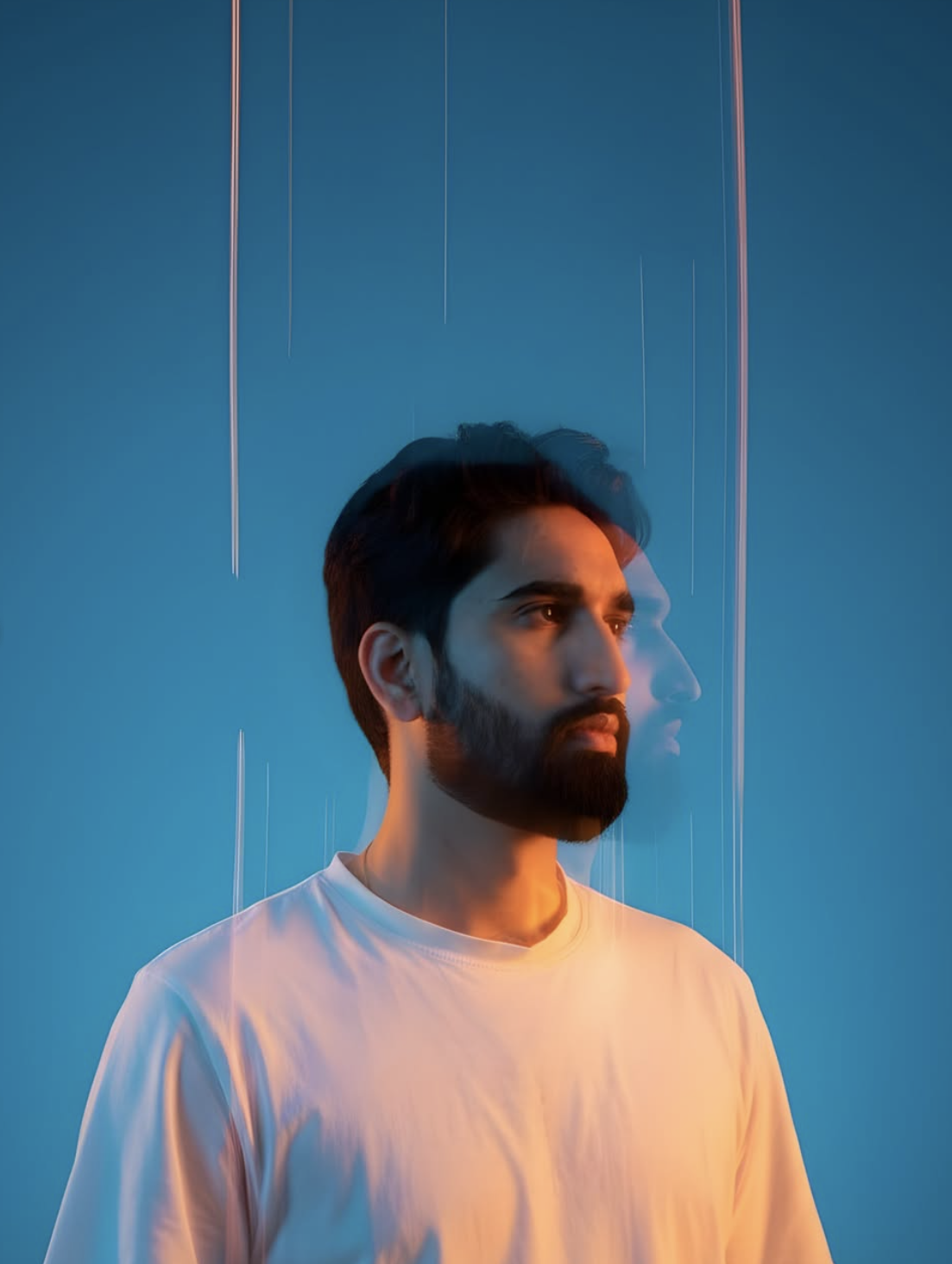
Om Editing Top स्टाइल में dreamlike edit एक ऐसा cinematic portrait look देता है जो साधारण फोटो को high-fashion, surreal और editorial feel में बदल देता है। यह खासकर उन लोगों के लिए है जो अपनी normal half-length photo को dreamy visual effect, motion blur, color glow और fashion-magazine style mood के साथ present करना चाहते हैं।
Read Also: cinematic-style realistic portrait | 2026 New Year
यह style creators, editors, Instagram content makers, profile photo users, और AI photo prompt seekers के लिए बहुत useful है। अगर आप ऐसी image चाहते हैं जिसमें subject शांत, stylish और थोड़ा mysterious लगे, तो यह look बिल्कुल सही रहता है। खास बात यह है कि इसमें realism भी बना रहता है, लेकिन साथ ही dreamlike atmosphere भी मिलता है।
इस तरह के edit में focus आमतौर पर face, fabric texture और pose पर रहता है, जबकि background, light trails और blur image को cinematic बनाते हैं। यही कारण है कि Om Editing Top keyword के साथ यह prompt style modern portrait editing में काफी popular हो रहा है।
यह dreamlike prompt आपको क्या visual result देता है?
इस style का सबसे बड़ा फायदा इसका surreal लेकिन polished look है। Image में subject को half-length framing में रखा जाता है, जिससे face और outfit दोनों clearly highlight होते हैं। साथ ही multi-exposure motion blur और ghosting effect फोटो में movement का एहसास लाते हैं, जैसे कोई fashion editorial shot धीरे-धीरे frame में dissolve हो रहा हो।
Background आमतौर पर clean gradient जैसा लगता है, जिसमें deep blue से cyan tone की smooth transition होती है। यह रंग combination photo को cool, modern और premium feel देता है। Lighting भी बहुत important होती है — cool blue wash के साथ orange या yellow edge glow image को contrast और depth देता है।
Result में आपको ये elements देखने को मिलते हैं:
- Dreamy cinematic mood
- High-fashion editorial composition
- Soft but dramatic lighting
- Blue, cyan, orange और yellow color harmony
- Motion blur, ghosting और subtle glitch-inspired effect
- Clean, minimal background with strong subject focus
इस look की खासियत यह है कि यह बहुत ज्यादा noisy या busy नहीं लगता। Instead, यह minimal रहते हुए भी powerful visual impact देता है। यही वजह है कि Om Editing Top dreamlike style social media posts, posters, profile visuals और creative portfolios में अच्छा perform करता है।
Mobile पर This Style dreamlike edit कैसे use करें?
अगर आप beginner हैं और सिर्फ mobile से इसे use करना चाहते हैं, तो process बहुत simple रखा जा सकता है। आपको बस सही photo चुननी है, editing app या AI tool में image upload करनी है, और style instructions को carefully apply करना है। सबसे पहले ऐसी photo लें जिसमें subject का upper body साफ दिखे और face पूरी तरह visible हो।
फिर image को crop करके half-length framing रखें, ताकि fashion portrait feel आए। उसके बाद lighting enhance करें, background को clean बनाएं, और blue-cyan tones के साथ cool cinematic color grading add करें। अगर tool support करता है, तो motion blur, chromatic separation या ghosting effect बहुत हल्के स्तर पर apply करें ताकि photo overdone न लगे।
Step-by-step beginner guide:
- अपने mobile gallery से एक साफ और sharp photo चुनें।
- Photo editor या AI editing tool खोलें और image upload करें।
- Crop को half-length portrait पर set करें।
- Background को simple और smooth रखें, clutter हटाएँ।
- Cool blue lighting और orange rim light जैसा tone add करें।
- Face और fabric पर clarity बनाए रखें, बाकी हिस्सों पर soft blur दें।
- अगर available हो, तो motion blur, ghosting या streak effect subtle रखें।
- Final output को check करके brightness, contrast और color balance adjust करें।
Best results के लिए editing हमेशा subtle रखनी चाहिए। Dreamlike style का मतलब यह नहीं कि हर part heavily distorted हो जाए। इसका goal है cinematic elegance create करना, न कि photo को unreadable बनाना।
Which photos This Style dreamlike style के लिए सबसे अच्छी रहती हैं?
इस style के लिए photo selection बहुत important है। सबसे अच्छा result तब मिलता है जब subject front-facing या slight angle में हो, और face clearly visible हो। Half-length composition इस prompt style के साथ सबसे naturally काम करती है, क्योंकि इसमें body posture और clothing दोनों अच्छे से दिखाई देते हैं।
Resolution जितनी बेहतर होगी, result उतना clean आएगा। Low-quality या heavily compressed photo में fabric detail, skin texture और edge glow अच्छे से नहीं दिखते। इसलिए कोशिश करें कि image sharp हो, exposure balanced हो, और face पर harsh shadow न पड़े। Background भी simple होना चाहिए ताकि final edit में gradient और cinematic lighting smoothly blend हो सके।
Photo choose करते समय इन बातों का ध्यान रखें:
- Angle: Straight या slight side angle, ताकि face open और expressive लगे
- Resolution: High-resolution image, preferably clear and sharp
- Lighting: Soft natural light या evenly lit indoor shot
- Background: Plain, uncluttered, and easy to replace
- Clothing: Simple outfit, especially plain white oversized T-shirt जैसा look
- Pose: Calm, still, introspective posture जो cinematic mood create करे
अगर clothing में too many patterns, bright logos या busy textures हों, तो dreamlike fashion effect कमजोर पड़ सकता है। इसीलिए minimal outfit best रहता है, क्योंकि इससे glow, blur और color contrast ज्यादा refined दिखते हैं। Om Editing Top style में simplicity ही elegance create करती है।
Om Editing Top Ke liye Best Results Kaise Lein
Om Editing Top style me dreamy, cinematic aur fashion-inspired look tabhi really strong dikhta hai jab aap input details ko carefully guide karte ho. Isme sirf visual effect nahi, balki subject ki pose, lighting, background aur mood ka balance bhi important hota hai. Agar aap clean output chahte ho, to photo choice aur prompt direction dono ko thoughtful rakhna chahiye.
Best result ke liye aapko image ko simple aur readable rakhna hota hai. Clear face, proper framing aur plain outfit jaisi cheezein editing ko aur polished banati hain. This style ka advantage tab zyada milta hai jab aap motion blur, ghosting aur color glow jaise effects ko controlled way me use karte ho, taaki final image surreal bhi lage aur premium bhi dikhe.
- High-quality source photo use karein jisme face aur upper body clearly visible ho.
- Plain white ya neutral outfit choose karein taaki colored lighting better pop kare.
- Background ko clean aur uncluttered rakhein, especially agar cinematic portrait banana ho.
- Expression ko calm aur introspective rakhne se dreamy fashion mood strong hota hai.
- Soft shadows aur edge lighting ka balance maintain karein, warna image overdone lag sakti hai.
- Half-length framing use karein to subject aur effects dono achhe se highlight hote hain.
Ek aur useful tip hai ki aap variations ko step-by-step test karein. Pehle basic portrait result dekhein, phir lighting intensity, blur amount, ya color tones ko adjust karein. This prompt me small changes bhi output ka mood kaafi change kar dete hain, isliye experimentation se best version milta hai.
Common Mistakes Jo Avoid Karne Chahiye
This look type edits me sabse common mistake hoti hai source image ka weak hona. Agar original photo blurry, dark ya heavily cropped hai, to final result me subject details lose ho sakti hain. Dreamlike effect ke saath clarity ka balance zaroori hota hai, warna output artistic ki jagah messy lag sakta hai.
Dusri problem hoti hai overediting. Bahut zyada ghosting, streaks ya color glow add karne se face aur outfit ka structure drown ho jata hai. Is style ka goal surreal fashion feel dena hai, isliye effect ko support role me rakhna better hota hai. Aapko subject ko dominate karne ke bajay enhance karna chahiye.
- Too busy background: Clean gradient ke bajay cluttered background image ko less cinematic bana sakta hai.
- Wrong outfit choice: Dark ya pattern-heavy clothes colored lighting ko properly reflect nahi karte.
- Unbalanced lighting: Agar highlights aur shadows ka ratio off ho, to face flat ya unnatural lag sakta hai.
- Excess blur: Zyada blur se subject ki identity aur sharpness reduce ho jati hai.
- Overuse of effects: Glitch aur motion streaks ka overdose output ko polished ke bajay noisy bana deta hai.
- Ignored framing: Face ya torso ka wrong crop composition ko weak kar deta hai.
Agar aap in mistakes se bach jao, to yeh style ka result kaafi refined aur share-worthy dikhega. Especially social media par, clean subject + cinematic glow combo zyada professional impact deta hai.
This Style Ko Kahan Use Kar Sakte Ho
This edit images ka use sirf ek edited portrait tak limited nahi hai. Ye style social profiles, aesthetic posts, mood boards aur visual branding ke liye kaafi versatile hai. Dreamlike cinematic look un creators ke liye perfect hota hai jo apni feed me premium editorial vibe lana chahte hain.
Instagram par aise portraits instantly attention grab karte hain, especially jab background smooth ho aur subject ka expression calm ho. Profile picture ke liye bhi ye style strong lag sakta hai, kyunki isme face detail ke saath ek modern artistic identity build hoti hai. Agar aap thumbnails ya reels covers banana chahte ho, to ye effect content ko instantly standout kara deta hai.
- Instagram posts: Aesthetic feed aur carousel slides ke liye ideal.
- Profile pictures: Stylish aur memorable personal branding ke liye.
- YouTube thumbnails: Cinematic look se click appeal badh sakti hai.
- Reels covers: Consistent visual identity banane ke liye useful.
- Portfolios: Fashion, portrait aur creative work showcase karne ke liye.
- Story highlights: Sections ko premium aur curated feel dene ke liye.
Creators aur editors is style ko mood-based content me bhi use kar sakte hain. Agar aap apne brand ya personal page ko more artistic banana chahte ho, to this style look ek strong visual signature create kar sakta hai. Iska cinematic polish casual portrait ko bhi editorial-level feel de deta hai.
Variations Jo Aap Try Kar Sakte Ho
This prompt ka sabse fun part ye hai ki aap different moods aur environments me iska look test kar sakte ho. Same concept ko thoda change karke aap fresh outputs bana sakte ho, jaise cool-toned winter vibe, neon night mood, ya soft pastel editorial style. Isse aapko ek hi prompt se multiple aesthetic versions mil sakte hain.
Aap colours ke saath bhi experiment kar sakte ho. Deep blue aur cyan ke alawa teal, violet, magenta, silver, ya warm amber accents try kiye ja sakte hain. Background season-wise bhi shift ho sakta hai, jaise winter chill, rainy-day atmosphere, dusk lighting, ya soft studio gradient. Is tarah this look aur zyada versatile ban jata hai.
- Mood variations: calm, mysterious, confident, melancholic, futuristic.
- Colour variations: blue-cyan, purple-pink, gold-orange, teal-silver, monochrome.
- Setting variations: studio, abstract gradient, neon edge-light, minimal editorial backdrop.
- Season variations: winter cool tones, monsoon haze, autumn warmth, summer neon.
- Style variations: fashion portrait, glitch art portrait, cinematic poster look, soft surreal edit.
Aap pose aur framing me bhi changes kar sakte ho. Seedha khada subject, slight head tilt, ya side-facing posture alag emotional read create karta hai. Yeh style ka output jitna intentional hoga, utna hi professional aur editorial finish milega.
This Style: Final Result Ke Liye Short Conclusion
This edit ek powerful cinematic portrait style hai jo dreamy lighting, motion blur aur minimal fashion mood ko ek saath combine karta hai. Agar aap clean input, balanced effects aur thoughtful framing use karte ho, to result kaafi striking aur premium lag sakta hai.
Ab aap different colour tones, moods aur use cases ke saath experiment karke apna best version try kar sakte ho. This style ko creative way me use karo aur dekho kaise ek simple portrait bhi editorial artwork me transform ho jata hai.
💬 Comments