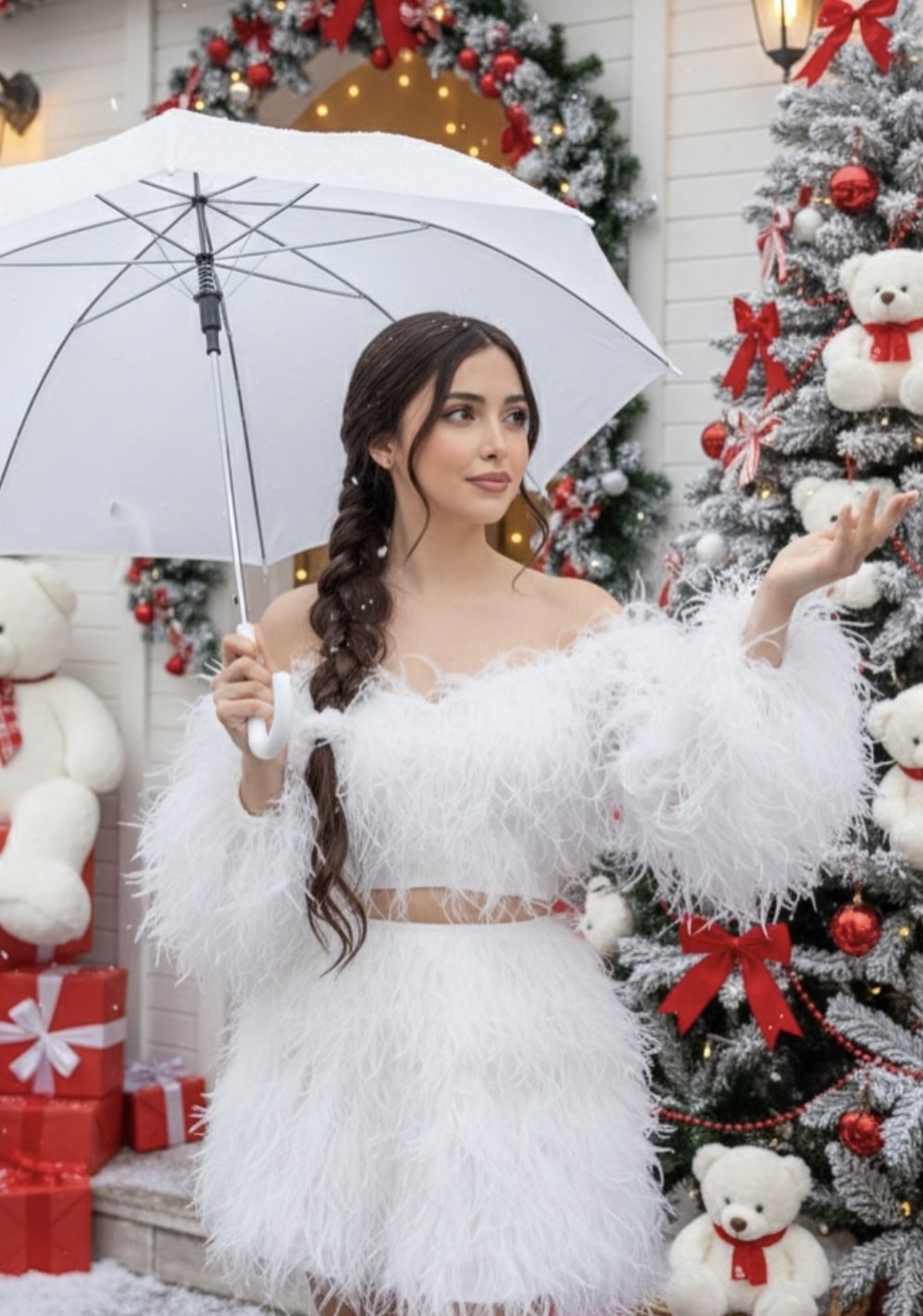
Crishmass with umbrella
Om Editing Top के साथ Crishmass with umbrella स्टाइल क्या है?
Om Editing Top वाला Crishmass with umbrella एडिटिंग स्टाइल उन लोगों के लिए है जो एक dreamy, festive और cinematic portrait look बनाना चाहते हैं। इस तरह की फोटो में subject को Christmas mood, snow feel, soft lighting और decorative outdoor background के साथ दिखाया जाता है, जिससे image में एक कहानी जैसी feeling आती है। खासकर social media reels, profile edits, birthday-style festive portraits, aur AI photo generation ideas के लिए यह style बहुत popular हो सकता है।
Read Also: cinematic-style realistic portrait | 2026 New Year
इस prompt/photo style का main idea simple है: एक close-up fashion portrait, जिसमें umbrella, snowfall effect, fluffy outfit, braided hair, और Christmas decoration मिलकर image को rich और premium बनाते हैं। यह style उन creators के लिए useful है जो festive portrait prompts, AI photo editing ideas, या realistic holiday-themed image concepts ढूंढ रहे हैं। अगर आप mobile से editing करते हैं, तो भी इस look को समझना और recreate करना आसान है, क्योंकि इसमें clear visual cues होते हैं—color palette, pose, background, and lighting.
इस prompt/photo style में आपको क्या look मिलता है?
यह style आमतौर पर soft, warm, और slightly magical vibe देता है। Main subject close-up frame में रहता है, जिससे face details, makeup, hair texture, और outfit clearly दिखते हैं। Umbrella एक strong visual prop बनता है, और falling snow या snow-catching pose फोटो में movement और emotion जोड़ती है। इससे image सिर्फ portrait नहीं रहती, बल्कि एक festive moment जैसी लगती है।
Color tone आमतौर पर Christmas-inspired होता है—white, red, cream, soft brown, और natural festive greens का mix। Background में decorated shopfront, café entrance, Christmas tree, teddy bears, ribbons, pearls, and holiday ornaments जैसी चीजें image को visually rich बनाती हैं। Composition में subject usually center या slightly side-position पर होता है, ताकि umbrella, snowflakes, and decor balance में रहें।
Realism के लिहाज से इस तरह की photo में three things बहुत important हैं: skin texture natural लगे, fabric fluffy और detailed दिखे, और light soft but defined हो। अगर editing अच्छी हो, तो photo premium fashion editorial और festive postcard दोनों जैसी feel दे सकती है।
- Soft Christmas lighting के साथ warm-cool balance
- Close-up portrait framing for face and outfit focus
- Snow effect से movement और mood add होता है
- Umbrella prop composition को unique बनाता है
- Decorative background festive storytelling मजबूत करता है
This Style को use कैसे करें? Step-by-step guide
अगर आप beginner हैं, तो भी इस style को use करना मुश्किल नहीं है। सबसे पहले अपनी base photo चुनें, फिर decide करें कि आपको Christmas portrait look चाहिए या more cinematic festive editorial look। Mobile users के लिए best तरीका है कि आप पहले सही photo select करें और फिर editing app या AI tool में lighting, background, and color harmony पर काम करें।
Editing करते समय ध्यान रखें कि subject का face clear हो, pose natural लगे, और festive elements overdone न दिखें। Umbrella, snowfall, braided hair, fluffy dress, और Christmas decor को balance में रखना जरूरी है। अगर बहुत ज्यादा elements होंगे, तो image cluttered लग सकती है; और अगर बहुत कम होंगे, तो festive identity कमजोर हो जाएगी।
नीचे simple workflow दिया गया है जिसे कोई beginner भी follow कर सकता है:
- एक साफ, front-facing या slightly side-angle portrait photo choose करें।
- Photo में face sharp हो और background ज़्यादा busy न हो।
- Lighting को soft और even बनाएं ताकि skin natural दिखे।
- Umbrella, snow, and Christmas decor जैसे elements add या enhance करें।
- Hair, dress, और color tones को festive palette में match करें।
- Final image में shadows, highlights, and edges check करें ताकि realism बना रहे।
अगर आप AI generation या prompt-based editing use कर रहे हैं, तो subject details, outfit description, pose, and environment को clearly define करना चाहिए। इससे final result ज़्यादा accurate और polished आता है।
कौन-सी photos इस style के लिए सबसे अच्छी रहती हैं?
इस तरह के festive portrait के लिए best photo वही होती है जिसमें subject का face साफ दिखे और posture relaxed हो। Close-up या medium close-up angle सबसे अच्छा काम करता है, क्योंकि इससे umbrella, expression, makeup, और hair details properly दिखती हैं। यदि photo बहुत दूर से ली गई है, तो Christmas styling का impact कम हो सकता है।
Resolution जितनी high होगी, उतना better result मिलेगा, खासकर जब आप dress texture, feathers, braids, और snow effect जैसे fine details रखना चाहते हैं। Lighting ideally soft natural light या diffused indoor light होनी चाहिए। Harsh sunlight या dark shadow वाली photo में face uneven लग सकता है, जिससे overall festive look कमजोर पड़ जाता है।
Background भी बहुत important है। Best results के लिए plain background से थोड़ा decorated background better होता है, लेकिन इतना cluttered नहीं होना चाहिए कि subject lose हो जाए। Clothing के मामले में light, fluffy, festive, and textured outfits अच्छे लगते हैं—especially white, cream, or soft pastel tones. Hair accessories, braid detail, and subtle makeup इस look को और polished बनाते हैं।
- Angle: close-up या slightly side-facing portrait
- Resolution: sharp, high-quality, no blur
- Lighting: soft natural light or gentle indoor light
- Background: clean but festive, with Christmas decor
- Clothing: fluffy, textured, holiday-inspired outfit
- Hair: braided, neat, and visually detailed
- Expression: calm, fresh, and lightly expressive
Pro Tips for the Best Results with Om Editing Top
Om Editing Top style edits work best when you keep the subject clear, the outfit balanced, and the holiday scene visually rich without making it too crowded. Since this look depends on a soft winter mood, small details like lighting, posture, and background decoration can completely change the final image. A clean close-up portrait with a festive outdoor setup usually gives the strongest result.
If you want a polished output, think about the image as a combination of fashion portrait + Christmas ambience + snowfall effect. The more naturally these elements blend together, the more premium the result looks. Use the focus keyword Om Editing Top when planning your image style, but keep the prompt simple and specific so the AI does not confuse the dress, face, and background.
- Use soft natural light or warm evening light to make the face look fresh and detailed.
- Keep the girl centered or slightly off-center so the umbrella and snowflakes remain visible.
- Describe the dress clearly, especially the fluffy texture, feathers, and festive styling.
- Ask for a gentle facial expression so the portrait feels elegant, not overly dramatic.
- Include background details like Christmas trees, teddy bears, and decorative entrance spaces for a stronger holiday mood.
- Make the snowfall light and realistic so it adds atmosphere instead of hiding the face.
- Keep hair details natural and flowing, because braided or soft textured hair looks beautiful in close-up fashion edits.
Another useful tip is to balance the subject with the environment. If the background becomes too busy, the portrait can lose focus. A good Om Editing Top edit should make the girl stand out first, while the Christmas setup supports the story in a soft and stylish way. This balance is what makes the image look like a premium social media edit rather than a random generated scene.
Common Mistakes to Avoid in This Style Prompts
One of the biggest mistakes is overloading the prompt with too many conflicting details. When that happens, the AI may mix up the dress design, lose the umbrella, or create strange snow effects. For Om Editing Top edits, clarity matters more than adding extra words.
Another common problem is forgetting to guide the mood. If you do not mention the expression, lighting, and festive setting, the output may feel flat. Since this style is meant for a Christmas-themed portrait, the image needs a soft, elegant, and dreamy look to feel complete.
- Too many background objects: This can distract from the portrait and reduce the premium look.
- Weak lighting instructions: Without light direction, the face may appear dull or uneven.
- Unclear outfit description: The AI may generate the wrong fabric, shape, or sleeve style.
- Ignoring hand placement: If the hand holding the umbrella or catching snow is not described clearly, the pose may look unnatural.
- Forcing too much snow: Heavy snowfall can cover the face and ruin the close-up details.
- Missing festive elements: The Christmas feeling becomes weaker if you do not mention tree décor, entrance styling, or seasonal props.
A simple way to avoid these issues is to keep the portrait hierarchy clear: face first, outfit second, props third, and background last. That structure helps the Om Editing Top style stay clean, detailed, and visually pleasing. It also makes the image easier to use for profile pictures, edits, and social posts.
Best Use Cases and Creative Ideas for These Images
This kind of Christmas portrait can be used in many places where a stylish festive visual is needed. Because the image combines fashion, winter mood, and decorative holiday scenery, it works especially well for social platforms and creative branding. The Om Editing Top look is not just for one use — it can fit multiple content formats.
If you are building a festive feed, this portrait can become a strong centerpiece. It also works well when you want a soft romantic winter aesthetic or a luxury holiday edit. The umbrella, snowfall, and teddy-bear Christmas décor all give the image a story, which makes it more engaging than a plain portrait.
- Instagram posts: Great for festive portrait feeds and seasonal aesthetic grids.
- Profile pictures: The close-up framing helps the face stand out beautifully.
- Thumbnails: Useful for reels, edit tutorials, or Christmas-themed content covers.
- Portfolios: Ideal for showing AI portrait editing style and creative direction.
- Reels covers: Adds a polished, elegant look that catches attention quickly.
- Festive greetings: Can be used in holiday cards, story posts, or digital wishes.
You can also use this concept for themed series, such as winter fashion edits, Christmas portrait collections, or soft dreamy girl portraits. If you want a stronger brand identity, keep the this style style consistent across multiple images so your feed feels more cohesive and recognizable.
Variations You Can Try with This Style
One of the best parts of this concept is how easily it can be customized. You can keep the same core idea and still create very different results by changing the mood, colors, weather, or scene style. That flexibility makes this prompt useful for experimenting with new visual directions without losing the festive theme.
If you want a softer, more dreamy portrait, go for pastel tones and gentle snowfall. If you want a richer holiday look, use deep reds, warm golds, and brighter Christmas decorations. Small changes in setting can make the entire image feel fresh, even when the pose and subject stay the same.
- Mood variations: dreamy, elegant, romantic, playful, calm, or luxurious.
- Colour variations: white and silver, red and gold, blush pink, cream, or deep winter blue.
- Setting variations: café entrance, shop façade, garden corner, decorated street, or snowy walkway.
- Seasonal variations: light snowfall, frosty morning, evening lights, or pre-Christmas décor.
- Accessory variations: different umbrellas, ribbons, bows, hair ties, or festive ornaments.
You can also change the dress styling slightly while keeping the same fluffy festive fashion idea. For example, one version can feel more glamorous with stronger accessories, while another can look softer and minimal. These small variations help this look images stay interesting and give you more options for posting or editing practice.
Conclusion: Try This Style for a Stylish Christmas Portrait
If you want a festive portrait that feels elegant, dreamy, and social-media ready, yeh style is a strong style to try. The mix of umbrella pose, snowfall, Christmas décor, and soft fashion details creates a beautiful winter story that stands out instantly.
Whether you want an Instagram post, a profile picture, or a creative thumbnail, this concept gives you a lot of flexibility. Try different moods, colors, and background styles, and keep refining the details until the image matches your vision. With the right balance, this edit can turn a simple festive portrait into a polished, eye-catching visual.
💬 Comments