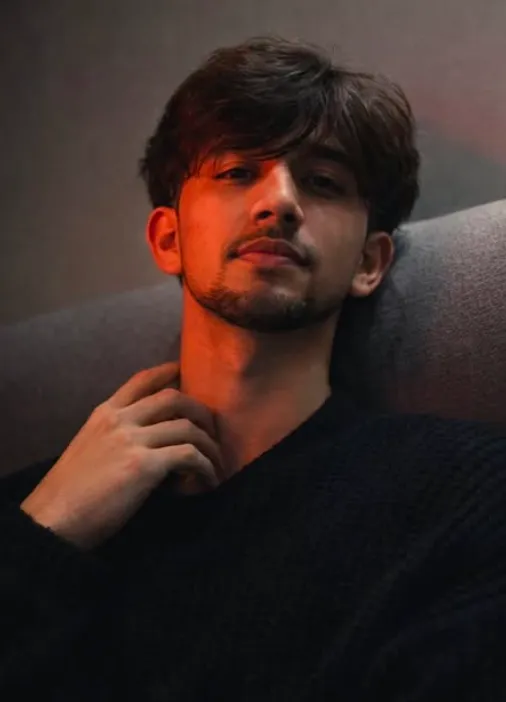
Crimson Shadow Close-Up
Crimson Shadow Close-Up: Om Editing Top ka cinematic portrait style kya hai?
Om Editing Top style ka Crimson Shadow Close-Up ek dramatic portrait look hai jo mobile editing aur AI image generation dono mein bahut popular hai. Is tarah ka edit usually ek close-up facial composition, moody lighting, aur intense red-shadow contrast par based hota hai. Result ek aisa portrait banta hai jo cinematic, stylish, aur emotionally strong lagta hai.
Read Also: cinematic-style realistic portrait | 2026 New Year
Ye style un logon ke liye useful hai jo apne photos ko normal selfie se ek premium, film-like frame mein convert karna chahte hain. Agar aap creator ho, Instagram profile build kar rahe ho, ya bas apni portrait photos ko standout banana chahte ho, to Om Editing Top type prompts aur edits ka concept aapko kaafi help kar sakta hai. Is look mein face identity ko clean rakha jata hai, skin texture natural hoti hai, aur overall frame mein depth aur realism maintain rehta hai.
Crimson Shadow Close-Up ka main appeal uski lighting aur composition mein hota hai. Ek taraf bold crimson ya red glow hota hai, doosri taraf soft shadow rehta hai, aur subject ka expression calm but intense feel deta hai. Isi wajah se ye style fashion portraits, mood edits, profile pictures, aur cinematic social media posts ke liye perfect mana jata hai.
Ye photo style aapko exactly kya deta hai?
Is type ke prompt ya edit se aapko sabse pehle ek strong visual contrast milta hai. Red side lighting face ke ek hisse ko dramatic bana deti hai, jabki shadow side image ko depth aur mystery deti hai. Isse photo flat nahi lagti; instead ek story-like mood create hota hai. Skin par natural texture visible rehna bhi is style ka important part hai, kyunki isse portrait zyada realistic aur high-end dikhta hai.
Composition bhi is style mein bahut important hai. Subject usually close-up frame mein hota hai, slight head tilt, chin up, aur relaxed pose ke saath. Hair partially face ko frame karta hai, jo ek cinematic feel deta hai. Clothing simple but textured hoti hai, jaise knit sweater ya neutral outfit, taaki attention face aur lighting par rahe.
Overall, Om Editing Top category ka ye look aapko ye cheezein deta hai:
- Dramatic red lighting jo portrait ko eye-catching banati hai
- Soft neutral shadows for depth and realism
- Cinematic close-up framing jo face details ko highlight karta hai
- Natural skin texture bina over-smoothing ke
- Moody expression jo image ko emotional feel deti hai
- Minimal background so subject sabse zyada focus mein rahe
This Style prompt ko mobile par kaise use karein: step-by-step guide
Agar aap beginner ho aur phone se hi is type ka portrait banana chahte ho, to process ko simple rakho. Sabse pehle apni best reference photo choose karo. Ye photo face ko clearly dikhani chahiye, kyunki cinematic close-up mein identity aur facial structure kaafi important hote hain. Blur, dark, ya low-quality photo se result weak aa sakta hai.
Phir app ya tool mein jaakar image upload karo aur relevant cinematic portrait style select karo. Yahan focus is baat par rakho ki prompt ya edit face ko natural rakhe, red light ka effect left side ya chosen side par aaye, aur background clean rahe. Mobile par kaam karte waqt zoom karke preview check karna helpful hota hai, taaki aap dekh sako ki eyes, jawline, aur hair details sahi aa rahi hain ya nahi.
Easy mobile workflow kuch is tarah follow karo:
- Ek sharp, front-facing ya slightly side-angled photo select karo.
- Photo ko app mein upload karo.
- Cinematic close-up portrait ya moody red light style apply karo.
- Face identity aur natural texture preserve karne wala option on rakho.
- Lighting ko dramatic, but not overexposed, set karo.
- Background ko minimal ya neutral rakho.
- Preview dekhkar crop aur framing adjust karo.
- Final image save karke social media ya portfolio mein use karo.
Best result ke liye har step ke baad image ko closely inspect karo. Agar red glow too strong lag raha ho, ya shadows face ko hide kar rahe ho, to intensity ko thoda reduce karo. Om Editing Top style mein balance sabse important hota hai — dramatic look hona chahiye, lekin face readable aur realistic bhi rehna chahiye.
Kaunsi photos is style ke liye sabse achchi kaam karti hain?
Crimson Shadow Close-Up jaise edit ke liye photo selection sabse critical step hai. Sabse achchi photos woh hoti hain jinmein subject ka face clear ho, eyes visible ho, aur head pose natural ho. Slightly raised chin, relaxed expression, aur clean face angle is style ko aur cinematic bana dete hain. Agar photo mein hair face ko thoda frame kar raha ho, to composition aur bhi strong dikhegi.
Resolution high honi chahiye, kyunki close-up portrait mein chhoti details bhi visible hoti hain. Low-resolution images par skin, hair, aur eye details blur ho sakte hain, jis se final output amateur lag sakta hai. Lighting bhi important hai: soft indoor light ya balanced daylight base ke liye best hoti hai, kyunki red shadow effect baad mein clean tarike se add kiya ja sakta hai.
Photo choose karte waqt ye points dhyan mein rakho:
- Angle: front ya slight side angle, too much tilt avoid karo
- Resolution: sharp, high-quality image use karo
- Lighting: even lighting ho, face overdark na ho
- Background: simple wall ya plain indoor background best rahta hai
- Clothing: textured, simple outfit jisse face distract na ho
- Expression: calm, serious, ya subtly intense expression better kaam karta hai
Agar aap mobile photo khud shoot kar rahe ho, to window ke paas stand karke natural light lo. Face par hard direct sunlight na ho, warna red-shadow effect later unnatural lag sakta hai. Plain background, neat hair, aur clear facial features Om Editing Top style ko aur premium banate hain.
Pro Tips for the Best Results with Om Editing Top
To get the strongest Om Editing Top result, start with a clean, clear reference image and a prompt that keeps the pose, lighting, and mood consistent. The more specific your direction is, the easier it is to preserve the facial identity and overall cinematic look without losing detail.
When you are aiming for a dramatic close-up, small instructions make a big difference. Mention the angle, expression, fabric texture, and background style clearly, so the final image feels polished and intentional instead of random or overly edited.
- Use a sharp reference photo with visible eyes, jawline, and hairline for better identity matching.
- Keep the lighting direction clear, such as red light from one side and soft shadow on the other.
- Ask for natural skin texture so the image does not look plastic or over-smoothed.
- Describe the pose in simple terms, like leaning back slightly, chin raised, or hand near the neck.
- Choose one clear outfit idea, such as a textured sweater, to keep the composition focused.
- Use a minimal background so the face remains the main subject of attention.
For better quality, try variations in camera distance and crop. A tight close-up can create a more emotional, editorial look, while a slightly wider frame can show more of the clothing and body pose. This helps you find the best version of the Om Editing Top style for social media, profile use, or creative portrait edits.
Common Mistakes to Avoid in This Style
One of the biggest mistakes is making the prompt too vague. If you do not clearly define the face direction, expression, and lighting, the output can lose the exact mood you want. For a strong Om Editing Top edit, precision matters more than adding extra random details.
Another common issue is overloading the scene with too many elements. A close-up portrait works best when the focus stays on the subject, so crowded backgrounds, too many props, or conflicting color instructions can weaken the overall cinematic impact.
- Using a blurry reference image: This can reduce facial accuracy and make the output less consistent.
- Mixing too many light sources: If the lighting is unclear, the red-shadow effect loses its dramatic contrast.
- Adding conflicting emotions: Calm, intense, smiling, and sad all together can confuse the result.
- Forgetting natural texture: Over-smoothing can remove realism from skin, hair, and fabric details.
- Over-detailing the background: A busy backdrop can distract from the face and reduce the cinematic feel.
It also helps to avoid changing the identity instructions halfway through the prompt. If the goal is a faithful portrait-style edit, consistency is essential. The best this style results usually come from simple, confident direction that keeps the focus on face shape, lighting contrast, and mood.
Best Use Cases for These Images
The this prompt style is perfect for people who want a striking portrait with a bold, editorial feel. Because it combines close-up framing, dramatic lighting, and a clean background, it works especially well on platforms where strong visuals get attention fast.
You can use this style in many places depending on your goal. Some people want a stylish profile image, while others use it for fashion content, mood-based posts, or high-impact thumbnails. The close-up format makes the face the focal point, which helps the image stand out in feeds and galleries.
- Instagram posts: Great for aesthetic portraits, mood edits, and dramatic storytelling images.
- Profile pictures: A strong close-up can create a memorable and polished avatar.
- YouTube thumbnails: The lighting contrast and face visibility can grab attention quickly.
- Portfolio showcases: Useful for demonstrating portrait editing, cinematic style, or AI-based image work.
- Reels covers: Ideal when you want a bold cover image that looks premium and artistic.
This style also works well for personal branding, especially if your content has a fashion, photography, or creative-editing angle. The this look approach gives the image a serious and refined tone, making it suitable for modern digital presentation.
Variations You Can Try with This Style
Once you have the base look, you can experiment with different moods and environments while keeping the same strong portrait structure. That is one of the best parts of yeh style: it is flexible enough to adapt to many visual styles without losing its cinematic identity.
You can change the mood by adjusting the light, background, outfit texture, or seasonal feeling. Small changes can completely transform the image, letting you create a collection of related edits that still feel consistent and professional.
- Mood variations: calm, intense, dreamy, mysterious, elegant, or moody editorial.
- Colour variations: red and shadow, warm amber tones, cool blue lighting, or neutral grayscale style.
- Setting variations: indoor wall, studio backdrop, soft window light, or minimal textured background.
- Seasonal ideas: winter knitwear, autumn tones, rainy-day mood, or summer low-light portrait style.
- Accessory changes: no accessories for a clean look, or simple fashion details for a more styled portrait.
If you want to test different results, keep the same facial reference and only change one or two creative details at a time. That way, you can see how each adjustment affects the final look and decide which this edit variation fits your content best.
Conclusion: Try This Style for a Bold Cinematic Portrait
this style is a strong choice if you want a close-up portrait with dramatic red lighting, natural texture, and a clean cinematic finish. It works especially well when you want the face, pose, and mood to feel expressive without becoming too busy or artificial.
Use the tips, avoid the common mistakes, and test a few variations to find the version that matches your style. If you want a portrait that feels striking, polished, and visually memorable, this prompt is definitely worth trying.
💬 Comments