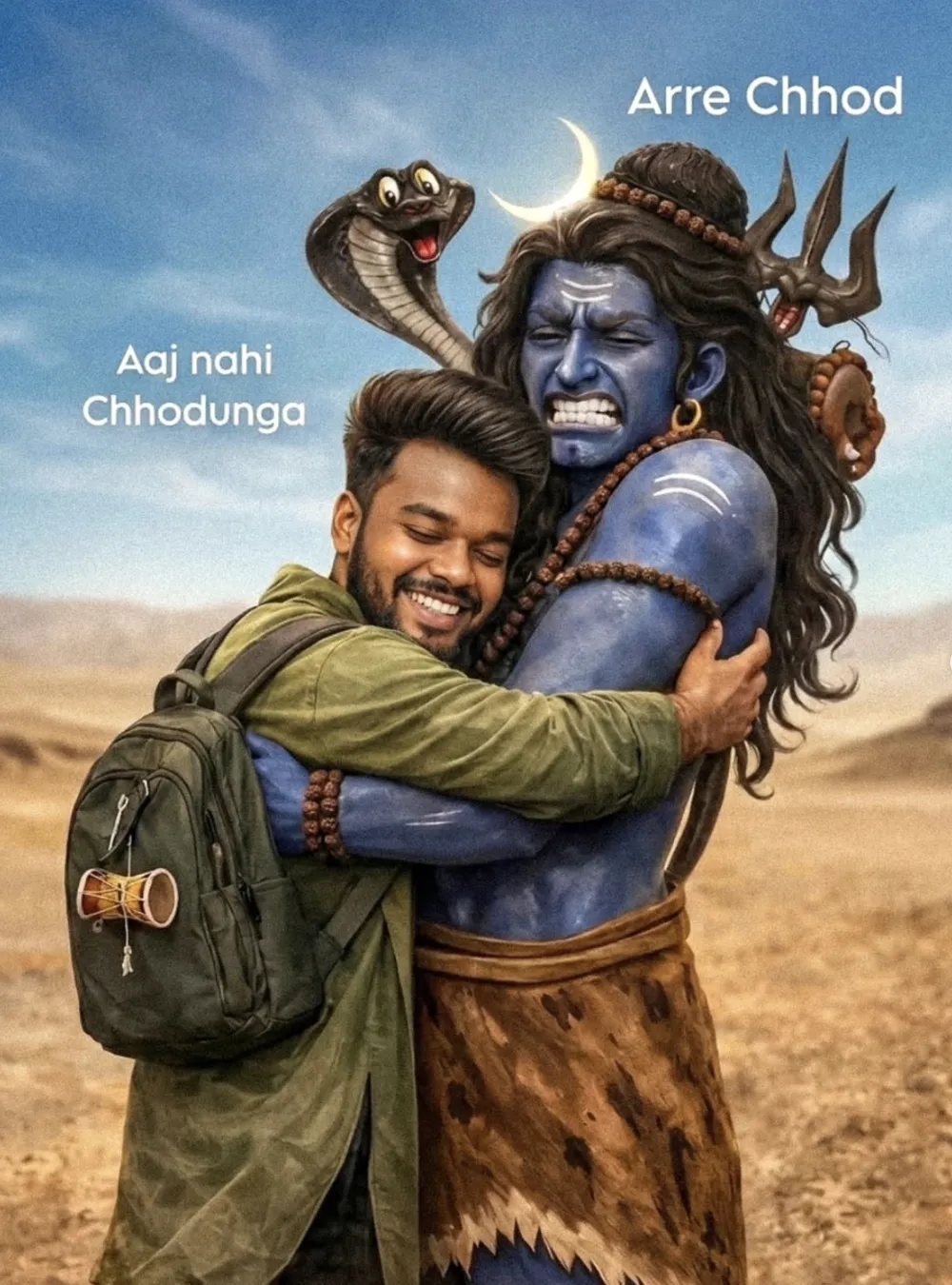
Bholenath Ji
Om Editing Top से Bholenath Ji Devotional Edit क्या है?
Om Editing Top style का Bholenath Ji edit एक ऐसा cinematic devotional visual है, जिसमें modern portrait aur divine imagery ko ek saath blend kiya jata hai. Is type ka prompt un users ke liye hota hai jo apni photo ko spiritual, emotional aur powerful look dena chahte hain.
Read Also: cinematic-style realistic portrait | 2026 New Year
Ye style खास तौर par social media reels, WhatsApp DP, Instagram posts, fan edits aur festival greetings ke liye popular hota hai. Isme subject usually ek young Indian man hota hai jo Lord Shiva ke saath emotional connection show karta hai. Result me image sirf ek normal photo nahi rehti, balki ek devotional story jaisi lagti hai.
अगर aap Bholenath Ji photo editing, Shivji cinematic edit, ya devotional AI photo transformation banana chahte hain, to ye style aapko ek dramatic aur realistic look deta hai. Ye especially un logon ke liye useful hai jo apni personal photo ko spiritual theme ke saath unique banana chahte hain.
Is Photo Style Me Aapko Kya Milega?
Om Editing Top type devotional edit ki sabse badi strength uska cinematic realism hai. Isme lighting soft aur dramatic hoti hai, colors warm golden tones aur deep natural shades ke around rehte hain, aur overall mood emotional, divine aur powerful lagta hai.
Composition bhi kaafi important hoti hai. Subject foreground me clearly dikhai deta hai, jabki background me open landscape, sky aur natural environment image ko depth dete hain. Aise edits me facial expression, body posture aur clothing details bahut matter karti hain, kyunki wahi image ko believable banati hain.
Visual output aam taur par is tarah ka feel deta hai:
- Ultra-realistic skin texture aur natural facial details
- Cinematic light with warm sunrise ya sunset mood
- Spiritual atmosphere with devotional energy
- Clear subject focus and strong background depth
- Rich, vibrant colours without looking over-edited
- High-detail divine elements like rudraksha, trishul, vibhuti, aur traditional accessories
This Style Ko Step-by-Step Kaise Use Karein?
Agar aap beginner hain aur mobile se edit banana chahte hain, to process ko simple rakhna best hota hai. Sabse pehle ek achhi clear photo choose karein, kyunki blurry ya low-light image par result उतना sharp nahi aata. Uske baad prompt style ko carefully apply karke devotional look create kiya jata hai.
Editing app ya AI tool me image upload karne ke baad, photo ka subject aur mood match karna zaroori hota hai. Aapko aise settings choose karne chahiye jo cinematic lighting, realistic skin tones aur strong background separation de sakein. Mobile users ke liye ye process usually bahut easy hota hai agar steps sahi follow kiye jayein.
- Apni ek clear portrait photo choose karein.
- Ensure karein ki face seedha ya thoda angled ho, taaki details visible rahein.
- Background simple rakhein, taaki AI ya editor subject ko easily isolate kar sake.
- Photo ko editing app me upload karein jo cinematic ya AI transformation support karti ho.
- Devotional style apply karein aur output me realism par focus rakhein.
- Final image me brightness, contrast aur sharpness check karein.
- Agar zaroorat ho to crop karke vertical social media format me save karein.
Best result ke liye hamesha ek clean, centered portrait use karein. Aapka goal ye hona chahiye ki subject natural lage aur divine elements image ke saath smoothly blend ho jayein. Too much clutter ya noisy background edit ko weak kar sakta hai.
Kaunsi Photos Is Style Ke Liye Sabse Achchi Rehti Hain?
Om Editing Top devotional edit me photo selection ka role bahut important hota hai. Agar base photo strong hogi, to final output bhi dramatic aur clean dikhega. Isliye aisi image choose karein jisme face, expression aur clothing clearly visible ho.
Best photos usually woh hoti hain jo natural light me li gayi hon. Daylight, soft shade, ya golden hour lighting editing ke liye perfect maani jaati hai. Agar photo me harsh shadows ya very dark exposure ho, to final result uneven lag sakta hai.
Practical tips jo aapko follow karne chahiye:
- Angle: Front-facing ya slightly side-angle portrait best rehta hai.
- Resolution: High-resolution photo use karein, taaki facial details clear rahein.
- Lighting: Soft natural light ya warm sunlight ideal hoti hai.
- Background: Plain ya lightly blurred background sabse achcha rehta hai.
- Clothing: Simple traditional ya solid-colour outfit edit ko realistic banata hai.
- Expression: Calm, devotional, ya joyful expression image ko emotionally strong banata hai.
- Framing: Chest-up ya half-body shot zyada effective hota hai.
Agar aap photo ko devotional story look dena chahte hain, to clothing me earthy shades, traditional kurta style, ya simple festive outfit better lagte hain. Isse Bholenath Ji theme ke saath visual harmony banti hai aur final edit aur bhi powerful dikhta hai.
Ek aur important point ye hai ki photo me face completely hidden nahi hona chahiye. Eyes, smile aur beard details clear honi chahiye, kyunki emotional devotional edit me yahi elements connection build karte hain. Proper source image ke saath Om Editing Top style ka result kaafi impressive aur shareable ban jata hai.
Om Editing Top ke liye Pro Tips for Best Results
Om Editing Top style images ko aur strong banane ke liye sabse pehle composition par focus karein. Subject ka face clear hona chahiye, background simple rahe, aur devotional feel disturb na ho. Agar aap cinematic effect chahte hain, to light direction aur color harmony ko carefully choose karna bahut important hota hai.
Ek aur useful tip hai detail balance. Lord Shiva ke divine elements jaise trishul, rudraksha, vibhuti, cobra aur crescent moon ko highlight karein, lekin itne zyada heavy na karein ki main subject se attention hat jaye. Om Editing Top prompt style me devotion aur realism ka balance hi output ko premium banata hai.
- Subject ke face ko sharp aur expressive rakhein, taaki emotion clearly dikhe.
- Background ko uncluttered rakhein, especially agar aap cinematic devotional portrait bana rahe hain.
- Warm sunlight ya soft glow add karein to image zyada divine aur attractive lage.
- Clothing colors ko earthy ya muted tone me rakhein, jaise olive, brown, green, saffron ya beige.
- Accessories jaise backpack, damru ya malas ko balanced placement me use karein.
- Agar hug ya interaction scene hai, to body language natural aur emotional honi chahiye.
Om Editing Top me best results ke liye vertical composition bhi kaafi useful hoti hai, especially agar image Instagram ya reel cover ke liye banani ho. Isse subject ka height aur divine presence dono better feel hote hain. Aap depth of field ka effect bhi use kar sakte hain, jisse foreground aur background ka separation aur cinematic lagta hai.
Common Mistakes to Avoid in These Images
Sabse common mistake hoti hai overloading the scene. Jab ek hi image me bahut saare visual elements bhar diye jaate hain, to devotional impact kam ho jata hai. Om Editing Top type edits me simplicity often zyada powerful hoti hai, kyunki woh subject aur emotion ko clearly show karti hai.
Dusri galti hoti hai inconsistent lighting. Agar background daylight me hai aur subject par artificial dark shadows hain, to image unnatural lag sakti hai. Same tarah, colors ka mismatch bhi output ko weak bana deta hai. Har element ko ek hi visual mood me fit karna zaroori hota hai.
- Too many props add karna, jis se main subject dull lagne lagta hai.
- Expression ko too artificial banana, jisse emotional connection khatam ho jata hai.
- Background aur subject ke colors ko clash karna, jo image ko messy banata hai.
- Divine symbols ko random placement dena, jisse composition weak ho jati hai.
- Body proportions ko ignore karna, jo realism ko hurt karta hai.
- Lighting ko inconsistent rakhna, jis se cinematic effect break ho jata hai.
This style ka goal sirf fancy image banana nahi, balki ek aisa devotional visual create karna hai jo clean, impactful aur believable lage. Isliye har edit me clarity, balance aur subject focus ko priority deni chahiye. Agar output me koi ek element extra loud lag raha ho, to usse soft ya subtle karna better hota hai.
These Images ke Best Use Cases and Ideas
This prompt style images ka use kaafi versatile hota hai. Inhe Instagram posts par devotional theme ke saath share kiya ja sakta hai, profile pictures me spiritual identity ke liye use kiya ja sakta hai, aur reels covers me bhi dramatic appeal ke liye rakha ja sakta hai. Agar aap creator, devotee ya fan-based page manage karte hain, to aise visuals engagement ko boost kar sakte hain.
Thumbnails ke liye bhi this look ka look bahut effective hota hai, especially jab aapka content Shiva devotion, bhakti edits, or cinematic religious art se related ho. Portfolio me bhi aise images showcase ki ja sakti hain, taaki aapka editing style emotional aur polished dono lage. Bold yet devotional visual identity banane ke liye ye ek strong option hai.
- Instagram post: devotional quote ya bhakti caption ke saath.
- Profile picture: close-up or half-body hero look ke liye.
- Thumbnail: high-contrast, eye-catching visual presence ke liye.
- Reels cover: cinematic and spiritual storytelling ke liye.
- Portfolio: editing skills aur creative concept show karne ke liye.
Yeh style images ko festival content, Shivratri specials, devotional reels, aur spiritual status posts me bhi use kiya ja sakta hai. Agar aap content ko regular basis par post karte hain, to same theme ke multiple versions bana kar ek consistent visual series bhi create kar sakte hain. Isse audience ko ek recognizable style milta hai.
This Style ke Variations Aap Try Kar Sakte Hain
Agar aap apne edits me variety lana chahte hain, to this edit theme ke andar alag-alag moods aur settings explore karein. Ek hi core concept ko different colors aur environments me present karne se content fresh lagta hai. Isse aapka page repetitive bhi nahi dikhega aur audience ko naye visuals milte rahenge.
For example, aap desert scene ko morning golden light me try kar sakte hain, ya phir evening sunset tone me. Blue spiritual glow, smoky temple atmosphere, mountain background, ya snow-covered Kailash-inspired setting bhi interesting variations ban sakti hain. This style ka base devotional rahe, lekin mood har version me different ho sakta hai.
- Mood variations: peaceful, emotional, heroic, playful, divine, intense.
- Colour variations: saffron, golden, blue, earthy brown, dark emerald, white ash tones.
- Setting variations: desert, temple courtyard, mountain view, river bank, cave-like backdrop.
- Season variations: summer glow, monsoon clouds, winter mist, festive night lighting.
- Camera feel variations: close-up portrait, mid-shot hug scene, wide cinematic frame.
Aap accessories aur styling me bhi variation la sakte hain. Kabhi backpack ke saath modern devotional look rakhein, kabhi traditional attire ke saath pure bhakti vibe create karein. This prompt style me modern aur spiritual fusion bahut achha kaam karta hai, kyunki ye youth audience aur devotional audience dono ko appeal karta hai.
Conclusion: This Style Ko Try Karke Dekhiye
This look style images un logon ke liye perfect hain jo devotional feel ko cinematic touch ke saath present karna chahte hain. Is theme me emotion, detail, lighting aur divine symbolism ka combination ek powerful visual story create karta hai. Agar aap clean composition aur balanced elements use karte hain, to result aur bhi impressive ban sakta hai.
Ab aap different moods, colours aur backgrounds ke saath experiment karke apna best version create kar sakte hain. Yeh style ko ek creative base ki tarah use kijiye aur usme apni personal devotional style add kijiye. Try karke dekhiye — aapko ek strong, memorable aur visually rich output zaroor milega.
💬 Comments