Beachy Look AI Prompt
Beachy Look AI Prompt: What It Means
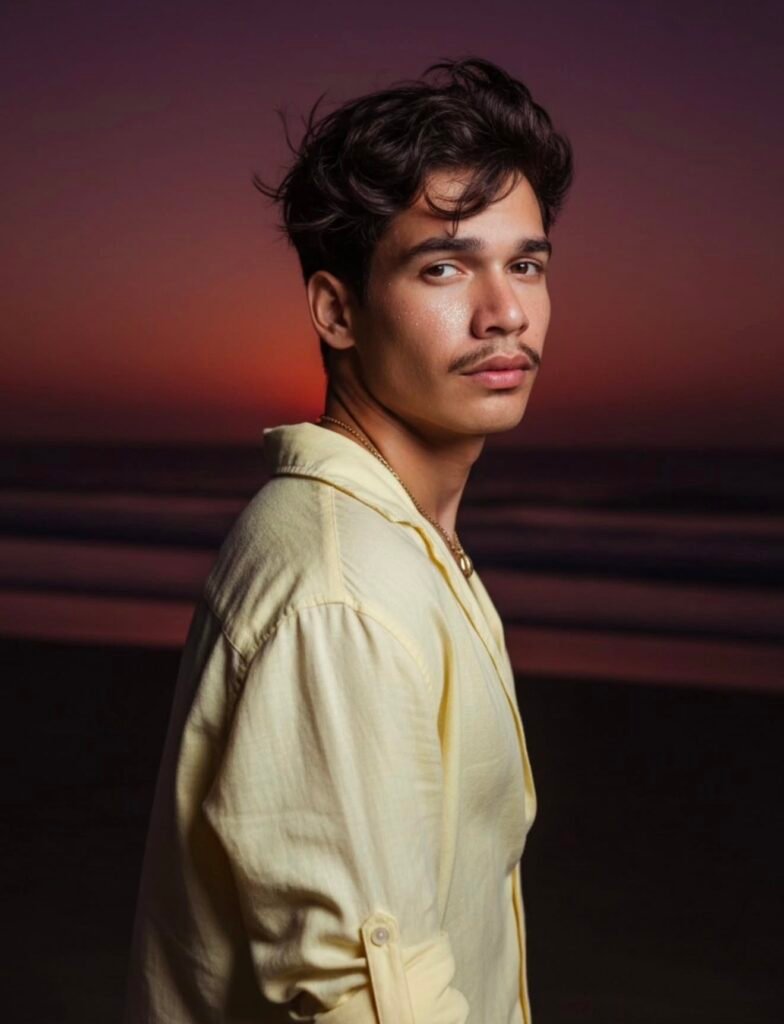
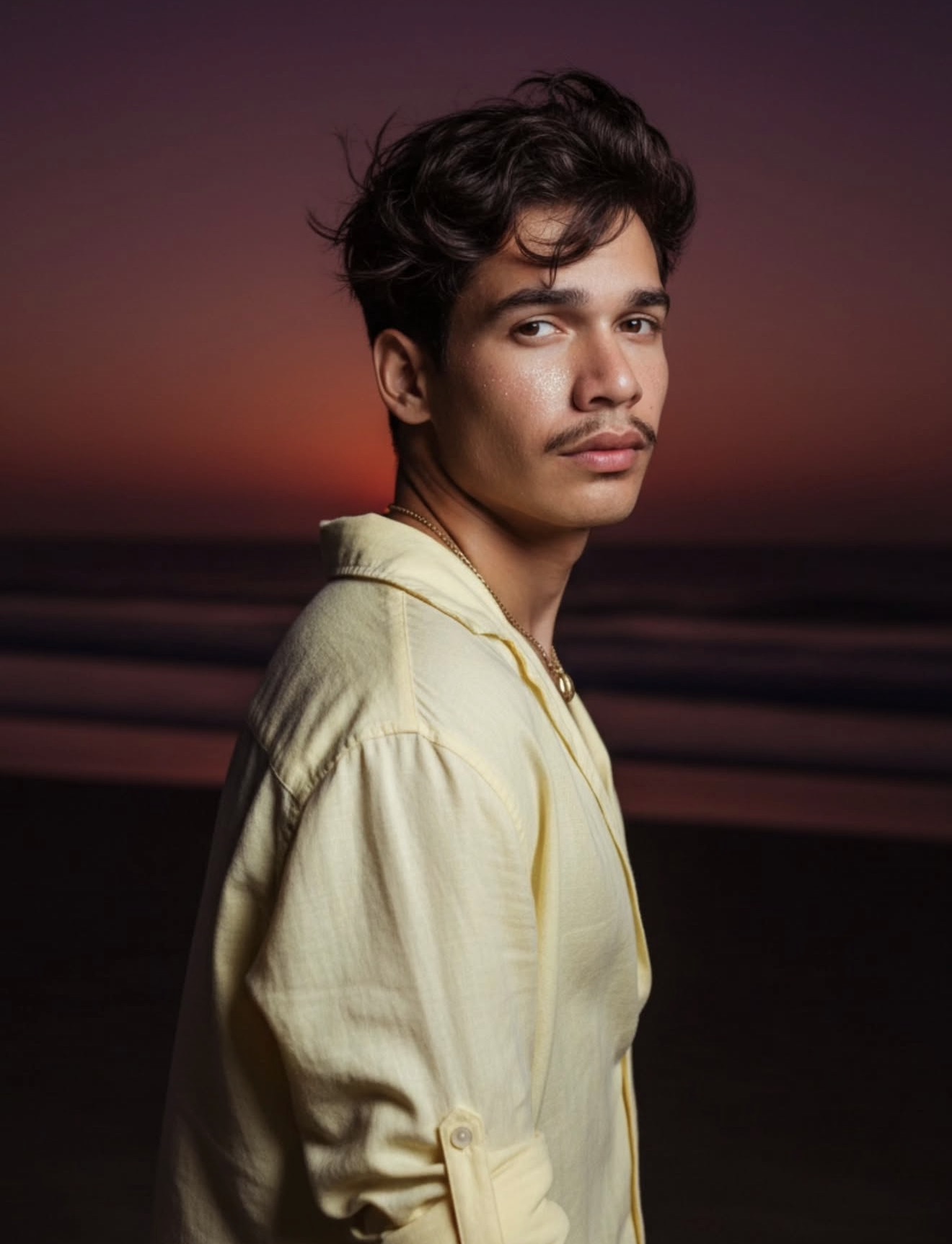
This beachy look AI prompt is for anyone who wants a soft, dreamy, cinematic beach photo. The face and skin get a lightly glowing finish, the background carries a moody sunset atmosphere, and the overall frame feels relaxed and stylish — the kind of AI photo prompt people search for when they want a sun-kissed portrait or a beach aesthetic photo.
Read Also: Cinematic Realistic Portrait AI Prompt
This look is especially useful for creators who want a standout result for Instagram, a reel thumbnail, a profile picture, or an aesthetic photo edit. If you want an image that still looks natural but carries a premium beach-portrait feel, this prompt style is worth trying. The goal is a realistic yet artistic output — enhanced enough to stop the scroll, without looking artificial. That’s why this beachy look is popular with fashion portraits, casual outdoor shots, and social content creators alike.
What This Beachy Look Prompt Delivers
The biggest highlight of this style is its visual mood. The photo typically combines a dark beach setting with flash-like brightness on the face, creating a soft glow, light shimmer, and sun-kissed effect that naturally highlights the subject.
In the background, the sunset is nearly set, turning the sky a deep purple-red tone — this color palette is what makes the image feel cinematic. Combined with windswept hair, relaxed clothing, and an upper-body crop, the photo gets a surfer-inspired beach aesthetic.
- Flash-lit face with glowing skin
- Moody sunset background with a purple-red sky
- Natural beach texture and realistic shadows
- Soft glamour combined with a casual surfer vibe
- Upper-body focus for a clean composition
How to Use This Beachy Look Prompt: Step-by-Step
If you’re editing on mobile, the process is simple. Start by picking a photo where your face and upper body are clearly visible — crop and pose matter a lot for this style, so the subject needs to be clear.
- Choose a clean, high-quality photo where the face isn’t blurry.
- Open the photo in your prompt-based edit tool or AI image editor.
- Select a beachy aesthetic or fashion portrait style.
- Set the lighting to a flash-like, glowing tone.
- Add a dark beach sunset feel to the background.
- Keep hair and clothing details natural and airy.
- Check the final preview for color, skin glow, and crop.
If the result looks too bright, lower the brightness slightly and keep contrast mild. If the background looks flat, add purple, red, and dark blue tones for a more dramatic sky.
Which Photos Work Best for This Style
The best photos for a beachy look have a slightly dynamic angle. A side angle, a back-turn pose, or a shoulder-turn pose works well since it adds motion and a natural feel — a relaxed pose beats a straight, passport-style pose here.
Resolution matters too. A clearer photo keeps the face glow, hair texture, shirt fabric, and small details like a necklace looking clean. A noisy low-light photo can lose quality after editing, so a sharp source image is the safest choice.
- Angle: back-turn or half-turn pose with the upper body visible
- Resolution: clear, high-resolution image
- Lighting: natural daylight or soft dusk light
- Background: plain beach, sea, or open outdoor space
- Clothing: light-colored, loose, linen, or summer outfit
- Hair: open, slightly messy, wind-friendly look
Light colors work best for clothing since they support the beach palette — white, cream, light yellow, beige, and soft pastels all fit this aesthetic. Minimal accessories, like a subtle necklace, keep the final image looking elegant. The simpler and more open the background, the more the focus stays on the subject, so avoid crowded scenery, heavy shadows, or busy objects.
Pro Tips for the Best Results
Beach portraits in this style look best when the subject feels natural, glowing, and lightly cinematic. The goal isn’t an overly edited look, but an effortless beach mood with a soft flash effect and a moody sunset background.
- Keep the face and skin tone warm so the sun-kissed glow looks realistic and flattering.
- Use a loose, relaxed pose to match the beachy aesthetic instead of a stiff studio pose.
- Keep strong contrast between the glowing subject and the darker background for a cinematic feel.
- Choose soft, breezy textures like linen for a believable, stylish outfit.
- Keep accessories minimal, like a delicate necklace, so the image stays clean and elegant.
- Make sure the wind effect in the hair looks natural, not overly messy or artificial.
- Use a sunset palette of purple, red, and dim orange tones to support the dark beach atmosphere.
For a more polished result, focus on balance — the flash should highlight the skin while the image still keeps that evening beach mood. A good edit always feels intentional, not overprocessed.
Common Mistakes to Avoid
The biggest mistake is over-editing the glow. Too much shine makes skin look plastic instead of naturally sun-kissed — a subtle sparkle effect works far better for a premium, believable beach portrait.
Another common issue is a background that’s too bright. Since this look depends on a nearly-set sunset and a darker sky, a daytime beach scene breaks the mood entirely. The atmosphere should feel late-evening, calm, and slightly dramatic.
- Avoid overly saturated colors — they make the sunset look fake and reduce the soft aesthetic.
- Don’t add too many accessories, since clutter distracts from the upper-body composition.
- Skip harsh shadows on the face, since they hide the glow and weaken the flash effect.
- Don’t ignore the clothing fit — oversized styling should look relaxed, not shapeless.
- Avoid awkward body angles, especially when the subject is turning toward the camera from behind.
- Don’t make the hair too uniform — a little wind movement is what gives the surfer vibe.
These mistakes pull the image away from the intended beachy look. The best result feels natural, atmospheric, and slightly editorial — not forced or noisy.
Best Use Cases for This Beachy Look
This style works well for Instagram posts, especially for a dreamy summer feed with warm, cinematic visuals. It also suits profile pictures when you want a confident but soft-looking portrait that stands out without feeling too formal.
Creators often use this kind of edit for thumbnails, reel covers, and portfolio images because it instantly communicates a vibe. Glowing skin, windswept hair, and a dark sunset background make the image feel memorable and scroll-stopping.
- Instagram posts: perfect for beach diaries, travel memories, and aesthetic portraits.
- Profile pictures: ideal for a stylish, sun-kissed, clean personal look.
- Thumbnails: a bold but classy visual for lifestyle content.
- Reel covers: great for summer clips, seaside edits, and fashion videos.
- Portfolios: works well for personal branding, fashion shoots, and creative showcases.
If you’re building a consistent visual identity, this beach look can help you create a recognizable style, balancing mood, glow, and fashion in a way that feels modern and highly shareable.
Variations to Try
You can experiment with different moods without losing the beach aesthetic. Small changes in color, light, or setting give a completely different final result while keeping the same core vibe.
- Warm golden version: softer orange and gold tones for a sunset-rich summer feel.
- Moody purple version: deep purple and red skies for a darker cinematic look.
- Tropical version: brighter coastal tones and a fresher breeze for a vacation vibe.
- Monsoon beach version: cooler tones and cloudy skies for a dramatic seasonal twist.
- Minimal editorial version: a simple background that lets the glow on the face do the work.
- Festival-style version: a little more sparkle and contrast for a bold, trendy finish.
You can also try changing the outfit texture, like switching linen shades or adding different jewelry details — small updates that create multiple variations from the same base concept without feeling repetitive.
Conclusion: Try This Beachy Look Prompt
This beachy look AI prompt is a strong choice if you want a portrait that feels glowing, stylish, and naturally cinematic. It brings together flash-lit skin, a dark sunset sky, windswept hair, and relaxed clothing into one clean visual story.
If you want your image to stand out on Instagram, reel covers, or profile pictures, this style is worth trying. Keep the details balanced, stay close to the beach mood, and let this prompt do the rest for a beautiful final result.
FAQ: Beachy Look
How do I use the "Beachy Look" prompt?
Copy the prompt above, open Gemini or ChatGPT, upload a clear photo of yourself and paste the prompt. Generate the image and adjust the outfit or background if you want a variation.
Is this prompt free?
Yes. This prompt is free to copy and use for Instagram, reels, WhatsApp DP and profile pictures.
Which photo works best?
A sharp, front-facing, well-lit photo with no filter. A clear face helps the AI keep your identity in the final image.
Last updated: 10 September 2026

💬 Comments