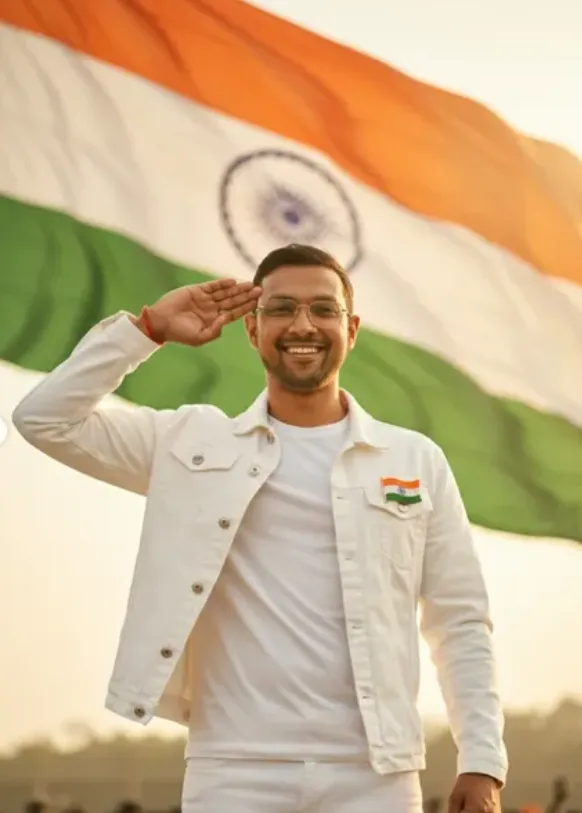
26TH JANUARY
26TH JANUARY के लिए Om Editing Top स्टाइल क्या है?
Om Editing Top स्टाइल में 26TH JANUARY के लिए ऐसा रिपब्लिक डे लुक बनाया जाता है जो साफ, cinematic और emotionally powerful लगे। यह खास तौर पर उन लोगों के लिए useful है जो अपनी photo को festive, patriotic और premium look में edit करके social media पर share करना चाहते हैं।
Read Also: cinematic-style realistic portrait | 2026 New Year
इस style की सबसे बड़ी खासियत है कि इसमें subject, background, outfit और lighting सब कुछ एक balanced, realistic composition में दिखता है। यानी फोटो सिर्फ decorated नहीं लगती, बल्कि एक strong visual story बनाती है — जैसे कोई Republic Day portrait, patriotic poster या profile image।
अगर आप mobile से photo editing करते हैं और एक simple reference image को full patriotic poster में बदलना चाहते हैं, तो Om Editing Top related prompts और styles बहुत मदद करते हैं। खासकर तब, जब आपको natural skin tone, clean background, soft golden light और Indian flag theme के साथ professional result चाहिए।
यह फोटो स्टाइल आपको क्या देता है?
26TH JANUARY वाला यह editing style एक ultra-realistic portrait look देता है, जिसमें image का focus subject पर रहता है और background soft, dreamy तथा monument-inspired feel देता है। Golden hour lighting फोटो को warm tone देती है, जिससे पूरा scene ज्यादा cinematic और graceful लगता है।
इस तरह की edit में colors आमतौर पर balanced रहते हैं — white kurta, tricolor scarf, soft blue-pastel sky, और calm river background एक साथ मिलकर patriotic mood बनाते हैं। Composition सीधी और clean होती है, इसलिए फोटो dramatic होते हुए भी overcrowded नहीं लगती।
इस style का इस्तेमाल खासकर इन जरूरतों के लिए किया जाता है:
- Republic Day profile photo
- Instagram patriotic post
- WhatsApp status image
- 26 January banner-style portrait
- School, college, or event greeting visuals
अगर आप चाहते हैं कि आपकी photo “AI edited” न लगे और real DSLR portrait जैसी दिखे, तो यह Om Editing Top style उसी direction में काम करता है। इसमें depth, subject separation, natural pose, और soft cinematic grading बहुत important होते हैं।
This Style को मोबाइल पर कैसे इस्तेमाल करें?
अगर आप beginner हैं, तो चिंता की जरूरत नहीं है। इस तरह का portrait edit mobile पर भी आसानी से बनाया जा सकता है, बस आपको सही photo चुननी होगी और prompt/style को step by step use करना होगा।
सबसे पहले अपनी एक clear reference image तैयार करें। उसके बाद जिस app या AI editor में आप काम कर रहे हैं, वहां image upload करें और उसी patriotic theme के हिसाब से edit settings apply करें। ध्यान रहे कि output तभी अच्छा आएगा जब subject और background का match natural लगे।
Step-by-step method:
- एक साफ और अच्छी resolution वाली फोटो चुनें।
- अगर face visible है, तो front-facing या slightly turned pose बेहतर रहेगा।
- Photo upload करने से पहले background distraction कम करें।
- AI editor या editing app में portrait mode / prompt mode open करें।
- Republic Day theme, tricolor elements, and golden hour lighting जैसी style settings choose करें।
- Output generate करने के बाद brightness, contrast और skin tone check करें।
- जरूरत हो तो text placement और cropping adjust करें ताकि poster clean लगे।
Mobile users के लिए सबसे अच्छा तरीका है पहले basic image select करना, फिर edit generate करना, और आख़िर में final export को story या post size में save करना। इससे photo sharp भी रहेगी और social media पर perfectly fit भी होगी।
कौन-सी photos इस style के लिए सबसे बेहतर रहती हैं?
Om Editing Top 26TH JANUARY style के लिए हर photo सही नहीं होती। अगर base image मजबूत होगी, तो final output भी ज्यादा realistic और attractive बनेगा। इसलिए photo चुनते समय angle, lighting, background और clothing पर खास ध्यान देना चाहिए।
सबसे अच्छा result उस photo से मिलता है जिसमें subject का face clear हो, body posture steady हो, और light face पर evenly पड़े। बहुत dark, blurry या crowded background वाली photo में patriotic details उतनी naturally blend नहीं होतीं।
बेहतर photo चुनने के practical tips:
- Angle: front-facing या हल्का side-angle सबसे अच्छा रहता है।
- Resolution: कम से कम clear HD photo use करें, ताकि face details sharp रहें।
- Lighting: natural daylight या soft indoor light ideal है।
- Background: plain, open या कम clutter वाला background चुनें।
- Clothing: simple outfit पर patriotic elements जोड़ना आसान रहता है, खासकर white, beige या light colors।
- Pose: calm, straight posture वाली photo professional look देती है।
अगर आपकी original photo already bright और clean है, तो golden hour effect, tricolor scarf, monument background और cinematic tone और भी सुंदर तरीके से blend होंगे। यही कारण है कि अच्छी base photo this style style का सबसे जरूरी हिस्सा बन जाती है।
Pro Tips for the Best Results with This Style
अगर आप this prompt style में सबसे अच्छा result चाहते हैं, तो सबसे पहले composition पर ध्यान दें। Subject को frame के center में रखते हुए background को clean और balanced रखें, ताकि message clear लगे और image ज्यादा premium दिखे। Republic Day, patriotic portrait, या poster-style design में small details बहुत फर्क डालती हैं, जैसे scarf placement, hand position, and lighting direction.
Golden hour lighting, soft haze, और cinematic color grading इस तरह की images को instantly more realistic बनाते हैं। अगर आप prompt-based editing कर रहे हैं, तो outfit, pose, and location को simple लेकिन descriptive रखें। इससे final image में subject natural भी लगेगा और festive mood भी strong रहेगा.
- Subject को forward-facing रखें ताकि Republic Day message strong लगे.
- White, saffron, and green tones को balanced तरीके से use करें ताकि tricolor theme साफ दिखे.
- Background में monument, river, या open sky जैसे elements add करें for depth.
- Natural light और soft shadows mention करें, क्योंकि इससे portrait realistic बनता है.
- Text placement को minimal और readable रखें, especially poster or thumbnail style में.
- Clothing details जैसे kurta-pajama, scarf, or footwear define करें ताकि scene authentic लगे.
एक और useful tip यह है कि image mood को पहले से decide कर लें। अगर आपको proud and powerful look चाहिए, तो strong stance और dramatic lighting चुनें. अगर softer, emotional feel चाहिए, तो calm river, pastel sky, और gentle expression बेहतर काम करेंगे. यही small choices this look results को simple edit से professional edit में बदल देती हैं.
Common Mistakes to Avoid
बहुत लोग prompt में unnecessary details भर देते हैं, जिससे output cluttered या confusing हो जाता है। अगर subject, outfit, background, और text सब एक साथ overload हो जाएं, तो AI composition बिगाड़ सकता है. इसलिए specific रहना जरूरी है, लेकिन over-describe नहीं करना चाहिए.
दूसरी common problem inconsistent styling है। उदाहरण के लिए, अगर outfit traditional है लेकिन background modern urban style का है, तो overall look mismatch हो सकता है। इसी तरह, too much saturation या harsh contrast patriotic theme को artificial बना सकता है, इसलिए balance बहुत important है.
- बहुत ज्यादा objects add करना — इससे focus main subject से हट जाता है.
- Unclear text instructions — इससे “HAPPY REPUBLIC DAY 26TH JANUARY” जैसा text properly visible नहीं रह सकता.
- Lighting का mention न करना — image flat या dull दिख सकती है.
- Outfit और setting में mismatch — इससे realism कम हो जाता है.
- Over-editing colors — tricolor theme overpower होकर unnatural लग सकती है.
- Face angle या pose को ignore करना — इससे portrait weak या less engaging लगता है.
एक practical mistake यह भी है कि लोग final use case नहीं सोचते. Instagram post के लिए composition अलग होगी, profile picture के लिए framing अलग, और reel cover के लिए text space अलग चाहिए. अगर आप पहले से output purpose decide कर लेंगे, तो editing और framing दोनों better हो जाएंगी, और yeh style style image ज्यादा polished लगेगी.
Best Use Cases and Creative Ideas
इस तरह की patriotic editing images का use बहुत versatile है। आप इन्हें Instagram posts, Republic Day stories, WhatsApp status, Facebook cover photos, या festival greeting cards में इस्तेमाल कर सकते हैं। अगर image का framing strong है, तो यह professional profile picture या banner design के लिए भी अच्छी लगती है.
Creators और editors के लिए भी ये बहुत useful होती हैं, खासकर जब उन्हें thumbnail, reel cover, या poster-style visual चाहिए हो. Statue of Unity, river background, and tricolor elements इसे national pride के strong visual asset में बदल देते हैं. इससे content festive भी लगता है और attention-grabbing भी.
- Instagram post: patriotic quote या Republic Day caption के साथ.
- Profile picture: clean center framing के साथ simple portrait.
- YouTube thumbnail: bold text और strong face visibility के साथ.
- Reels cover: festive visual hook के लिए.
- Portfolio sample: editing skills दिखाने के लिए.
- Greeting card design: family, friends, or community wishes के लिए.
अगर आप content creator हैं, तो एक ही concept के multiple versions बनाना बहुत काम का है. जैसे एक version monument background के साथ, दूसरा close-up portrait style में, और तीसरा wider cinematic frame में. इससे आप हर platform के हिसाब से best visual चुन सकते हैं, और this edit theme को कई formats में repurpose कर सकते हैं.
Variations You Can Try
एक ही idea को अलग-अलग moods में test करना हमेशा smart रहता है। आप lighting, color palette, weather, और pose बदलकर बिल्कुल नया look बना सकते हैं। इससे same patriotic concept boring नहीं लगता, बल्कि हर version fresh और engaging दिखता है.
For example, golden hour version में soft warm tones बहुत attractive लगते हैं, जबकि sunrise version में fresh and hopeful mood आता है। अगर आप more dramatic output चाहते हैं, तो cloudy sky, stronger contrast, और slightly darker background use कर सकते हैं. Seasonal changes भी image को unique बनाते हैं, जैसे winter mist, monsoon freshness, या summer clarity.
- Mood variations: proud, calm, emotional, powerful, celebratory.
- Color variations: soft pastel, warm golden, high contrast, muted cinematic.
- Setting variations: riverfront, monument view, open field, flag stage, temple backdrop.
- Season variations: winter haze, spring sky, monsoon clouds, summer sunset.
- Pose variations: standing straight, holding flag higher, slight side angle, gentle smile.
आप text style भी vary कर सकते हैं, लेकिन हमेशा readability को priority दें। बड़े festive layouts के लिए bold text अच्छा रहता है, जबकि minimal portraits में subtle text ज्यादा elegant लगता है. अगर आप experimentation करना चाहते हैं, तो same this style concept को अलग-अलग background styles और wardrobe combinations के साथ try करें. इससे आपको समझ आएगा कि किस look में image सबसे strong, balanced, और share-worthy बनती है.
Conclusion
this prompt style images Republic Day content को simple से memorable बना सकती हैं। सही lighting, balanced colors, natural pose, और clear patriotic theme के साथ आप बहुत powerful visual create कर सकते हैं. अगर आप practical tips follow करते हैं और common mistakes avoid करते हैं, तो आपका final output और भी professional लगेगा.
अब आप अलग-अलग variations try करके देख सकते हैं और अपने लिए सबसे अच्छा version चुन सकते हैं. चाहे Instagram post हो, profile picture हो, या reel cover, this look approach आपके patriotic design को next level पर ले जा सकती है. इसे experiment करें, compare करें, और अपने पसंदीदा style को refine करें.
💬 Comments