Men in Hat Winter AI Prompt
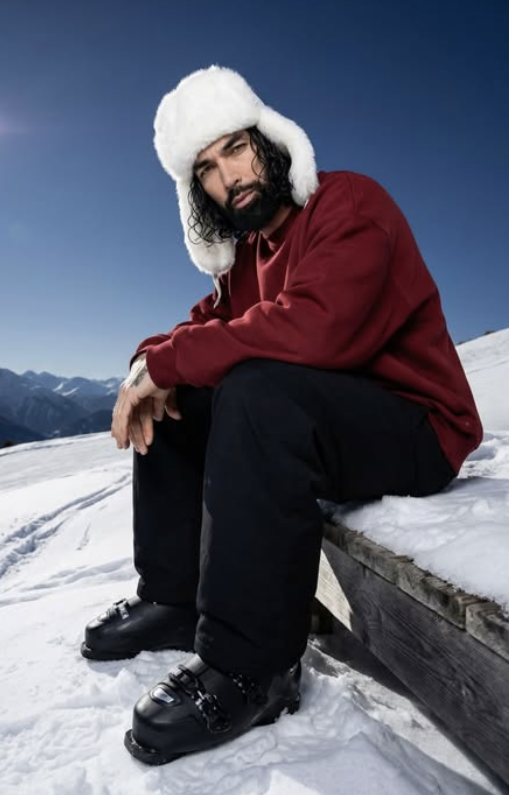
Men in Hat Winter AI Prompt: What Is This Style?
This winter photo edit is a creative portrait style that turns a simple photo into a cinematic, high-detail, premium outdoor look. It focuses on winter fashion, a snow environment, close-up realism, and building a strong overall mood. If you want a standout profile photo, an AI-style portrait, or a stylish winter poster, this look is genuinely useful.
Read Also: Cinematic Realistic Portrait AI Prompt | 2026 New Year AI Prompt
This style is best for anyone who wants a polished, dramatic, cold-weather aesthetic. The “Men in Hat Winter” edit usually uses a fur hat, oversized winter outfit, snow background, and sharp facial detail — giving an image that’s both natural and visually very premium.
The main goal isn’t just showing winter clothes — it’s building a mood across the whole frame. Snowy light, blue sky, clean mountain surroundings, and low-angle portrait composition combine for a cinematic feel, which is why this prompt style appeals to beginners and advanced editors alike.
What Visual Result This Prompt Gives
The output is usually an ultra-realistic portrait where skin detail, fabric texture, and snow environment all show clearly. A white faux-fur hat frames the face, a dark red sweatshirt adds warm contrast, and black pants plus ski boots give the image a grounded, rugged winter look — making the subject stand strong and stylish against the snow background.
Lighting is the most important part of this style. Bright daylight, soft natural shadows, and a clear sky give the subject a crisp, fresh, high-end look. Snow reflection adds a gentle brightness to the face, keeping the image from feeling harsh. Composition is carefully set too — a low camera angle, knees toward the camera, head slightly tilted — making the portrait feel more intimate and expressive.
The overall mood is clean, calm, cinematic. Distant mountains, an open snow slope, and a clutter-free background give the image a premium feel — especially good for a realistic winter fashion photo, an editorial portrait, or an AI-generated outdoor poster.
- Lighting: Bright natural daylight, soft contrast, snow reflection
- Colors: White snow, deep blue sky, dark red outfit, black boots
- Mood: Calm, cold, cinematic, premium, realistic
- Composition: Low-angle front view, centered subject, clean background
- Detail level: Sharp face, visible clothing texture, realistic hair and fabric
How to Use This Style on Mobile
This style isn’t as complicated as it looks. Select a suitable photo, then upload it into your editing app or AI image generator. On mobile, crop and align the image correctly so the final portrait’s angle and framing feel natural.
Follow the style settings or prompt guidance to apply winter elements — keep the hat, sweatshirt, pants, boots, and snowy background look consistent. If the app allows customization, keep the setting for preserving face details, hair texture, and pose ON, so the output doesn’t distort and the subject stays true to the original photo.
In the final step, carefully check the image preview — does the hat properly cover the face, is the snow background clean, does the subject’s posture look natural? If shadows are too dark or colors too flat, adjust light and contrast slightly. Even a simple mobile workflow can give good results with attention to framing and detail.
- Choose your best photo: a clear face with a visible expression.
- Upload the photo: to an editing app or AI tool.
- Apply the winter look: select the style with hat, outfit, and snowy scene.
- Check pose and angle: match the low-angle front view and seated composition.
- Keep the background clean: avoid clutter, crowds, and extra objects.
- Inspect the preview: check for hair, face, hand, and clothing distortion.
- Export the final image: save it in high quality and share.
Which Photos Work Best
The best photo for this winter edit has a clear face and an edit-friendly posture. Front-facing or slightly angled portraits work better, since the hat and winter outfit fit naturally. If the face is blurry or the light is weak, the final result won’t be as sharp.
Resolution matters too. A high-resolution image preserves facial detail, hair texture, and clothing folds better. A clean daylight photo or one with soft outdoor light is most useful, since it blends naturally with the winter theme. Very dark indoor photos make it harder to achieve the snow effect and winter mood.
The background should be simple — a busy wall, a crowd, indoor objects, or strong colors distract from the final winter composition. Plain, fitted clothing works better too, since the edit’s oversized sweatshirt and ski outfit effect looks stronger. If shoulders and upper body are clear in your original photo, the output looks even more realistic.
- Angle: Front view or slight side angle, face clearly visible
- Resolution: High-resolution photo, avoid blurry images
- Lighting: Natural daylight or soft outdoor light is best
- Background: Simple, clean, non-distracting background
- Clothing: Plain top, clear body outline, strong upper-body visibility
- Face quality: Sharp eyes, visible hair, no heavy motion blur
Pro Tips for the Best Results
Keep subject details clear and consistent for the most polished output. The strongest edits usually come from prompts that describe outfit, pose, background, and lighting in a simple, organized way. If your reference photo already has a strong face angle or hairstyle, mention that you want it preserved for a natural, realistic feel.
Think in layers: first define the character, then the environment, then the mood. A winter portrait works better when you specify the snow setting, clothing texture, and sky color together, rather than listing only one element.
- Keep face, hair, and body proportions consistent with the original image.
- Use clear clothing descriptions so the winter outfit looks intentional and styled.
- Mention the angle and pose to control how cinematic or natural the shot appears.
- Describe the background with simple location details like snow slope, mountains, or blue sky.
- Ask for clean surroundings for a minimal, distraction-free image.
- Use mood words like calm, premium, dramatic, or soft to guide the final atmosphere.
For winter fashion edits, balance is key — a warm hat, heavy layers, and snowy scenery should work together without feeling crowded.
Common Mistakes to Avoid
- Overloading the prompt with unnecessary style words, which reduces focus on the main subject.
- Changing the face or hairstyle too much when the goal is keeping the original identity intact.
- Forgetting background consistency — a winter outfit needs a matching snowy setting to look convincing.
- Using vague pose instructions, which often creates unnatural results.
- Mixing unrelated season cues, since summer elements can break the winter atmosphere.
- Ignoring clean composition, since clutter weakens the overall visual impact.
A better approach is defining the hero element first, then adding supporting details — keep face, hat, outfit, and snow background as the core priorities.
Best Use Cases
- Instagram posts: great for aesthetic winter portraits and fashionable visual updates.
- Profile pictures: useful when you want a clean, stylish, memorable avatar.
- Thumbnails: works well for content needing a strong human subject and clear mood.
- Portfolios: helpful for showcasing editing style, character design, or portrait concepts.
- Reel covers: ideal for grabbing attention with a bold, polished winter look.
Variations You Can Try
- Mood variations: calm, cinematic, moody, premium, bold, dreamy.
- Colour variations: deep red, black, white, muted grey, icy blue, warm brown.
- Setting variations: alpine slope, snowy deck, mountain backdrop, open snowfield, forest edge.
- Seasonal variations: early winter, heavy snowfall, clear frost, sunset snow, bright midday snow.
- Style variations: clean portrait, fashion editorial, outdoor adventure, social media aesthetic.
Conclusion: Try This Style for Your Next Winter Edit
If you want a clean, stylish, realistic winter portrait, this is a strong direction to follow. It works especially well when you combine a clear subject description, a believable snowy setting, and a simple cinematic pose.
FAQ: Men in Hat Winter
How do I use the "Men in Hat Winter" prompt?
Copy the prompt above, open Gemini or ChatGPT, upload a clear photo of yourself and paste the prompt. Generate the image and adjust the outfit or background if you want a variation.
Is this prompt free?
Yes. This prompt is free to copy and use for Instagram, reels, WhatsApp DP and profile pictures.
Which photo works best?
A sharp, front-facing, well-lit photo with no filter. A clear face helps the AI keep your identity in the final image.
Last updated: 8 October 2026
💬 Comments