← Back
Protest Crowd
Gemini 📅 30 Jun 👁 26

Protest Crowd

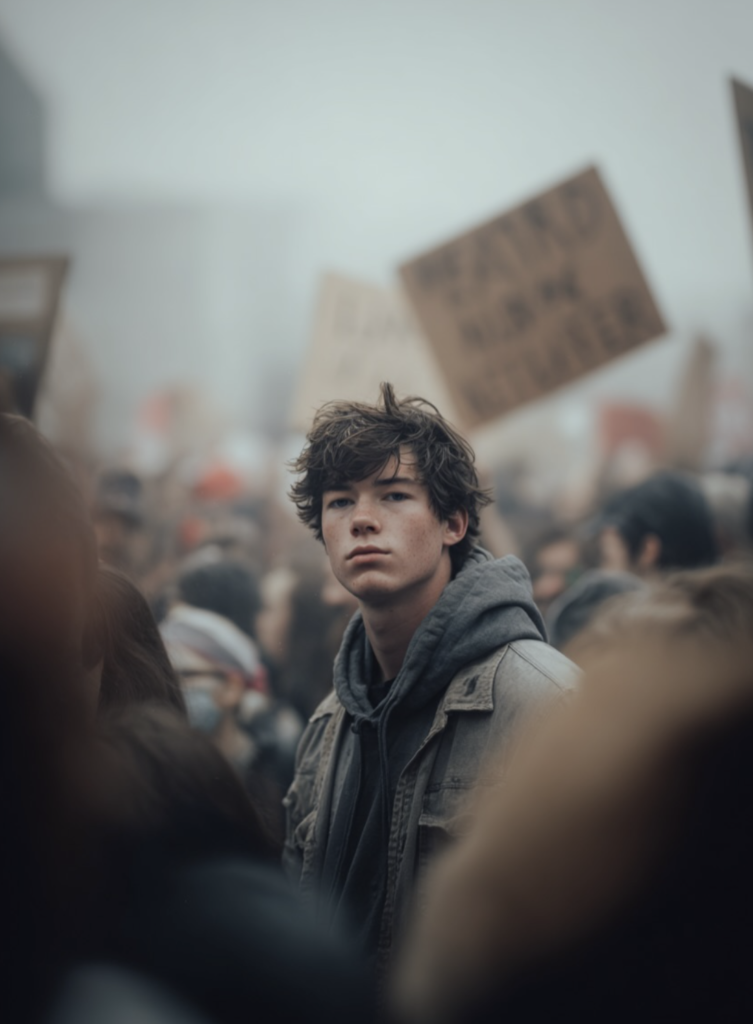
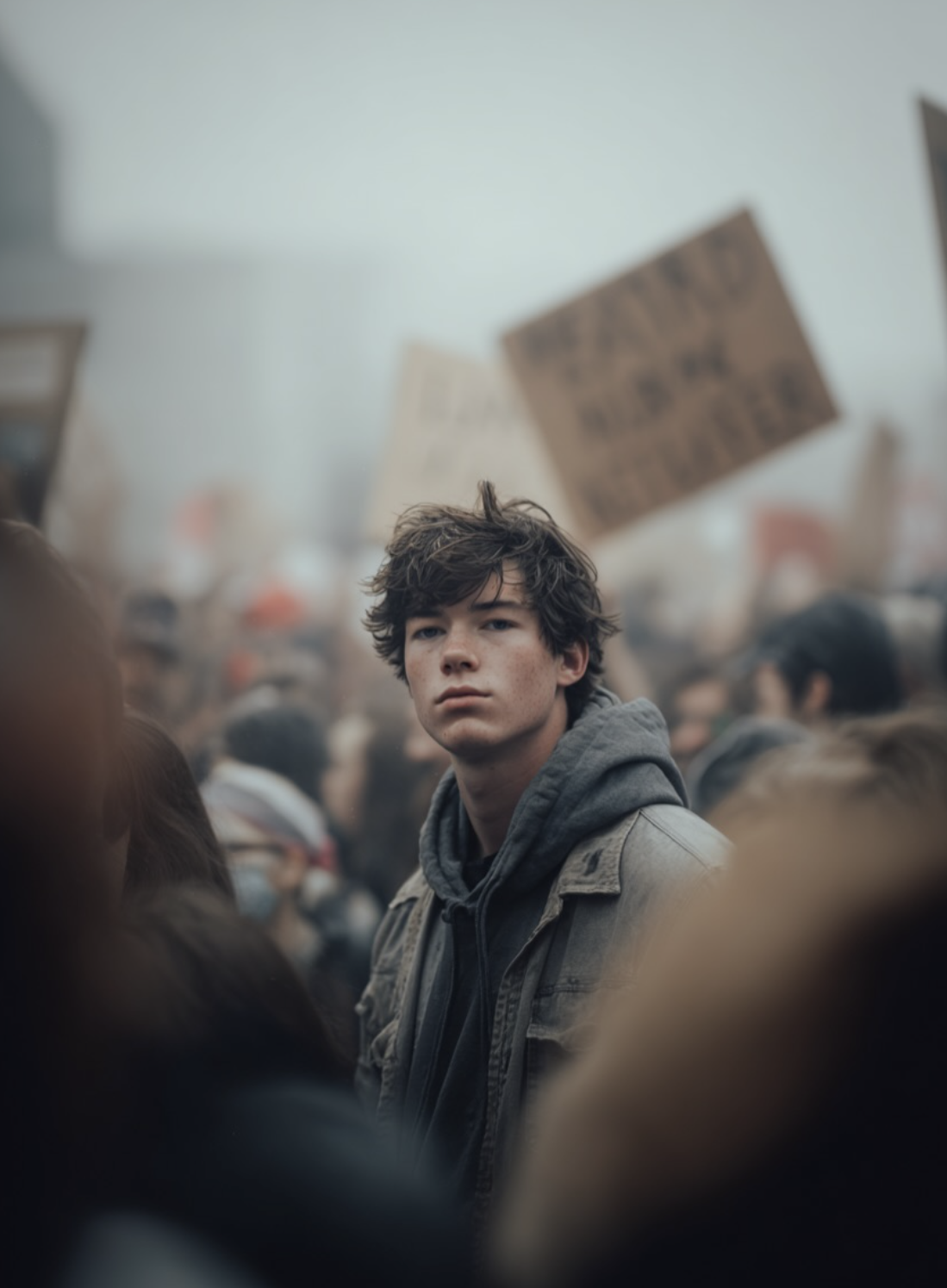
Shot on a Canon R6 with a 50mm at f/2.8, mid-profile framing, low shutter. Lighting: flat daylight with smoke haze. Color tone inspired by Children of Men muted greys, dirty whites. Subject: Gen-Z male holding a placard down by his side, face sharp, pores visible. Crowd: protesters chanting, waving signs blurred into abstract motion. Emotion: quiet conviction. Aesthetic: cinematic realism. Post: physical blur realism, no glitches. --ar 4:5 --raw. Keep my face 100% match as in the reference image
⬇ Save Image

Protest Crowd — Om Editing Top style ka ek cinematic, realistic look

Om Editing Top style me Protest Crowd prompt ka use un creators ke liye hota hai jo apni photo ko film-like protest scene me convert karna chahte hain, bina over-editing ke. Is style ka focus loud effects par nahi, balki realistic mood, controlled color tone, aur strong emotional presence par hota hai.

Read Also: cinematic-style realistic portrait | 2026 New Year

Agar aap Instagram, YouTube thumbnails, AI portrait edits, ya poster-style visuals banate ho, to ye kind of prompt aapko ek grounded, serious, aur visually powerful output de sakta hai. Isme crowd energy hoti hai, lekin subject clearly readable rehta hai, jisse image dramatic bhi lagti hai aur authentic bhi.

Is type ki editing un logon ke liye best hai jo cinematic protest photography, documentary-inspired portraits, aur realistic street atmosphere pasand karte hain. Yaani agar aapko aisa result chahiye jo “generated” kam aur “captured on camera” zyada लगे, to ye style kaafi useful hai.

Protest Crowd prompt photo style kya give karta hai?

Is prompt style ka sabse bada strength uska cinematic realism hai. Output me usually muted greys, dirty whites, aur soft contrast milta hai, jo image ko harsh color pop se bachata hai. Lighting flat daylight jaisi feel deti hai, isliye scene natural lagta hai, aur smoke haze ya atmospheric softness se depth create hoti hai.

Composition bhi kaafi intentional hoti hai. Subject mid-profile ya slightly side-facing position me hota hai, jisse face details sharp rehti hain aur background crowd motion blur ke saath alive feel hota hai. Yeh balance image ko emotional aur editorial dono banata hai.

Visual mood me quiet conviction jaisa tone aata hai. Matlab image noisy ya chaotic lagne ke bajay restrained, serious, aur reflective feel deti hai. Background me signs, chanting crowd, aur blurred movement protest energy show karte hain, lekin main subject par focus bana rehta hai.

How to use Protest Crowd prompt — beginner-friendly step-by-step guide

Agar aap mobile se AI editing kar rahe ho, to sabse pehle ek clear portrait choose karo. Best results ke liye aisi photo lo jisme face visible ho, angle too extreme na ho, aur subject ka expression natural ho. Agar image already dark, blurry, ya heavily filtered hai, to prompt ka output weak ho sakta hai.

Uske baad apne editor me image upload karo aur prompt box me original style instruction apply karo. Aapko bas apni photo ko reference ke taur par dena hai aur output me cinematic protest crowd feel chahiye. Mobile par edit karte waqt image ratio aur framing ka bhi dhyan rakho, kyunki mid-profile composition me subject ka face aur shoulders clearly dikhna chahiye.

Processing ke baad result ko zoom karke check karo. Agar face too soft lag raha ho ya crowd effect zyada overpower kar raha ho, to prompt strength ya stylization ko thoda balance karo. Beginners ke liye sabse achha approach hota hai simple base photo + strong but realistic prompt combination.

  1. Ek sharp aur clean portrait select karo.
  2. Image ko AI editor me upload karo.
  3. Prompt/style box me protest crowd cinematic direction apply karo.
  4. Aspect ratio ko vertical ya portrait-friendly rakho.
  5. Generate output aur face clarity check karo.
  6. Agar background too busy ho, to lesser stylization try karo.
  7. Final image ko save karke Instagram ya poster use ke liye export karo.

Kaun si photos is style ke liye best kaam karti hain?

Is style me wahi photos best perform karti hain jisme subject ka face clear ho aur composition already strong ho. Mid-profile ya slight side angle photos especially useful hoti hain, kyunki unme cinematic framing naturally build ho jati hai. Front-facing selfies bhi chal sakti hain, lekin unme protest scene ka documentary feel thoda kam ho sakta hai.

Resolution high honi chahiye, ideally aisi jisme pores, skin texture, aur natural detail preserve ho. Low-quality or heavy beauty-filtered images me realism kam ho jata hai. Lighting ke liye soft daylight ya overcast conditions best hoti hain, kyunki ye face ko evenly illuminate karte hain aur harsh shadows se bachate hain.

Background simple ho to prompt zyada effective lagta hai. Plain wall, street edge, ya minimal outdoor setting useful hoti hai, kyunki AI ko crowd environment add karne ke liye clean canvas milta hai. Clothing bhi simple aur real-world feel wali honi chahiye, jaise casual shirt, tee, ya jacket, taaki final output believable rahe.

Om Editing Top me is look ko aur strong kaise banayein

Agar aap Om Editing Top workflow use kar rahe ho, to hamesha subject clarity ko first priority do. Protest crowd style me image ka impact tabhi aata hai jab face aur mood dono balanced ho. Bahut zyada dramatic filters lagaoge to realism toot sakta hai, isliye clean, controlled editing better hoti hai.

Color tone ko muted rakhna is style ki sabse important cheezon me se ek hai. Bright reds, neon tones, ya over-saturated backgrounds se image ka documentary feel kam ho jata hai. Instead, soft greys, dusty whites, aur subtle contrast se scene zyada serious aur cinematic dikhega.

Ye style especially un users ke liye powerful hai jo social commentary, poster art, ya realistic protest-themed portrait edits banana chahte hain. Sahi source photo aur disciplined composition ke saath, output kaafi professional aur high-end lag sakta hai.

Pro Tips for the Best Results with This Style

अगर आप Om Editing Top style में protest crowd image को ज्यादा cinematic और realistic बनाना चाहते हैं, तो सबसे पहले composition पर ध्यान दें। Mid-profile framing, sharp face detail, और background crowd motion blur का balance सही होना चाहिए, ताकि subject अलग भी दिखे और scene का energy भी बना रहे। इसी वजह से simple framing के बजाय intentional framing ज्यादा अच्छा output देता है।

Lighting भी बहुत बड़ा role play करती है। Flat daylight, smoke haze, और muted color tone मिलकर उस grounded documentary feel को मजबूत करते हैं, जो protest scene को believable बनाती है। अगर face details clear रहें और crowd blur naturally feel हो, तो image visually powerful लगती है और social-poster style quality भी बढ़ जाती है।

Common Mistakes to Avoid in These Images

एक common mistake है image को too polished बना देना. Protest crowd scenes का power उनकी rawness में होता है, इसलिए over-sharpening, neon colors, या unreal contrast output को artificial बना सकते हैं। अगर skin texture, pores, और natural daylight को preserve नहीं किया गया, तो final image documentary feel lose कर देती है।

दूसरी गलती है crowd blur को completely ignore करना या बहुत aggressive blur दे देना. Motion blur का purpose background energy दिखाना है, subject को hide करना नहीं। इसी तरह, too much clutter in the placards, faces, or signs image को noisy बना सकता है और focal point कमजोर पड़ जाता है।

Best Use Cases for This Style Protest Crowd Images

Om Editing Top style protest crowd visuals कई तरह के creative और editorial use cases में बहुत अच्छे लगते हैं। ये images Instagram posts, awareness campaigns, and documentary-inspired content के लिए powerful visual hook बन सकती हैं। Quiet conviction वाला look खासकर ऐसे designs में अच्छा काम करता है जहाँ emotion को loud expression के बजाय subtle presence से दिखाना हो।

अगर आप portfolio बनाते हैं, तो इस type की image cinematic storytelling demonstrate करने में मदद करती है। यह reels covers, blog headers, poster concepts, or profile visuals में भी strong impression छोड़ सकती है। Background crowd की abstract movement और subject की sharp face clarity मिलकर image को high-impact बनाते हैं।

Variations You Can Try with This Style

अगर आप Om Editing Top look को experiment करना चाहते हैं, तो mood और environment बदलकर बहुत अलग results पा सकते हैं। उदाहरण के लिए, same protest crowd setup को dawn light में रखा जाए तो scene softer और more reflective लगेगा। वहीं overcast sky या dust-filled atmosphere use करने पर image ज्यादा heavy और urgent महसूस हो सकती है।

Colour variations भी काफी effective होती हैं। Muted greys के साथ blue undertones scene को colder बना सकते हैं, जबकि warm sepia hints इसे archival documentary feel दे सकते हैं। Seasonal changes जैसे winter haze, monsoon drizzle, या dry summer dust भी story को अलग emotional angle देते हैं, जिससे same concept multiple versions में useful बन जाता है।

Conclusion: Try This Style for a Strong Protest Crowd Look

this style is a strong style for anyone who wants protest crowd images that feel cinematic, realistic, and emotionally grounded. The mix of sharp subject detail, blurred moving crowd, muted tones, and natural-looking atmosphere creates a visual story that feels both powerful and believable.

If you want to make your next edit look more editorial and impactful, try experimenting with this prompt variations and keep the focus on expression, light, and motion. With the right balance, the final image can deliver a quiet but unforgettable message.

💬 Comments