Reality Meets Doodle
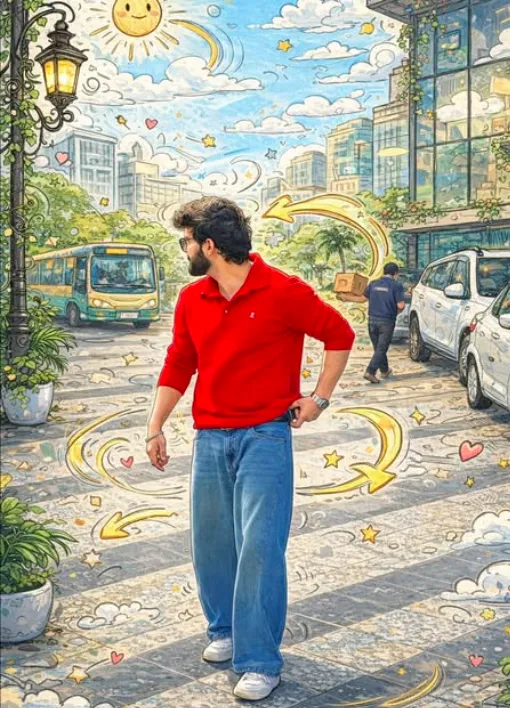
Om Editing Top के साथ Reality Meets Doodle स्टाइल क्या है?
Om Editing Top का यह Reality Meets Doodle स्टाइल उन लोगों के लिए है जो अपनी फोटो को एक normal snapshot से हटाकर playful, artistic और eye-catching look देना चाहते हैं। इसमें real subject को natural रखा जाता है, जबकि आसपास का पूरा scene doodle, cartoon sketch और colorful illustration जैसा feel देता है। यही mix इसे खास बनाता है—real life और hand-drawn creativity का perfect combination.
Read Also: cinematic-style realistic portrait | 2026 New Year
यह style खासकर उन users के लिए useful है जो Instagram, WhatsApp DP, reels thumbnails, posters, fan edits, या creative photo posts बनाते हैं। अगर आप चाहते हैं कि आपकी photo देखते ही लगे कि इसमें imagination, fun और modern art का touch है, तो Om Editing Top वाला यह prompt-style effect बहुत काम आता है। Beginner भी इसे आसानी से use कर सकता है, क्योंकि इसका result direct, striking और visually rich होता है.
असल में यह सिर्फ photo editing नहीं, बल्कि scene transformation है। Background, buildings, sky, roads, lights और surroundings को doodle art में बदला जाता है, जबकि subject realistic रहता है। इसी वजह से फोटो में depth भी रहती है और creative storytelling भी बनती है.
यह Doodle Photo Style आपको क्या देता है?
Reality Meets Doodle edit का सबसे बड़ा फायदा है कि यह image को immediately unique बना देता है। Normal city scene हो या outdoor portrait, इसमें आसपास की चीजें cartoon outlines, bright fills और sketch details में बदल जाती हैं। इससे photo ज्यादा energetic, fun और artistic लगती है।
Lighting आमतौर पर natural और balanced feel देती है, ताकि real subject अलग से pop करे। Background में bright colors, playful shapes, clouds, stars, arrows, panels और decorative line work image को lively बनाते हैं। Composition में subject centered रह सकता है या slightly off-center भी, ताकि surrounding doodles और scene details अच्छे से दिखें।
इस style की खास बात realism को बनाए रखना है। Subject की face detail, body structure, pose और natural look intact रहती है, लेकिन बाकी world hand-drawn world में बदल जाता है। इस कारण यह edit “overdone” नहीं लगता, बल्कि creative mixed-media artwork जैसा दिखता है.
- Real subject with untouched facial and body realism
- Buildings, windows, plants, sky, lamps और ground पर cartoon sketch effect
- Bright, colorful fills with playful doodle accents
- Swirling arrows, hearts, stars, clouds और decorative background elements
- Mixed-media look that feels modern, fun, and social-media friendly
This Style में इसे कैसे use करें: beginner-friendly step by step
अगर आप mobile पर editing कर रहे हैं, तो सबसे पहले एक ऐसी photo चुनें जिसमें subject clear हो और background ज्यादा cluttered न हो। फिर editing app या AI image tool में अपनी photo upload करें। Om Editing Top style usually तब best काम करता है जब scene में buildings, street, lamps, plants या open background details हों, क्योंकि इन्हें doodle art में बदलना visually strong result देता है।
इसके बाद prompt या style settings में mixed-media, cartoon overlay, doodle background, colorful sketch effect जैसे concepts apply करें। अगर app layers या masking support करती है, तो subject को अलग रखें ताकि वह realistic बना रहे। Background elements को transform करने की कोशिश करें—यही इस style की core strength है।
जब first result आए, तो image को zoom करके check करें कि outlines साफ हैं या नहीं, colors too harsh तो नहीं लग रहे, और subject पर unwanted sketch effect तो नहीं आ रहा। जरूरत हो तो brightness, contrast और saturation हल्के adjust करें। इससे final image ज्यादा polished लगेगी.
- अपनी सबसे clear outdoor photo चुनें.
- Image upload करके style/effect section खोलें.
- Mixed-media, doodle, cartoon overlay या hand-drawn scene effect apply करें.
- Subject को realistic रखने के लिए face/body protection या masking use करें.
- Background में buildings, sky, lamps, plants और ground elements को transform करें.
- Color balance check करें और जरूरत हो तो light corrections करें.
- Final image export करने से पहले zoom करके edges और details verify करें.
कौन-सी photos इस style के लिए सबसे अच्छी रहती हैं?
Om Editing Top का यह prompt-style effect उन photos पर सबसे अच्छा काम करता है जिनमें background से subject अलग दिखता हो। Outdoor portrait, street pose, travel photo, campus shot, urban scene या park photo इस style में बहुत अच्छे लगते हैं। जितना साफ subject होगा, उतना ही mixed-media effect polished दिखेगा।
Angle की बात करें तो eye-level या थोड़ा low-angle shot अच्छा रहता है, क्योंकि इससे subject strong लगता है और surrounding doodles को जगह मिलती है। Resolution कम से कम clear और sharp होनी चाहिए, ताकि sketch lines और colorful fills pixelated न दिखें। Lighting natural daylight या soft evening light में बेहतर रहती है, क्योंकि harsh shadows doodle effect को uneven बना सकती हैं।
Background practical होना चाहिए—जैसे street, building wall, park path, lamp post, open sky, railing या garden area। Clothing में solid colors, simple patterns या neat contrast बेहतर काम करते हैं, क्योंकि इससे subject background के colorful doodles से अलग दिखता है। अगर कपड़े बहुत busy pattern वाले होंगे, तो final edit थोड़ा cluttered लग सकता है.
- Outdoor portraits with clear separation from the background
- Street, campus, park, or travel photos with visible scene elements
- Sharp resolution and well-lit images
- Natural daylight, golden hour, or soft evening lighting
- Simple clothing colors that stand out against colorful doodles
- Photos with buildings, lamps, plants, sky, or open space in frame
This Style के लिए Pro Tips: Best Results कैसे लें
अगर आप this style style में mixed-media look चाहते हैं, तो सबसे पहले composition पर ध्यान दें। जब realistic subject और doodle overlay साथ आते हैं, तो balance बहुत important होता है। Scene का main focus साफ रहना चाहिए, जबकि background में cartoon sketch details extra energy जोड़ें।
इस तरह की editing में सबसे अच्छे results तब आते हैं जब आप subject को clean रखते हैं और surrounding elements को thoughtfully design करते हैं। Bright fills, outlined sketches, playful arrows, और decorative doodles तब ज्यादा अच्छा काम करते हैं जब पूरे frame में visual hierarchy clear हो।
- Subject को untouched और sharp रखें, ताकि reality vs doodle contrast strong लगे।
- Buildings, lamps, plants और ground पर outlined cartoon detailing add करें, लेकिन clutter ज्यादा न करें।
- Sky elements जैसे clouds, stars और swirls को light and airy रखें, ताकि image crowded न लगे।
- Background doodles में repeated shapes का use करें, जिससे style consistent दिखे।
- Color palette में bright but coordinated shades रखें, ताकि mixed-media effect polished लगे।
- Vines, panels, hearts, और sketch lines को edges और corners में spread करें, center को clean छोड़ें।
अगर आप social media post, creative portfolio, या reel cover के लिए image बना रहे हैं, तो readability बहुत जरूरी है। Text overlay लगाने की planning पहले से करें, ताकि doodle elements आपकी composition को overpower न करें। यही छोटी-छोटी बातें this prompt result को amateur look से professional look में बदल देती हैं।
Common Mistakes to Avoid in This Style
Mixed-media illustration बनाते समय सबसे common mistake होती है over-editing। जब हर corner में equally heavy doodles भर दिए जाते हैं, तो subject lose हो जाता है और image messy लगने लगती है। इस style का charm ही यही है कि realistic core के ऊपर cartoon energy आए, लेकिन whole frame chaotic न लगे।
दूसरी mistake है color imbalance। अगर bright fills बहुत harsh हों या contrast बहुत ज्यादा हो जाए, तो scene natural flow खो देता है। Similarly, अगर outlines बहुत weak हों, तो doodle effect subtle पड़ जाएगा और mixed-media identity clear नहीं दिखेगी।
- बहुत ज्यादा doodles डालना: इससे subject दब जाता है और image crowded दिखती है।
- Outline consistency miss करना: अलग-अलग thickness होने से visual style टूट जाता है।
- Background और foreground को same weight देना: इससे depth कम हो जाती है।
- Unmatched colors use करना: Random colors image को noisy और unprofessional बना सकते हैं।
- Subject पर doodle overlay करना: अगर main subject disturb हुआ, तो realism का effect खत्म हो जाएगा।
- Empty spaces ignore करना: Negative space न छोड़ने से image breathe नहीं कर पाती।
एक और important point है theme consistency। अगर city scene है, तो doodles को urban feel के हिसाब से shape देना बेहतर रहता है—जैसे arrows, panels, clouds, vines, stars, और sketchy motion lines। यही consistency this look editing को visually believable और artistically appealing बनाती है।
Best Use Cases: These Images कहाँ Use करें
yeh style style images बहुत versatile होती हैं, खासकर तब जब आप eye-catching content create करना चाहते हैं। Realistic subject और doodle illustration का mix Instagram posts, story covers, profile visuals, और creative showcases में तुरंत attention grab करता है।
इस ��रह की mixed-media art branding content के लिए भी useful है। अगर आप designer, creator, editor, या artist हैं, तो यह style आपके portfolio को unique identity दे सकती है। It feels playful, modern, and highly shareable—जो आज के visual-first platforms पर बहुत valuable है।
- Instagram posts: Creative feed aesthetics और bold visual storytelling के लिए।
- Profile pictures: Artistic identity highlight करने के लिए stylized edits।
- Thumbnails: High-contrast, fun, and clickable YouTube or short-form video covers।
- Portfolios: Mixed-media editing skills को showcase करने के लिए।
- Reels covers: Fast-scroll audience का attention पकड़ने के लिए।
- Creative banners: Blogs, channels, or pages में a unique visual theme set करने के लिए।
अगर आपका aim engagement बढ़ाना है, तो इस style को seasonal posts, quote cards, event promotions, या artistic announcements में भी use किया जा सकता है। this edit look खासतौर पर तब अच्छा लगता है जब आप modern digital art और hand-drawn energy दोनों को एक साथ present करना चाहते हैं।
Variations You Can Try with This Style
इस style की सबसे अच्छी बात यह है कि आप mood, color, और setting बदलकर हर बार नया result पा सकते हैं। Same basic idea को different seasons, different lighting, और different doodle density के साथ experiment किया जा सकता है। इससे आपकी edits repetitive नहीं लगतीं और हर version fresh महसूस होता है।
आप city scene को cheerful, dreamy, edgy, या poster-like look दे सकते हैं। कुछ variations में cartoon clouds और stars ज्यादा prominent रखें, जबकि कुछ में vines, arrows, और sketch lines को subtle रखें। इस तरह this style concept हर project में अलग personality ले आता है।
- Bright summer look: Yellow, cyan, pink, and fresh green fills के साथ energetic vibe।
- Night city mood: Dark blue background, neon doodles, and glowing outlines।
- Soft pastel version: Light peach, lavender, mint, and baby blue for a calm aesthetic।
- Autumn theme: Warm orange, brown, and golden accents with leaf-like doodles।
- Rainy-day style: Cloud sketches, motion lines, and cool-toned fills for a cinematic feel।
- Playful comic version: Strong outlines, bigger hearts, bold panels, and more exaggerated doodles।
आप setting को भी बदल सकते हैं—street view, campus corner, rooftop, park, or downtown scene. हर environment में doodle placement अलग तरह से काम करेगी। कभी lamps और buildings पर focus करें, कभी plants और sky elements पर, ताकि final edit balanced yet inventive लगे। यही experimentation this prompt images को repeatable trend से creative signature बनाता है।
Conclusion: This Style को Try करें
अगर आप realistic photography को fun, artistic, and eye-catching mixed-media look में बदलना चाहते हैं, तो this look एक शानदार direction है। इसमें subject natural रहता है, जबकि आसपास का scene hand-drawn cartoon energy से भर जाता है। Result ऐसा लगता है जैसे reality और doodle art एक ही frame में organically मिल गए हों।
Best part यह है कि आप इस style को अपने mood, platform, और audience के हिसाब से customize कर सकते हैं। चाहे Instagram post हो, profile visual हो, thumbnail हो, या portfolio piece—yeh style आपको creative and professional output देने में मदद कर सकता है। अब इसे अलग-अलग colors, settings, और doodle combinations के साथ try करें और अपना unique version बनाएं।
FAQ: Reality Meets Doodle
How do I use the "Reality Meets Doodle" prompt?
Copy the prompt above, open Gemini or ChatGPT, upload a clear photo of yourself and paste the prompt. Generate the image and adjust the outfit or background if you want a variation.
Is this prompt free?
Yes. This prompt is free to copy and use for Instagram, reels, WhatsApp DP and profile pictures.
Which photo works best?
A sharp, front-facing, well-lit photo with no filter. A clear face helps the AI keep your identity in the final image.
Last updated: 8 October 2026

💬 Comments