yellow colorfull holi
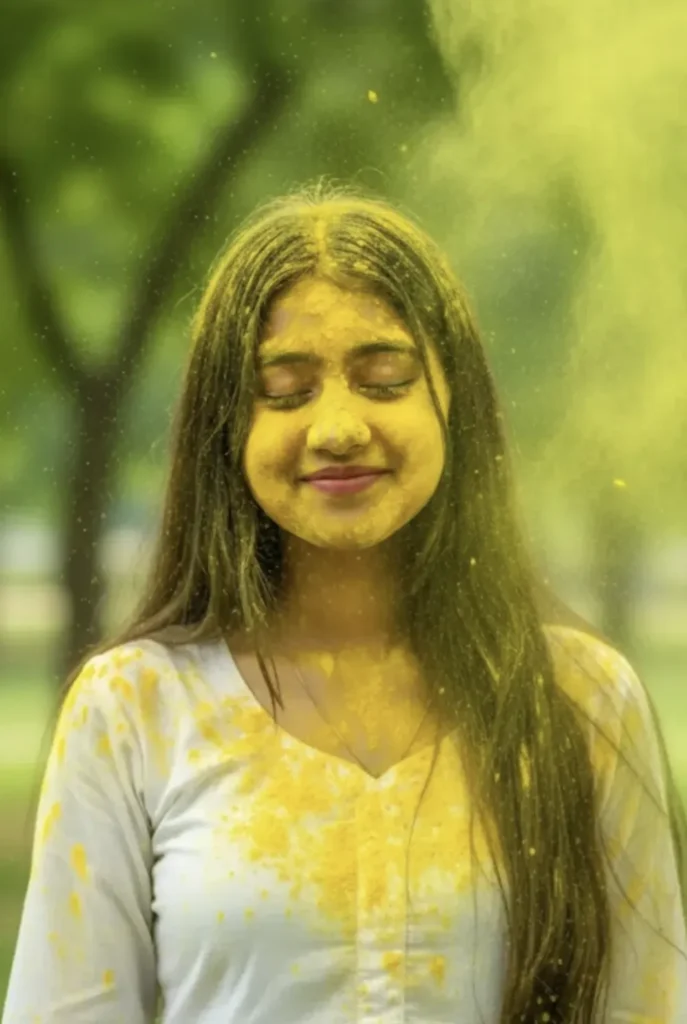
Om Editing Top के साथ Yellow Colorfull Holi Portrait का आइडिया क्या है?
Om Editing Top style में बनाया गया Yellow Colorfull Holi portrait उन लोगों के लिए होता है जो अपनी फोटो को festive, vibrant और ultra-realistic look देना चाहते हैं। यह खासतौर पर Holi season, social media profile, poster-style edits और creative photo transformation के लिए use किया जाता है, जहाँ natural face details के साथ colorful gulal effect जोड़कर image को eye-catching बनाया जाता है।
Read Also: cinematic-style realistic portrait | 2026 New Year
इस तरह का edit simple filter नहीं होता, बल्कि एक detailed photo style होता है जिसमें subject की real face identity बनी रहती है और background, lighting, colors aur mood को cinematic festive feel दी जाती है। जो लोग mobile se photo editing karte hain, AI image prompts use karte hain, या अपने uploaded photo ko creative Holi look देना चाहते हैं, उनके लिए यह style बहुत useful है।
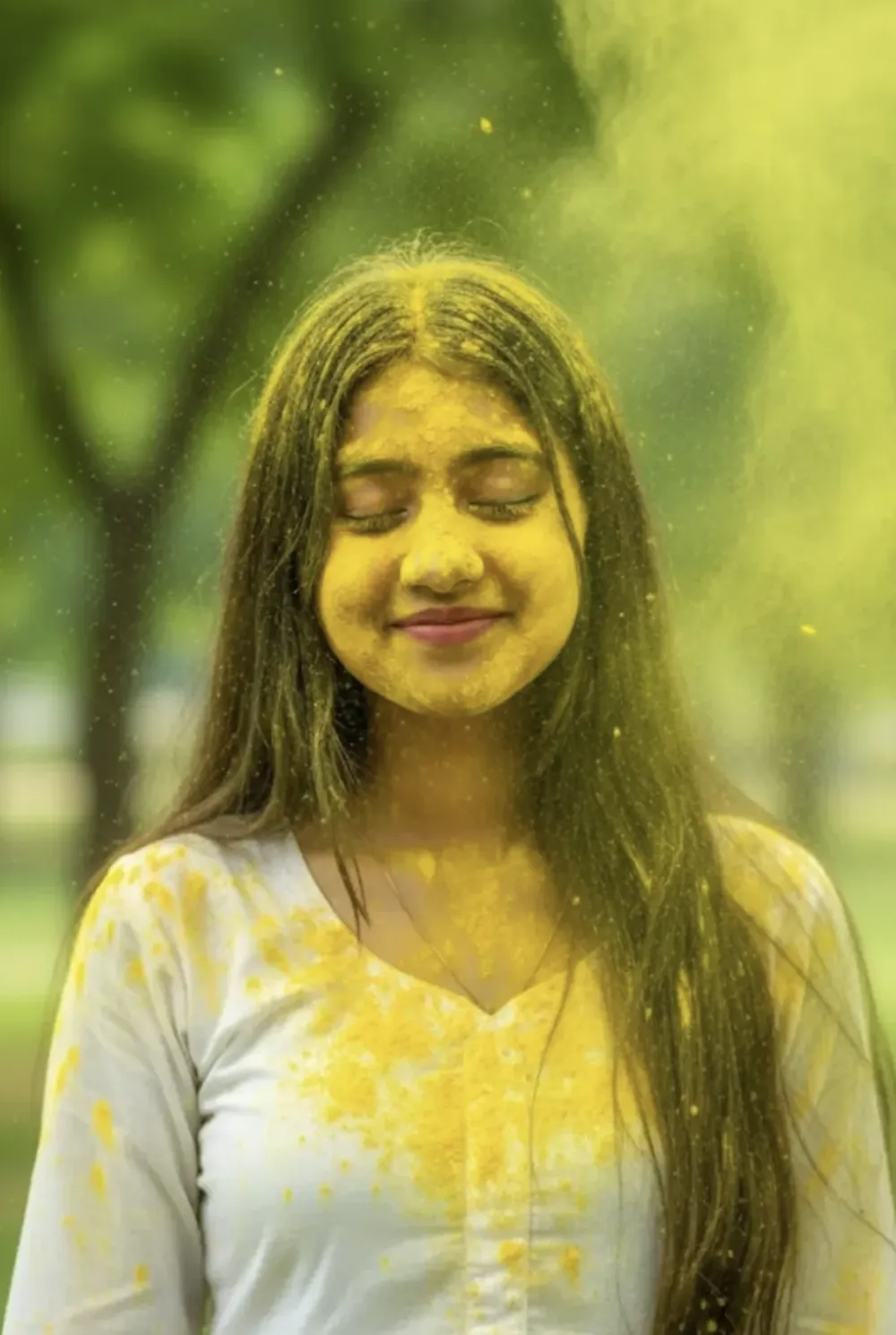
Yellow gulal, soft daylight, green park background और candid smile जैसी चीज़ें मिलकर फोटो को energetic, cheerful और natural बनाती हैं। अगर आप चाहते हैं कि आपकी image festival vibes के साथ professional-looking लगे, तो यह style beginner aur advanced दोनों के लिए practical है।
यह Yellow Holi Photo Style क्या खास देता है?
इस photo style का सबसे बड़ा फायदा इसका realistic festive appearance है। इसमें colors बहुत bright होते हैं, लेकिन overexposed नहीं लगते। Yellow gulal powder face, hair aur outfit पर naturally spread होता दिखता है, जिससे image में movement और celebration का strong feel आता है।
Lighting आमतौर पर soft natural daylight जैसी रहती है, इसलिए skin tones clean दिखते हैं और overall frame balanced लगता है। Background में lush green blur होने से subject clearly focus में रहता है, जबकि colorful powder foreground में drama add करता है। यही combination इसे social media-ready और visually rich बनाता है।
Composition की बात करें तो यह style close-to-medium portrait framing में सबसे अच्छा लगता है। Face का expression casual और joyful रहता है, eyes naturally open रहती हैं, और head थोड़ा tilt होने से picture ज्यादा candid और organic लगती है। इससे photo “posed” कम और “real moment” ज्यादा लगती है।
- Bright festive mood: Holi celebration ka lively feel
- Natural realism: Face features aur smile unchanged rehte hain
- Strong color contrast: Yellow gulal aur green background ka attractive combination
- Social media appeal: Profile, reel cover, ya festival post ke liye perfect
- Cinematic look: Clean subject separation aur soft daylight effect
This Style Prompt/Style Ko Mobile Par Kaise Use Karein?
Agar aap beginner hain, to is style ko use karne ka process simple rakhna best hota hai. Sabse pehle ek clear photo choose karein, phir us photo ko editing tool ya AI-based editor me upload karein. Mobile par kaam karte waqt internet stable hona chahiye, kyunki high-quality portrait processing me thoda time lag sakta hai।
Uske baad style ya prompt-based edit select karein jahan festive Holi portrait effect apply hota ho. Agar tool me color intensity, face reference, background blur ya lighting adjustments milte hain, to unko balanced rakhein. Goal ye hona chahiye ki face natural rahe aur holi colors sirf enhance karein, overpower na karein।
Final output save karne se pehle image ko zoom karke check karein. Face alignment, gulal placement, hair details aur clothing texture ko dekhein. Agar colors bahut harsh lag rahe hon, to slightly softer version try karein. Agar photo social media ke liye use karni ho, to square ya portrait crop best rehta hai।
- Apni best clear photo select karein.
- Photo ko mobile editor ya AI tool me upload karein.
- Holi/festive portrait style choose karein.
- Face reference aur realism settings ko on rakhein.
- Yellow gulal, daylight aur background blur jaise effects apply karein.
- Preview check karke output ko save karein.
- Low quality screenshot ki jagah original photo use karein
- One-face front or slight side angle zyada achha result deta hai
- Background simple ho to subject aur strong dikhta hai
- Editing se pehle face par shadow ya blur kam rakhein
- Natural smile wali photo festive look ko aur better banati hai
Kaunsi Photos Is Style Ke Liye Sabse Best Hoti Hain?
Yellow colorfull Holi edit ke liye aisi photo best hoti hai jisme face clearly visible ho aur head completely cut na hua ho। Slightly angled ya front-facing portrait is style me sabse achha perform karta hai, kyunki gulal effect face par natural tareeke se place ho pata hai aur expression bhi readable rehta hai।
Resolution high hona chahiye, ideally sharp portrait photo jisme eyes, hair aur skin details clear ho. Dark ya noisy photo se result weak ho sakta hai. Soft daylight, outdoor light ya evenly lit image is look ke लिए perfect hoti है, kyunki harsh shadow se festive realism kam ho sakta hai. Clothing ka simple white traditional outfit ya light-colored dress Holi colors ko aur zyada pop karne me help karta hai।
Background bhi important role play karta hai. Busy ya cluttered background ki jagah blurred park, open garden, ya plain outdoor setting better hoti hai. Isse focus face aur gulal effect par rehta hai. Agar original photo me already natural smile aur relaxed posture ho, to final edit aur bhi authentic aur attractive dikhega।
- Angle: Front ya slight side angle best hota hai
- Resolution: Clear, high-quality portrait photo use karein
- Lighting: Soft daylight ya even outdoor light
- Background: Simple, blurred, aur green/open setting
- Clothing: White ya light traditional outfit zyada effective hota hai
- Expression: Natural smile aur relaxed look sabse achha result deta hai
Om Editing Top के साथ Pro Tips for Best Results
अगर आप yellow colorfull holi theme में एक clean और eye-catching output चाहते हैं, तो सबसे पहले image reference को clear रखना बहुत जरूरी है। Om Editing Top style में सबसे अच्छा result तब आता है जब face details, pose, और expression natural रहें, ताकि final edit artificial न लगे।
Holi portrait में vibrancy, skin tone balance, और background harmony तीनों का सही combination होना चाहिए। खासकर जब yellow gulal use हो रहा हो, तो color placement ऐसा होना चाहिए कि photo energetic लगे, लेकिन face features ढकें नहीं। यही balance आपकी Holi edit को professional look देता है।
- High-quality face photo चुनें जिसमें light अच्छी हो और face clearly visible हो।
- Natural smile और soft expression वाली photo use करें, ताकि festive vibe बेहतर आए।
- Outfit simple रखें, क्योंकि plain clothing पर Holi colors ज्यादा attractive दिखते हैं।
- Background को clean और outdoor feel वाला रखें, जैसे park या garden setting।
- Yellow gulal को frame में evenly distribute करें ताकि composition balanced लगे।
- Hair, shoulders, and dress पर color gently spread हो तो result ज्यादा realistic दिखता है।
अगर आप Om Editing Top editing idea को repeat करने की सोच रहे हैं, तो lighting consistency और subject clarity पर ध्यान दें। इससे आपका portrait social media-ready लगता है और festival post के लिए तुरंत usable बन जाता है।
Common Mistakes to Avoid in This Style Holi Edits
बहुत से लोग Holi edit बनाते समय गलती से subject details को over-edit कर देते हैं। जब face texture, smile, या hair shape बहुत ज्यादा बदल जाता है, तो image real portrait की बजाय generated artwork जैसी लगने लगती है। Om Editing Top style का goal यही है कि identity preserved रहे और festive effect naturally add हो।
दूसरी common mistake color overload है। Yellow gulal बहुत सुंदर लगता है, लेकिन अगर हर जगह same intensity हो तो output flat या messy दिख सकता है। Best result तब आता है जब कुछ areas brighter हों और कुछ areas soft रहें, ताकि depth और realism बना रहे।
- Face reference blurry न रखें, वरना facial details lost हो जाती हैं।
- Too many colors add करने से yellow Holi theme कमजोर पड़ सकती है।
- Heavy shadows या harsh contrast image को unnatural बना सकते हैं।
- Background में unnecessary objects होने से focus face से हट जाता है।
- Outfit pattern बहुत busy हो तो gulal effect properly visible नहीं रहता।
- Expression बदलने की कोशिश से candid festival feel कम हो सकती है।
इन mistakes से बचकर आप अपनी this style image को ज्यादा polished, clean, और believable बना सकते हैं। यही चीज़ Holi-themed portraits को ordinary edit से अलग बनाती है।
Best Use Cases for This Style Yellow Holi Images
This prompt style की yellow colorfull Holi images कई जगह use की जा सकती हैं, खासकर जब आपको festive content quickly share करना हो। Instagram posts, profile pictures, और story updates में ये images बहुत strong visual impact देती हैं। Bright yellow tone तुरंत attention grab करती है और Holi celebration को lively तरीके से represent करती है।
Content creators के लिए ये edits reels covers और thumbnail graphics में भी useful होती हैं। अगर आपका theme festival, lifestyle, or photo edit content है, तो ऐसी image audience को instantly बता देती है कि post किस vibe की है। Personal branding के लिए भी यह style अच्छा काम करता है, क्योंकि इसमें portrait natural भी रहता है और stylish भी।
- Instagram post: festive feed design और Holi greeting posts के लिए
- Profile picture: bright and cheerful seasonal identity के लिए
- Reels cover: colorful, scroll-stopping cover image के लिए
- Thumbnail: Holi tutorial, editing, या celebration content के लिए
- Portfolio: photo editing samples और creative showcase के लिए
- Story status: quick festival share और personal updates के लिए
अगर आप this look को social media strategy के साथ use करते हैं, तो एक single portrait कई formats में काम आ सकता है। यही वजह है कि Holi edits सिर्फ decorative नहीं, बल्कि practical content asset भी बन जाती हैं।
Variations You Can Try with This Style
एक ही Holi concept को कई अलग-अलग moods में try किया जा सकता है, और यही creative flexibility yeh style edits को interesting बनाती है। आप color intensity, background style, और light direction बदलकर हर बार नया look पा सकते हैं। इससे आपका content repetitive नहीं लगता और audience को variety मिलती है।
Yellow गुलाल को different seasons और settings के साथ mix करना भी एक अच्छा idea है। कभी soft morning daylight use करें, कभी late afternoon warmth, और कभी cool green park background के साथ contrast बनाएं। इससे same portrait concept अलग-अलग emotional tone में सामने आता है।
- Soft festive mood: हल्का yellow powder और gentle smile के साथ
- High-energy look: stronger gulal splash और bold festive colors के साथ
- Natural outdoor style: garden, park, या open field background के साथ
- Minimal clean edit: कम color, ज्यादा face focus, classy look के लिए
- Bright sunshine version: warm daylight और golden-yellow tone के साथ
- Seasonal experiment: spring-inspired greenery या festive haze effect के साथ
आप अलग-अलग accessories, hair movement, और dress brightness के साथ भी experiment कर सकते हैं। this edit concept में छोटे changes भी final result को काफी अलग बना सकते हैं, इसलिए multiple versions try करना हमेशा useful रहता है।
Conclusion: This Style Holi Look Try Karna Mat Bhooliye
अगर आप एक vibrant, realistic, और festival-ready portrait चाहते हैं, तो this style style का yellow colorfull Holi look बहुत अच्छा option है। इसमें natural face details, joyful expression, और bright gulal effect मिलकर image को खास बना देते हैं।
चाहे आप इसे Instagram के लिए use करें, profile picture के लिए, या creative portfolio के लिए, यह style हमेशा fresh और attractive दिखती है। अब आप अलग-अलग moods, backgrounds, और color variations try करके अपने लिए best Holi edit बना सकते हैं।
This prompt के साथ experiment करें और अपने Holi portrait को ऐसा festive look दें जो देखने में energetic, clean, और यादगार लगे।
FAQ: yellow colorfull holi
How do I use the "yellow colorfull holi" prompt?
Copy the prompt above, open Gemini or ChatGPT, upload a clear photo of yourself and paste the prompt. Generate the image and adjust the outfit or background if you want a variation.
Is this prompt free?
Yes. This prompt is free to copy and use for Instagram, reels, WhatsApp DP and profile pictures.
Which photo works best?
A sharp, front-facing, well-lit photo with no filter. A clear face helps the AI keep your identity in the final image.
Last updated: 17 August 2026
💬 Comments