Snow Winter
Om Editing Top: Snow Winter Style Ka Intro
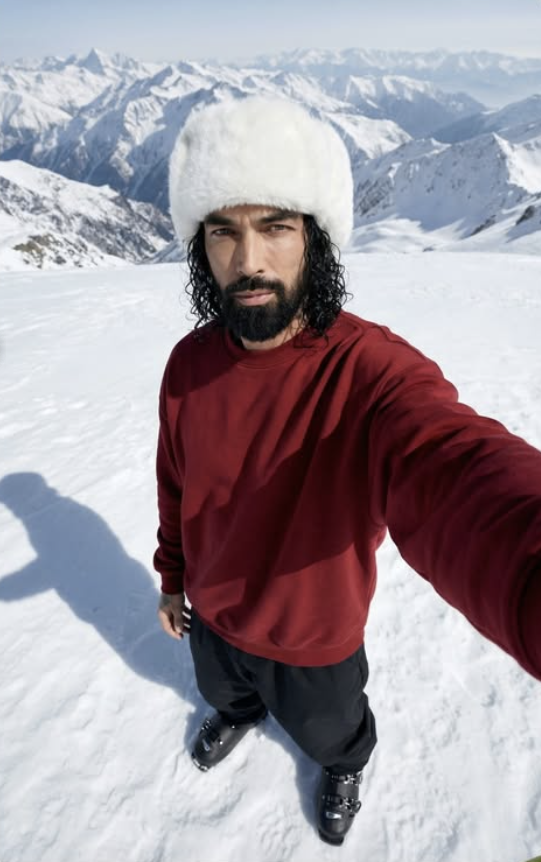
Om Editing Top ka Snow Winter style un logon ke liye hai jo apni normal photo ko cinematic, premium aur winter-themed look dena chahte hain. Is type ka edit usually close-up portrait ko aise transform karta hai jaise photo kisi cold mountain location par shoot ki gayi ho, jahan snow, soft daylight aur realistic textures photo ko ek high-end fashion feel dete hain.
Read Also: cinematic-style realistic portrait | 2026 New Year
Yeh style खास तौर par un creators, editors aur mobile users ke liye useful hai jo simple photo se dramatic winter portrait banana chahte hain. Agar aap apni profile photo, Instagram post, thumbnail ya AI-edit inspired portrait ko unique banana chahte ho, to Snow Winter theme ek clean aur eye-catching option hai.
Is look ki sabse badi khasiyat hai uska realistic yet stylized finish. Photo dekhne par lagta hai ki model ko snow-covered landscape mein shoot kiya gaya hai, with detailed fabric texture, natural shadows aur cold-weather outfit elements jo overall composition ko strong banate hain.
Ye Snow Winter Photo Style Kya Deta Hai
Om Editing Top ke Snow Winter prompt/photo style mein visual focus usually face, outfit texture aur snowy background par hota hai. Lighting soft aur crisp lagti hai, jisse skin details clear rehti hain aur overall image overexposed nahi lagti. Snow ka white tone photo ko fresh aur premium feel deta hai, jabki dark outfit contrast create karta hai.
Is style mein mood calm, cool aur thoughtful hota hai. Background mein mountains ya wide snow landscape photo ko depth dete hain, aur overhead angle selfie-like perspective add karta hai. Is combination se image modern bhi lagti hai aur artistic bhi, especially jab subject directly lens ki taraf dekh raha ho.
Colour palette generally white, dark red, black aur muted cold tones ke around hoti hai. Yeh contrast photo ko visually balanced banata hai. Winter headwear, bulky clothing aur realistic shadows photo ko natural appearance dete hain, isliye result sirf edited nahi balki believable bhi lagta hai.
- Soft natural light ya diffused daylight jaisa effect
- Snowy white background with mountain depth
- Dark outfit ke saath strong colour contrast
- Close-up facial detail aur realistic skin texture
- Cinematic, premium aur Instagram-ready finish
Om Editing Top Snow Winter Kaise Use Karein
Agar aap beginner ho, to is style ko mobile par use karna bhi easy hai. Sabse pehle ek clear portrait photo choose karo jisme face properly visible ho. Phir editing app, AI image tool ya prompt-based editor mein apni image upload karo aur Snow Winter style apply karo. Best result tab aata hai jab base photo already clean ho.
Second step mein crop aur framing par dhyan do. High angle, close-up aur selfie-style composition is theme ko suit karti hai. Agar app me lighting, background ya mood adjust karne ka option ho, to usse cold tone aur snowy environment ke hisaab se set karo. Isse image zyada natural lagegi.
Final step mein output ko zoom karke check karo. Face edges, hair detail, outfit folds aur snow shadows carefully dekho. Agar image too sharp, too bright ya artificial lag rahi ho, to slight adjustments karke balance lao. Mobile par bhi ek polished result mil sakta hai agar aap layering aur composition ka dhyan rakho.
- Apni best clear portrait photo select karo.
- Image ko editing app ya AI tool mein upload karo.
- Snow Winter style ya winter portrait look choose karo.
- Lighting ko soft aur cold tone mein set karo.
- Background mein snow mountains ya white landscape rakho.
- Result preview karke face aur outfit details check karo.
- Final image ko save karke social media ke liye export karo.
Kaunsi Photos Is Style Mein Best Kaam Karti Hain
Om Editing Top ka Snow Winter edit un photos par sabse achha lagta hai jisme face sharp ho aur subject camera ke kareeb ho. Close-up ya upper-body framing zyada useful hoti hai, kyunki isse facial expression aur winter accessories clearly show hote hain. Agar photo mein movement blur hai, to final result utna clean nahi aayega.
Lighting bhi bahut important hai. Soft daylight, cloudy weather, ya even studio-style diffused light base photo ke liye better hoti hai. Hard flash ya extreme shadows avoid karni chahiye, kyunki winter theme mein smooth and realistic finish zyada appealing lagti hai. Background simple ho to AI-style snow landscape better blend hota hai.
Clothing aur angle bhi result ko affect karte hain. Seedha front-facing ya slightly tilted angle achha perform karta hai, aur plain dark clothes editing ko aur strong banate hain. Agar aap chahein to aise photo choose karo jahan face clearly visible ho, hair detail define ho aur background already clutter-free ho.
- Angle: Close-up, high angle, ya slight overhead selfie-style
- Resolution: High-quality, sharp, and well-focused photo
- Lighting: Soft daylight, cloudy light, ya diffused indoor light
- Background: Simple background jise snow scene mein convert kiya ja sake
- Clothing: Dark or plain outfit, winter-themed clothes, clean textures
- Face detail: Clear eyes, natural expression, no heavy blur
Om Editing Top ke liye pro tips
Best results tab aate hain jab aap Om Editing Top ko sirf ek simple edit nahi, balki ek complete visual style ke roop me use karte ho. Snow winter look me sabse important cheez hoti hai balance — face details sharp रहें, outfit bold लगे, aur background natural feel de. Agar light, angle aur pose ka combination sahi ho, to image zyada cinematic aur premium lagti hai.
Ek aur useful tip ye hai ki subject ko background se alag dikhane ke liye contrast ka use karo. White snow ke saath dark red sweatshirt aur black trousers ka combination already strong visual impact deta hai. Isliye editing me over-saturation se bachna better hota hai, kyunki skin texture aur winter mood dono better preserve hote hain. Clean shadows aur soft highlights image ko aur realistic banate hain.
- Face aur hair texture ko natural rakho, unnecessary smoothing mat karo.
- Snow highlights ko soft rakho taaki image washed out na lage.
- Dark red aur black tones ko maintain karo for a strong winter contrast.
- Overhead selfie angle ko preserve karo, kyunki ye look ka main identity part hai.
- Background mountains aur snow field ko clear rakho for a wide cinematic feel.
- Shadow detail ko visible rakho, kyunki ye depth aur realism add karti hai.
Agar aap chaho to different export sizes bhi try kar sakte ho. Instagram feed ke liye square composition acha lagta hai, jabki story aur reel cover ke liye vertical framing better hoti hai. Om Editing Top me ye chhoti settings output ko zyada polished bana deti hain aur final image ko social media-ready feel देती हैं.
Common mistakes jo avoid karne chahiye
Sabse common mistake hoti hai image ko itna edit kar dena ki natural winter look kho jaye. Snow winter theme me realism bahut important hota hai, isliye face ko over-blur karna ya skin ko plastic look dena output ko weak bana sakta hai. Agar texture gayab ho jaye, to close-up portrait ka impact bhi kam ho jata hai.
Ek aur mistake ye hoti hai ki clothing colors ko over-bright kar diya jaye. Dark red sweatshirt aur black pants ka purpose hi ye hai ki woh snow background ke against stand out karein. Agar unko bahut zyada brighten kar diya gaya, to overall composition flat lag sakti hai. Isi tarah, background mountains ko zyada sharpen karna bhi unnatural feel de sakta hai.
- Too much smoothing: facial texture khatam ho jati hai aur portrait fake lagta hai.
- Overexposed snow: details wash out ho jati hain aur frame blank sa lagta hai.
- Wrong color balance: winter mood bigad sakta hai, especially skin tone aur outfit tones.
- Pose distortion: high-angle selfie effect ka natural look lose ho jata hai.
- Shadow removal: depth kam ho jati hai aur image flat dikhti hai.
- Background clutter: mountain scene ka clean, expansive feel disturb ho jata hai.
Agar aap Om Editing Top style me edit kar rahe ho, to subtlety ko priority do. Winter edits me chhoti details — jaise hair strands, snow texture, aur skin highlights — final image ko believable banati hain. Zyada dramatic changes se bachkar aap ek more premium aur share-worthy result pa sakte ho.
Best use cases aur ideas for Om Editing Top images
Ye type ka snow winter portrait kaafi versatile hota hai, isliye isse multiple platforms par use kiya ja sakta hai. Instagram profile picture me ye image bold aur stylish impression deti hai, especially agar face clearly visible ho. Thumbnails ke liye bhi ye look useful hai kyunki white snow aur dark outfit strong contrast create karte hain, jo attention grab karta hai.
Portfolio pages ya creative galleries me bhi Om Editing Top style images achha kaam karti hain. Agar aap fashion, travel ya portrait editing showcase karna chahte ho, to ye winter aesthetic aapke collection ko premium feel de sakti hai. Reels covers aur story highlights ke liye bhi ye look kaafi eye-catching hota hai, specially jab high-angle composition aur mountain backdrop dikh raha ho.
- Instagram profile picture: clean, sharp, and recognizable portrait ke liye.
- Thumbnails: bold contrast aur close-up framing ki wajah se.
- Portfolios: winter portrait editing skills showcase karne ke liye.
- Reels covers: stylish and cinematic first impression ke liye.
- Story highlights: themed winter or travel highlights me use kar sakte ho.
- Wallpaper-style posts: mountain landscape ke saath aesthetic feed content ke liye.
Agar aap content creator ho, to is type ki image personal branding ke liye bhi strong choice ho sakti hai. Snow, winter fashion aur thoughtful expression milkar ek moody but polished visual create karte hain. Is wajah se Om Editing Top images sirf pretty nahi, balki versatile bhi hoti hain.
Variations jo aap try kar sakte ho
Ek hi winter concept ko different moods aur color palettes me experiment karke aap kaafi unique results nikaal sakte ho. Example ke liye, agar aap cool blue tones use karte ho to image aur icy feel degi. Agar warm highlights add karte ho to face zyada inviting aur cinematic lag sakta hai. Isi tarah, morning snow, sunset snow aur cloudy snow scene teeno alag vibe create karte hain.
Om Editing Top ko aur interesting banane ke liye aap seasonal variations bhi try kar sakte ho. Fresh snowfall ke saath crisp white atmosphere milta hai, jabki late winter look me thoda muted aur soft mood aata hai. Background me light wind, falling snow, ya clear mountain distance add karke composition ko aur dynamic banaya ja sakta hai.
- Color mood: cool blue, neutral white, ya cinematic warm tint.
- Seasonal feel: fresh snowfall, late winter, ya early morning frost.
- Lighting: soft daylight, overcast sky, ya golden edge light.
- Background style: open mountains, deep snow field, ya slightly foggy terrain.
- Outfit variation: same palette me subtle changes for a different personality vibe.
- Expression variation: calm, thoughtful, confident, ya slightly dramatic look.
Aap crop ratio ke saath bhi play kar sakte ho. Wide frame me landscape zyada impactful lagta hai, jabki tighter crop me facial details aur outfit textures zyada prominent ho jate hain. Isi tarah, slight color grading changes se same Om Editing Top concept ko minimalist, cinematic ya dramatic style me shift kiya ja sakta hai.
Conclusion: Om Editing Top ko try karein
Snow winter portrait ka charm tab aur bhi strong ho jata hai jab composition, lighting aur textures ko carefully maintain kiya jaye. Om Editing Top style is look ko polished, stylish aur social-media ready banane me help karta hai. High-angle selfie feel, snowy mountains aur bold winter outfit milkar ek memorable visual create karte hain.
Agar aap apne edits ko next level par le jana chahte ho, to variations ke saath experiment karo aur natural details ko preserve karo. Sahi balance ke saath Om Editing Top aapko ek aisa winter image de sakta hai jo profile picture, thumbnail ya creative post, har jagah stand out kare.
💬 Comments