Merry Christmas AI Prompt
Merry Christmas AI Prompt: What Is This Style Used For?
This Christmas edit prompt is for anyone who wants to turn their normal photo into a cinematic, festive, high-impact holiday portrait. This kind of edit is very useful for social media posts, profile pictures, festive greetings, reel covers, and photo challenge content.
Read Also: Cinematic Realistic Portrait AI Prompt | 2026 New Year AI Prompt
This style’s biggest charm is turning a simple portrait into a dramatic full-body festive scene. The subject’s real face stays the same, but the whole look creates a premium visual story with Santa-inspired fashion, a bold pose, studio lighting, and a red Christmas background. If you’re a creator, designer, or just want a standout Christmas photo, this style is effective.
This prompt is also good for beginners in AI photo editing, since the result is visually striking without needing a complicated technical setup.
What This Prompt/Photo Style Actually Gives
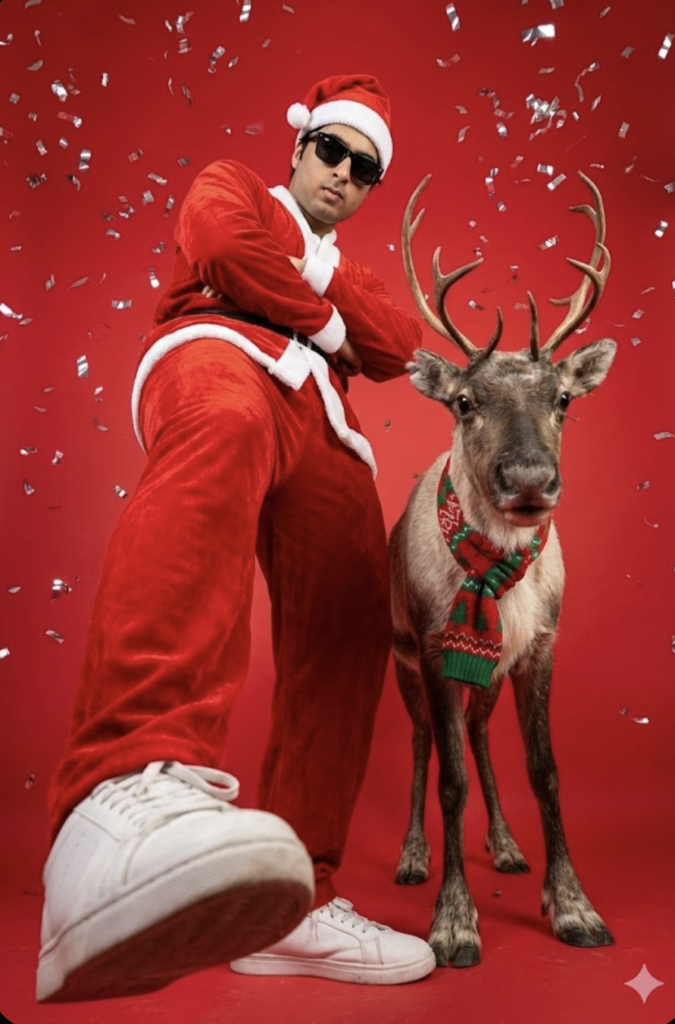
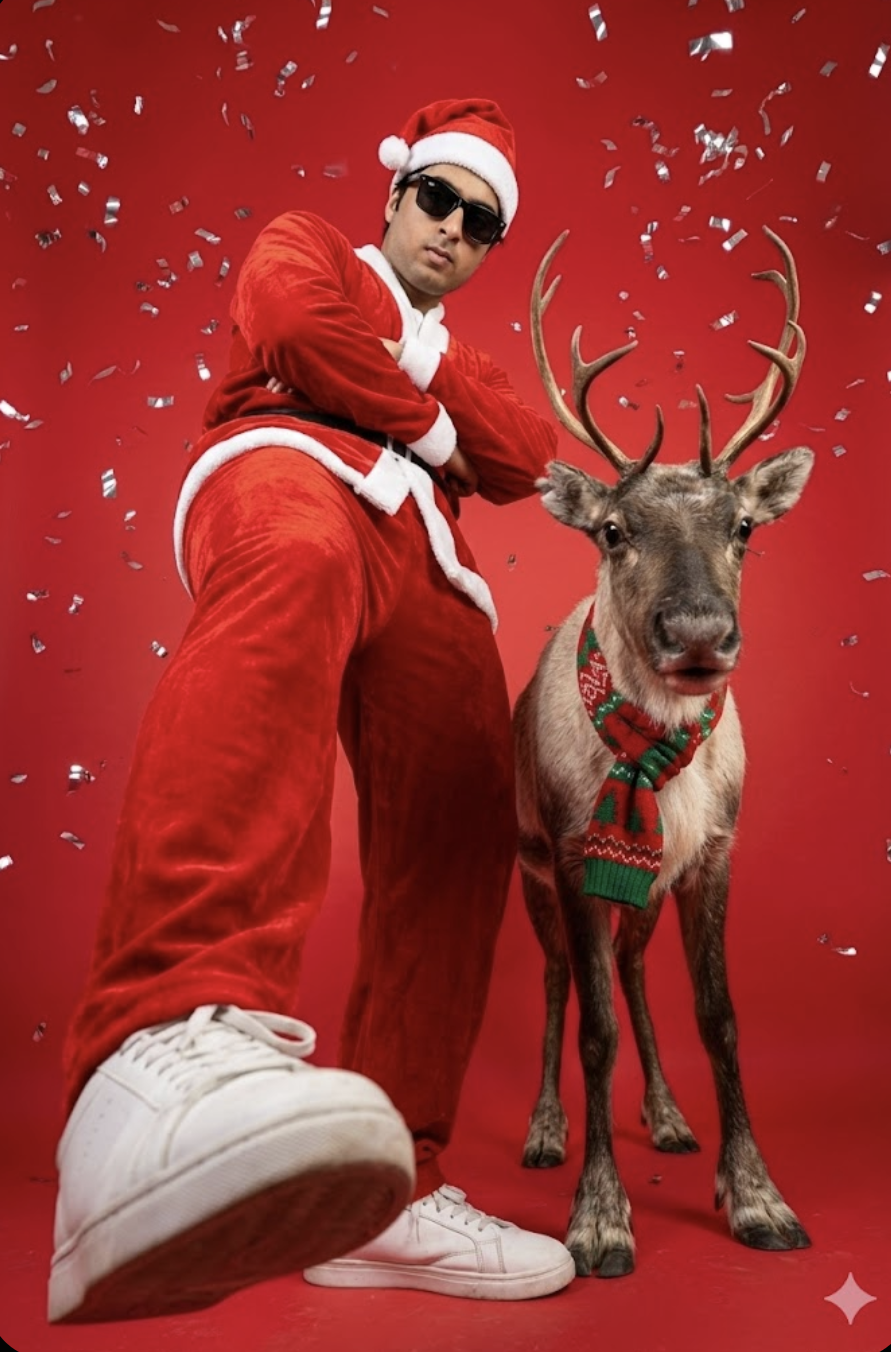
The final output is usually a bold, festive, photorealistic Christmas portrait. The subject gets a modern Santa Claus look with a red velvet outfit, matching hat, black sunglasses, and a confident stance. Full-body framing, an extreme low-angle view, and wide lens effect make the image even more cinematic.
The visual mood is both playful and premium. A vibrant red studio background with silver confetti adds festive energy, while high-contrast lighting highlights the velvet fabric and glossy details, giving the image depth and drama.
Realism is another strong point — keeping the face natural and unchanged makes the image more believable, while a reindeer element and Christmas color palette make the overall frame holiday-themed and instantly recognizable.
- Lighting: sharp studio light, high contrast, clear shadow separation
- Mood: festive, stylish, confident, slightly rebellious
- Colours: dominant red, white accents, silver confetti, green scarf details
- Composition: full-body subject, low-angle perspective, strong foreground presence
- Realism: natural face preservation, detailed fabric texture, realistic props
How to Use This Style: Step-by-Step
If you’re a beginner making this kind of edit on mobile, follow simple steps. Choose your best photo first, with the face clear and expression natural, since AI output mostly depends on input quality.
- Choose a clear, high-quality photo.
- Upload the photo to your AI editing app or generator.
- Apply the prompt for a festive Santa-style transformation.
- If available, choose vertical ratio and a realistic style.
- Generate and zoom in to check the output.
- Save the best version for final touch-up and export.
Which Photos Work Best
The best photo for this style has a straight, clear face. Front-facing or slightly angled portrait images usually work better, since they help the AI understand facial structure. If the face is blurry or in low light, the final result won’t be as sharp.
- Angle: front-facing or slightly turned face, clear jawline and eyes visible
- Resolution: high-quality image, preferably sharp and noise-free
- Lighting: soft daylight, even indoor light, no harsh shadows on the face
- Background: plain, uncluttered, one that separates the subject well
- Clothing: simple outfit, no extreme patterns, so the Santa costume effect comes out clean
Pro Tips for the Best Results
- Keep face details clear and natural so the output looks realistic.
- Use a balanced mix of Christmas tones like red, green, silver, and white.
- Keep the background simple, but add festive elements like confetti or studio glow.
- Try wide-angle or low-angle framing for a dramatic look.
- Choose sharp lighting to highlight outfit textures.
- Keep the pose confident, but avoid an overcrowded composition.
Common Mistakes to Avoid
- Adding too many competing details in the prompt — when background, outfit, pose, props, and lighting are all overly complex, the image feels cluttered.
- Inconsistent styling — if the Santa look is stylish but background and accessories don’t match, the overall image feels visually weak.
- Choosing an unnatural pose — body proportions can look odd.
- Making the background too busy — focus should stay on the subject.
- Lighting mismatch — can imbalance shadows and highlights.
- Random color palette — festive theme needs consistency.
Best Use Cases
- Instagram feed posts: festive branding and stylish holiday content.
- Profile pictures: a bold seasonal identity and unique look.
- YouTube thumbnails: high-contrast, clickable visuals.
- Reel covers: a neat, dramatic, instantly readable frame.
- Portfolios: displaying creative portrait editing and concept work.
Variations You Can Try
- Mood variations: confident, playful, luxury, cinematic, or cool winter vibe.
- Colour variations: red-green classic, silver-white elegant, gold-red premium, or dark festive tones.
- Setting variations: studio backdrop, snowy scene, gift-box setup, or holiday lights background.
- Seasonal variations: Christmas, New Year celebration, winter fashion, or festive party theme.
- Style variations: photorealistic, commercial, editorial, or social-media-ready portrait.
Conclusion: Upgrade Your Festive Look
This style is perfect for anyone who wants their festive edits to be stylish, sharp, and professional. With the right lighting, clean composition, and confident pose, even an ordinary holiday image can become a memorable visual.
FAQ: Merry Christmas
How do I use the "Merry Christmas" prompt?
Copy the prompt above, open Gemini or ChatGPT, upload a clear photo of yourself and paste the prompt. Generate the image and adjust the outfit or background if you want a variation.
Is this prompt free?
Yes. This prompt is free to copy and use for Instagram, reels, WhatsApp DP and profile pictures.
Which photo works best?
A sharp, front-facing, well-lit photo with no filter. A clear face helps the AI keep your identity in the final image.
Last updated: 10 September 2026
💬 Comments