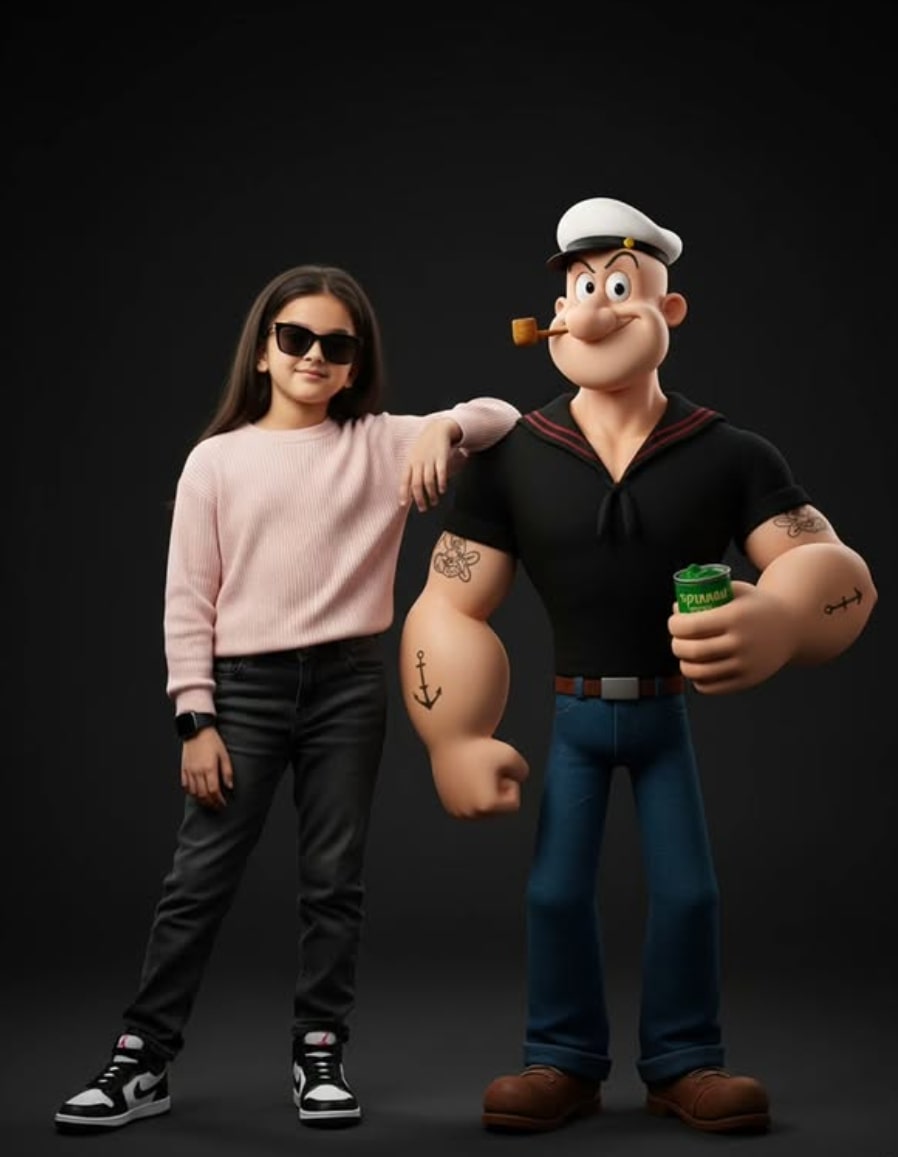
Ultra-Realistic Studio Portrait With 3D Cartoon Character
Om Editing Top के साथ Ultra-Realistic Studio Portrait Style क्या है?
Om Editing Top इस तरह की एडिटिंग के लिए खास तौर पर इस्तेमाल किया जाता है जब आपको अपनी normal photo को एक ultra-realistic studio portrait look में बदलना हो, लेकिन face identity और original expression same रखना हो। यह style उन लोगों के लिए है जो अपनी photo में clean outfit, cinematic lighting, realistic skin texture, और a professional studio vibe चाहते हैं।
Read Also: cinematic-style realistic portrait | 2026 New Year
इस तरह की editing में image सिर्फ edited नहीं लगती, बल्कि ऐसा feel देती है जैसे photo directly high-end studio camera से ली गई हो। Background usually clean रहता है, subject sharp दिखाई देता है, और overall mood polished, modern, aur aesthetic बनता है। इसी वजह से यह style social media, profile photos, AI portrait concepts, aur creative character blending के लिए बहुत popular हो रहा है।
अगर आपके पास एक clear standing pose वाली photo है, तो यह prompt-style editing उसे और भी impressive बना सकती है। खासकर तब जब outfit details, accessories, pose, aur face identity को tightly preserve करना हो। यही reason है कि लोग इस प्रकार के Om Editing Top photo edit prompt को realistic result पाने के लिए use करते हैं।
यह Style Photo में क्या-क्या देता है?
इस editing style का सबसे बड़ा advantage है इसका cinematic and realistic finish। Image में lighting soft लेकिन defined होती है, जिससे face पर natural depth आती है और outfit के fabric details clearly दिखते हैं। Pastel tones, clean contrast, और studio-quality shadows मिलकर portrait को premium look देते हैं।
Color palette आमतौर पर balanced रखी जाती है ताकि pink sweater, dark jeans, white-black shoes, aur black sunglasses जैसे elements visually pop करें लेकिन overdone न लगें। Cartoon character addition के बावजूद overall composition natural लगनी चाहिए, इसलिए placement, scale, aur spacing बहुत important हो जाते हैं।
इस style में realism बनाए रखने के लिए face details, smile, skin texture, aur body proportions को carefully preserve किया जाता है। इसी कारण output सिर्फ fun composite नहीं बल्कि एक polished cinematic portrait जैसा दिखता है।
- Soft studio lighting with realistic highlights
- Clean, premium background feel
- Natural skin texture and facial expression retention
- Balanced colors with aesthetic contrast
- Sharp subject focus and cinematic depth
- Realistic clothing folds and texture details
This Style को Mobile पर कैसे Use करें? Step-by-Step Guide
अगर आप beginner हैं, तो इस style को mobile पर use करना काफी easy हो सकता है, बस reference photo सही होनी चाहिए। सबसे पहले अपनी best standing photo select करें, फिर उसे उस app या editor में upload करें जहां image-based editing support हो। कोशिश करें कि photo clear हो और face पूरी तरह visible हो।
इसके बाद prompt-style instruction apply करें, लेकिन ध्यान रहे कि face, pose, outfit, aur expression जैसी important details maintain रहें। Mobile screen पर editing करते समय छोटे previews देखकर confirm करें कि subject position same है या नहीं। अगर output में cartoon character बहुत बड़ा या बहुत छोटा दिखे, तो placement adjust करना चाहिए।
Best results के लिए process को धीरे-धीरे check करना चाहिए, especially when the edit mixes real person with a cartoon-style companion. एक beginner भी सही steps follow करके polished result निकाल सकता है।
- अपनी clear full-body या mid-shot standing photo चुनें।
- Photo को editor/app में upload करें।
- Reference-based editing mode या image prompt mode चुनें।
- Face identity, pose, और outfit details preserve करने का option रखें।
- Lighting को soft cinematic और studio-like set करें।
- Cartoon character की position human subject के side में रखें।
- Result preview करें और crop, brightness, या contrast fine-tune करें।
- Final image को high resolution में export करें।
कौन-सी Photos इस Prompt Style के लिए सबसे बेहतर हैं?
इस तरह की editing के लिए सबसे अच्छी photo वही होती है जिसमें subject का face साफ दिखे और body pose stable हो। Standing pose वाली images खासकर useful होती हैं, क्योंकि prompt में human और cartoon character दोनों का arrangement एक specific posture में चाहिए होता है। Photo अगर blurry होगी, तो face retention मुश्किल हो सकती है।
Angle भी बहुत matter करता है। Front-facing या slight three-quarter angle वाली photo सबसे reliable रहती है क्योंकि इससे facial details, outfit fit, aur posture clearly read होते हैं। Lighting natural होनी चाहिए, ideally soft daylight या evenly lit indoor shot, ताकि editor को shadows समझने में आसानी हो और final result clean आए।
Background simple होना चाहिए, जैसे plain wall, outdoor clean backdrop, या low-clutter indoor space। Clothing भी minimal और structured हो तो better रहता है, क्योंकि pastel sweater, dark jeans, aur shoes जैसे details editing में sharp दिखाई देती हैं।
- Angle: front-facing या slight side angle
- Resolution: high-quality, sharp image without heavy blur
- Lighting: soft natural light या evenly lit indoor lighting
- Background: simple and uncluttered
- Clothing: clean, visible outfit with clear texture
- Pose: relaxed standing pose with visible hands and body lines
- Face: expression visible, no heavy shadows on features
Best Result के लिए छोटे लेकिन जरूरी Tips
अगर आप चाहते हैं कि Om Editing Top style output professional लगे, तो image quality पर compromise न करें। जितनी साफ source photo होगी, उतना ही accurate facial preservation और outfit rendering मिलेगा। साथ ही, background जितना simple होगा, subject उतना ज्यादा stand out करेगा।
Cartoon character वाली composite editing में सबसे बड़ी challenge balance होती है। Real person को overpower किए बिना cartoon element add करना चाहिए, ताकि final portrait cinematic भी लगे और playful भी। इसलिए subject spacing, shadows, aur color matching पर ध्यान देना जरूरी है।
Mobile users के लिए सबसे practical approach है कि पहले photo select करें, फिर preview देखकर light, contrast, aur framing check करें। थोड़ा patience रखने से output काफी ज्यादा realistic और share-worthy बन सकता है।
- High-quality source photo upload करें
- Face को shadow-free रखें
- Simple background prefer करें
- Natural standing pose चुनें
- Clothing details clearly visible रखें
- Cartoon character placement balanced रखें
This Style ke Best Results ke Liye Pro Tips
Om Editing Top style images ko zyada realistic aur polished banane ke liye sabse pehle reference photo ka quality high rakho. Clear face, proper lighting, aur clean background se output aur strong aata hai. Jab base image sharp hoti hai, to ultra-realistic studio portrait ka look naturally better feel hota hai.
Agar aap cinematic portrait chahte ho, to outfit details aur pose ko simple rakho. Minimal styling, balanced colors, aur relaxed posture image ko premium bana dete hain. Is type ke edit me facial identity ko same rakhna sabse important hota hai, isliye over-editing ya unnecessary changes avoid karo.
Better result ke liye prompt ko organized rakhna bhi useful hota hai. Subject, outfit, pose, lighting, aur character placement clearly mention karne se image generator ko direction milti hai. Om Editing Top workflow me detail important hai, but clarity aur consistency usse bhi zyada matter karti hai.
- High-resolution uploaded photo use karo taaki face details clear रहें.
- Soft studio lighting ya cinematic lighting mention karo for a premium finish.
- Pose ko fixed rakhne ke liye “same standing pose” type direction useful hoti hai.
- Outfit colors ko minimal aur clean rakhne se portrait zyada aesthetic dikhta hai.
- Cartoon character ka position human subject ke saath balanced rakho.
- Background ko clutter-free rakho taaki focus face aur character par रहे.
Common Mistakes Jo This Style Output Ko Kharab Kar Sakte Hain
Sabse common mistake hoti hai reference image ko ignore karna. Agar face details, expression, ya pose baar-baar change hon, to result natural nahi lagta. Ultra-realistic studio portrait ka main charm hi consistency hai, isliye face identity ko preserve karna bahut zaroori hai.
Doosri big mistake hoti hai overloading the prompt. Bahut zyada conflicting instructions dene se generator confused ho sakta hai. Jaise outfit, pose, lighting, aur cartoon character ko define karna theek hai, lekin extra unrelated details image ko weak bana sakte hain.
Ek aur issue hota hai color mismatch ya uneven styling. Agar subject ka outfit clean aur aesthetic ho, lekin background ya cartoon character too loud ho, to final image ka balance बिगड़ जाता है. Om Editing Top type edits me harmony bahut important hoti hai.
- Face change karne wali instructions mat do, warna identity lose ho sakti hai.
- Too many accessories add mat karo; minimal look zyada premium lagta hai.
- Pose ko change karne ki request image ko reference se door le ja sakti hai.
- Background ko too busy mat rakho, warna subject focus kam ho jata hai.
- Unclear clothing description se outfit mismatch aa sakta hai.
- Cartoon character ka size ya placement extreme ho to composition awkward lagti hai.
This Style Ko Kahan Use Kar Sakte Ho: Best Use Cases Aur Ideas
Ye type ka ultra-realistic studio portrait social media par kaafi powerful lagta hai. Instagram profile picture, story post, ya highlight cover ke liye yeh style instantly attention grab karta hai. Clean face, stylish outfit, aur 3D cartoon character ka combo post ko unique banata hai.
Agar aap content creator ho, to is image ka use thumbnails aur reel covers me bhi kar sakte ho. Bold yet aesthetic visual branding ke liye Om Editing Top style portraits kaafi effective hote hain, especially jab aapko ek memorable first impression chahiye hota hai.
Portfolio ya personal branding ke liye bhi ye look useful hai. Young, confident, and cinematic vibe ek professional identity create karti hai. Is style ko fashion edits, fan edits, profile makeovers, ya digital art showcases me bhi use kiya ja sakta hai.
- Instagram profile picture ke liye clean aur premium avatar look.
- Reels cover ke liye bold, eye-catching visual.
- YouTube thumbnail me strong character-based branding.
- Portfolio presentation me stylish studio portrait.
- WhatsApp DP ya social banner ke liye polished display image.
This Style Ke Different Variations Jo Aap Try Kar Sakte Ho
Agar aap experiment karna chahte ho, to mood change karke same concept ka fresh version bana sakte ho. Soft pastel tones zyada gentle aur aesthetic feel dete hain, jabki darker cinematic tones image ko dramatic bana dete hain. Isi tarah, background change karke bhi output ka vibe totally different ho sakta hai.
Seasonal variations bhi kaafi interesting lagti hain. Winter feel ke liye cozy lighting aur muted colors best hote hain, while summer version me brighter tones aur airy studio look kaam karta hai. This style style me chhote changes se bhi kaafi naya result mil sakta hai.
Aap accessories, lighting, aur character styling ko vary karke multiple creative versions bana sakte ho. Cartoon character ka pose same rakhkar background, color palette, aur facial mood ko alter karne se ek hi concept ke andar variety aa jaati hai. Yeh approach personal branding aur content testing dono ke liye useful hai.
- Soft pastel mood: pink, beige, aur cream tones.
- Cinematic dark mood: deep shadows aur rich contrast.
- Bright clean mood: white background aur soft daylight.
- Winter look: cozy sweater vibe aur cool tones.
- Summer look: fresh lighting aur vibrant but balanced colors.
- Luxury studio look: polished background aur glossy finish.
This Style Ke Saath Final Thoughts
This prompt style images un logon ke liye perfect hain jo apni photo ko stylish, realistic, aur creative look dena chahte hain. Jab face identity same rakhi jaati hai aur outfit, pose, aur cartoon companion ka balance sahi hota hai, to result kaafi professional aur engaging lagta hai.
Aap agar clean studio portrait, cinematic vibe, aur 3D cartoon character combo chahte ho, to is concept ko different moods aur settings ke saath zaroor try karo. This look ka best part ye hai ki aap same idea ko baar-baar fresh variations me convert kar sakte ho aur har baar ek unique output pa sakte ho.
💬 Comments