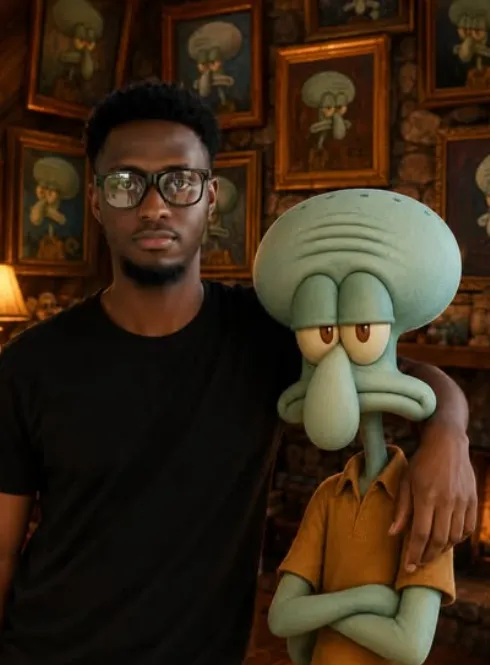
stand with cartoon
Om Editing Top के साथ “Stand with Cartoon” स्टाइल क्या है?
Om Editing Top जैसी फोटो-एडिटिंग स्टाइल उन लोगों के लिए है जो अपनी साधारण फोटो को एक cinematic, cartoon-inspired portrait में बदलना चाहते हैं। “Stand with cartoon” concept का मतलब है कि आपकी real photo को एक animated character के साथ इस तरह blend किया जाए कि दोनों साथ में naturally pose करते दिखें। इस तरह की editing खासतौर पर उन users के लिए है जो social media posts, profile pictures, reels thumbnails, या creative AI portraits बनाना चाहते हैं।
Read Also: cinematic-style realistic portrait | 2026 New Year
इस style की सबसे बड़ी खासियत यह है कि इसमें human subject की identity intact रहती है, जबकि background और scene को fantasy-like cinematic look दिया जाता है। यानी चेहरा real रहता है, लेकिन setting एक richly detailed animated environment बन जाती है। अगर आप ऐसी edit चाहते हैं जो playful भी लगे और premium भी, तो यह prompt-style idea काफी useful है।
यह खासकर beginners, mobile editors, content creators, और AI photo editing try करने वालों के लिए बहुत अच्छा है। आपको advanced design skills की जरूरत नहीं होती; बस सही photo, सही pose, और थोड़ी attention to detail चाहिए होती है। यही वजह है कि Om Editing Top style आज trending photo editing ideas में शामिल हो रही है।
यह फोटो स्टाइल आपको क्या look देती है?
इस तरह की editing में final image आमतौर पर warm, cinematic, और highly polished feel देती है। Background cozy lodge जैसा होता है, stone walls, framed art, और animated ambience के साथ। Visual mood friendly और fantasy-driven होता है, जिससे image में story-like quality आ जाती है।
Color palette अक्सर balanced रहती है — neutral stone tones, soft warm lighting, और subtle contrast के साथ। इससे subject और cartoon character दोनों clearly visible रहते हैं। Lighting premium portrait look देती है, जिससे skin tones natural लगते हैं और image amateur नहीं बल्कि professionally shot लगती है।
Composition भी बहुत important होती है। आमतौर पर human subject एक side में या center के करीब खड़ा दिखता है, और cartoon character उसके साथ naturally placed होता है। One arm on shoulder जैसी pose image को casual, friendly, और believable बनाती है। यही detail इस style को simple AI art से अलग करके more realistic, Instagram-ready बनाती है।
- Cinematic lighting: soft highlights और deep shadows के साथ
- Cozy mood: warm, inviting, storybook-like atmosphere
- Premium render feel: detailed background और smooth character finish
- Balanced composition: subject और cartoon figure दोनों clear दिखते हैं
- Realistic identity: face features natural रहते हैं
This Style को mobile par kaise use karein
अगर आप beginner हैं, तो इस type की editing को mobile पर use करना बहुत आसान हो सकता है। सबसे पहले एक साफ, sharp portrait चुनें जिसमें आपका चेहरा clearly visible हो। फिर editing app या AI photo tool में उस image को upload करें और style prompt apply करें। ध्यान रखें कि reference image को identity source की तरह treat करना होता है, इसलिए subject की facial details preserve रहनी चाहिए।
दूसरा step scene setting का होता है। आपको ऐसी composition चाहिए जिसमें background cinematic लगे और cartoon character human subject के साथ naturally fit हो। अगर app में pose या character placement control है, तो subject को standing position में रखें और shoulder-touch pose जैसा natural interaction choose करें। इससे result ज्यादा believable लगेगा।
तीसरा step preview और refinement का है। Generated result देखने के बाद check करें कि face distortion, extra shadows, या awkward hand placement तो नहीं आया। जरूरत हो तो brightness, contrast, warmth, और sharpness थोड़ा adjust करें। Final export से पहले image को high resolution में save करें ताकि Instagram, WhatsApp status, या YouTube thumbnail पर quality खराब न हो।
- एक साफ और frontal या slight-angle portrait चुनें।
- Photo को mobile editing app या AI generator में upload करें।
- Reference face details को preserve रखने वाला mode चुनें।
- Cartoon-style cinematic environment apply करें।
- Pose में standing position और shoulder-contact composition रखें।
- Result preview करके unwanted blur या face changes check करें।
- High-quality format में export करके save करें।
कौन-सी photos इस तरह की editing के लिए सबसे अच्छी रहती हैं?
Best results तब मिलते हैं जब original photo clear, well-lit, और properly framed हो। Face front-facing या हल्के angle पर होना चाहिए, ताकि facial structure आसानी से पहचान में आए। बहुत ज्यादा side profile, closed eyes, या motion blur वाली images से result कमजोर हो सकता है।
Lighting जितनी natural होगी, output उतना बेहतर मिलेगा। Indoor soft light या daylight portrait सबसे अच्छा रहता है, क्योंकि इससे skin tone accurate रहती है और AI face details को cleanly map कर पाता है। Background जितना simple होगा, उतना अच्छा; cluttered background से subject अलग करना मुश्किल हो सकता है।
Clothing भी image के overall feel को affect करती है। Simple solid-color outfits, casual shirts, या neat traditional wear इस type की edit में अच्छे लगते हैं। बहुत busy patterns या overly reflective clothes कभी-कभी face and body balance बिगाड़ देते हैं। अगर आपकी goal premium cartoon-portrait look है, तो neat, well-defined, and natural-looking photo चुनना सबसे smart choice है।
- Angle: front-facing या slight three-quarter angle
- Resolution: high-resolution, sharp face details वाली photo
- Lighting: soft natural light या balanced indoor lighting
- Background: simple, uncluttered, and clean background
- Clothing: solid colors, neat casual wear, or simple traditional outfits
- Expression: relaxed, neutral, or slight smile
Pro Tips for the Best Results with Om Editing Top
अगर आप Om Editing Top style में clean, cinematic, and eye-catching output चाहते हैं, तो सिर्फ prompt डालना enough नहीं होता। Reference image, pose description, lighting mood, और background details—ये सब मिलकर final image की quality decide करते हैं. Small changes भी result को काफी improve कर सकते हैं.
सबसे अच्छा output तब आता है जब आप subject identity को clear रखें और scene को simple but specific बनाएं। अगर face, hairstyle, और proportions same रखने हैं, तो prompt में “preserve exact facial structure” जैसे directions helpful होते हैं. साथ ही, background को unnecessarily crowded न रखें ताकि human subject और cartoon character दोनों clearly stand out करें.
Om Editing Top edits को ज्यादा polished बनाने के लिए practical approach अपनाएं. पहले one clear concept choose करें, फिर lighting, color tone, and camera look set करें. Isse image random नहीं लगेगी, बल्कि professional and premium feel देगी.
- Reference image को high quality रखें ताकि face details accurate रहें.
- Pose simple रखें, जैसे standing pose या shoulder-resting pose, ताकि composition natural लगे.
- Background elements limited लेकिन meaningful रखें, जैसे themed walls, framed art, or cozy environment.
- Lighting को cinematic and soft रखें ताकि character details sharp भी रहें और flattering भी लगें.
- Aspect ratio पहले से तय रखें, especially Instagram or profile use के लिए.
- Color palette consistent रखें, जैसे warm tones, cool cinematic tones, या premium studio look.
- अगर cartoon character है, तो उसका style clean और high-end रखें ताकि overall image cartoonish न लगे बल्कि stylized लगे.
Common Mistakes to Avoid in This Edits
सबसे common mistake होता है overloading the prompt. जब बहुत ज्यादा effects, props, poses, and background instructions एक साथ डाल दिए जाते हैं, तो model confused हो सकता है और image messy दिख सकती है। this style work में simplicity often better results देती है.
एक और बड़ी गलती है identity consistency ignore करना। अगर face structure, eyes, nose, lips, or age details loosely describe किए गए, तो output original subject से अलग जा सकता है. इसी तरह, background को इतना complex न बनाएं कि main subject hidden हो जाए या cartoon character overpower कर दे.
Editing mistakes mostly planning phase में होते हैं, generation phase में नहीं. इसलिए prompt लिखते समय हर element का purpose clear होना चाहिए. अगर कोई detail image की storytelling में help नहीं कर रही, तो उसे हटाना बेहतर होता है.
- बहुत ज्यादा styling words डालना: इससे output inconsistent और noisy लग सकता है.
- Face identity को vague रखना: subject का look बदलने का risk बढ़ जाता है.
- Background में too many objects जोड़ना: composition cluttered हो जाती है.
- Lighting mention न करना: result flat या dull दिख सकता है.
- Aspect ratio ignore करना: Instagram, reels cover, या profile fit बिगड़ सकता है.
- Cartoon character style को undefined छोड़ना: quality uneven लग सकती है.
- Watermark, text, caption जैसी चीजें भूलना नहीं चाहिए, क्योंकि clean output जरूरी होता है.
Best Use Cases and Creative Ideas for This Style
this prompt style images कई जगह use किए जा सकते हैं, especially जब आपको bold, fun, and visually memorable portrait चाहिए। Instagram posts में ये images attention grab करती हैं, क्योंकि real subject और cartoon-themed environment together एक unique story create करते हैं. Profile pictures के लिए भी यह style अच्छा काम करता है, अगर आप standout look चाहते हैं.
Thumbnails के लिए भी ये edits बहुत useful हैं, खासकर जब आपका content entertainment, AI art, character editing, or themed storytelling से related हो। Reels covers में ऐसी image instantly curiosity build करती है, जिससे clicks improve हो सकते हैं. Portfolios में ��ी ���से creative sample की तरह दिखाया जा सकता है.
अगर आप personal branding कर रहे हैं, तो this look edits से आप अपने content को different visual identity दे सकते हैं. यह style creators, editors, and social media pages के लिए खास तौर पर effective है क्योंकि इसमें human subject grounded रहता है और fantasy/cartoon vibe engagement बढ़ाती है.
- Instagram posts: aesthetic feed, character-themed edits, and story highlights.
- Profile pictures: unique identity with a premium illustrated twist.
- Thumbnails: eye-catching visuals for videos, shorts, and tutorials.
- Reels covers: strong first impression and better scroll-stopping power.
- Portfolios: showcase AI editing style, portrait composition, and concept work.
- Fan edits: playful, themed, and shareable content for niche audiences.
Variations You Can Try with This Style
Yeh style का सबसे अच्छा फायदा यह है कि आप एक ही concept को कई moods में try कर सकते हैं। अगर आपने cozy themed setup बनाया है, तो उसी idea को warm sunset lighting, dramatic blue lighting, or soft studio glow में बदलकर different outputs पा सकते हैं. इससे आपको एक single prompt से multiple creative looks मिलते हैं.
आप setting बदलकर भी experiment कर सकते हैं। जैसे indoor lodge, fantasy room, vintage wall art space, neon animated corner, या winter-themed cozy room. हर variation subject और cartoon character की chemistry को अलग flavor देती है. इसी तरह season-based edits भी interesting होते हैं—monsoon mood, festive winter look, summer bright tones, या autumn earthy tones.
Color adjustments भी बहुत impactful होते हैं. Warm gold tones image को inviting बनाते हैं, cool teal tones cinematic touch देते हैं, और pastel palettes soft, modern aesthetic देते हैं. अगर आप this edit images को multiple platforms के लिए बना रहे हैं, तो mood variations जरूर test करें.
- Mood variations: cozy, cinematic, playful, dreamy, dramatic, premium.
- Color variations: warm orange, cool blue, pastel pink, golden beige, moody dark.
- Setting variations: lodge room, studio scene, themed bedroom, fantasy hall, animated gallery.
- Season variations: winter cozy, rainy evening, festive lights, spring fresh look, autumn warm tones.
- Lighting variations: soft box light, rim light, golden hour, low-key cinematic lighting.
Conclusion: Try This Style for Creative and Premium Edits
this style style उन लोगों के लिए perfect है जो simple portrait को unique, cinematic, and share-worthy image में बदलना चाहते हैं। सही reference, clean composition, and thoughtful mood selection के साथ आप बहुत polished results पा सकते हैं. Human subject और cartoon character combination इसे fun भी बनाता है और visually striking भी.
अगर आप Instagram, profile pictures, thumbnails, or reels covers के लिए something different try करना चाहते हैं, तो this prompt approach definitely experiment करने लायक है. Better prompts, clear variations, and a balanced scene use करके आप every time stronger output पा सकते हैं. Try it, compare variations, and build your own signature editing style with this look.
💬 Comments