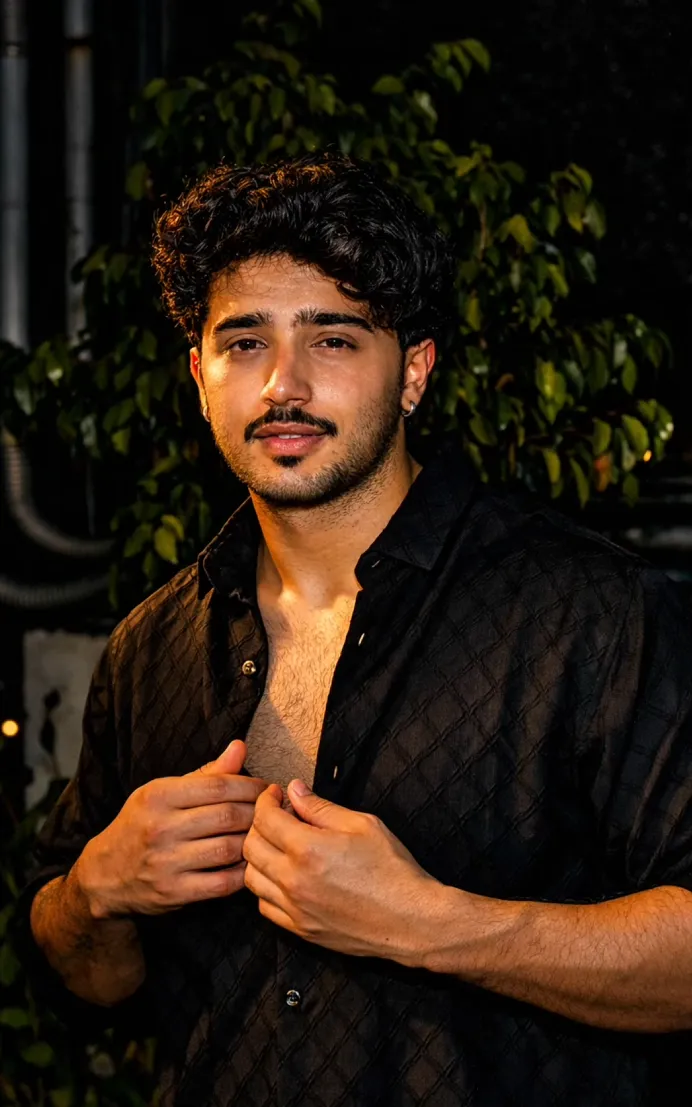
HDR Cinmatic
Om Editing Top के साथ HDR Cinmatic स्टाइल क्या है?
Om Editing Top जैसा HDR Cinmatic स्टाइल उन लोगों के लिए है जो अपनी फोटो को एक dramatic, cinematic और high-detail look देना चाहते हैं, लेकिन original scene की पहचान भी बिल्कुल same रखना चाहते हैं। इस तरह की editing में image का structure नहीं बदलता, बल्कि lighting, contrast, color balance और overall mood को powerful बनाया जाता है।
Read Also: cinematic-style realistic portrait | 2026 New Year
यह style खास तौर पर sunset feel, rich highlights, deep shadows और clean realism पर काम करता है। यानी photo में extra elements जोड़ने के बजाय उसे ऐसा बनाया जाता है कि वह naturally more cinematic लगे। यही वजह है कि यह style mobile editors, AI photo editors, social media creators, and photo enhancement lovers के बीच काफी popular है।
अगर आपके पास कोई normal portrait, outdoor shot, street photo, travel image या building photo है, तो यह prompt-style editing उसे ज्यादा polished, warm aur professional बना सकती है। Beginners भी इसे आसानी से use कर सकते हैं, क्योंकि इसमें complex masking या advanced manual editing की जरूरत नहीं होती।
यह HDR Cinmatic photo style actually क्या देता है?
इस style का सबसे बड़ा फायदा है realistic enhancement. Photo में sunset-inspired warm tones, balanced highlights, और deeper shadows आते हैं, जिससे image ज्यादा rich और dramatic लगती है। Sky, skin tones, buildings, trees और background सब naturally enhanced दिखते हैं, लेकिन fake या overedited look नहीं आता।
Om Editing Top style की खासियत यह है कि composition वही रहती है, subject वही रहता है, और focus भी original object पर बना रहता है। केवल mood बदलता है—photo more premium, more vibrant, and more cinematic दिखती है। Colors soft रहते हुए भी powerful महसूस होते हैं, जिससे image social media posts, thumbnails, profile edits और creative portfolios के लिए ideal बनती है।
इस तरह के HDR edit में आप आमतौर पर ये visual changes देख सकते हैं:
- Warm sunset lighting और golden tones
- Better contrast between light and shadow
- Sharper details without losing realism
- Clean and natural color enhancement
- More cinematic depth and photo clarity
Om Editing Top HDR Cinmatic style को step by step कैसे use करें?
अगर आप beginner हैं और mobile पर editing कर रहे हैं, तो इस style को use करना बहुत simple हो सकता है। सबसे पहले एक ऐसी photo चुनें जिसमें subject clearly visible हो और image बहुत ज्यादा blurry न हो। इसके बाद editor या AI tool में वही image upload करें जहाँ आप HDR sunset transformation apply कर सकते हैं।
Prompt-style editing का मतलब है कि आप photo को visually guide करते हैं ताकि result as close as possible original image के साथ match रहे। इसलिए instructions simple लेकिन clear होनी चाहिए। Mobile users के लिए सबसे आसान तरीका है: photo select करें, prompt paste करें, processing के बाद result compare करें, और जरूरत हो तो subtle corrections करें।
Beginner-friendly steps:
- Apni clear photo choose करें, preferably daylight या outdoor shot.
- Image को editor या AI photo tool में upload करें.
- HDR sunset / cinematic style option select करें या prompt use करें.
- Ensure करें कि original composition same रहे.
- Generate/edit result देखें और natural look check करें.
- अगर image over-bright या over-colored लगे, तो strength कम करें.
- Final image को high quality में save करें.
Mobile पर काम करते समय image preview ध्यान से देखें। खासकर face, background, road lines, buildings और shadows पर नजर रखें, ताकि photo realistic बनी रहे। Best results तब मिलते हैं जब edit subtle हो, न कि extreme.
कौन-सी photos HDR Cinmatic edit के लिए सबसे अच्छी रहती हैं?
इस style के लिए हर photo समान रूप से अच्छी नहीं होती। सबसे अच्छे results उन images में आते हैं जिनमें subject साफ दिखता हो, lighting average से थोड़ी अच्छी हो, और background बहुत cluttered न हो। Outdoor photos, portraits, travel shots, bike/car photos, street scenes और architecture images इस style में बहुत अच्छे लगते हैं।
Photo चुनते समय angle और resolution बहुत matter करते हैं। Front-facing या slightly side angle portraits cinematic feel देते हैं, जबकि wide shots landscapes और buildings में HDR effect better दिखता है। Low-resolution images में details loss हो सकती है, इसलिए जितना possible हो, high-quality original use करें।
Practical tips for best photo selection:
- Angle: Face ya subject clearly visible हो, बहुत tilted angle avoid करें.
- Resolution: High-resolution photo use करें ताकि details sharp रहें.
- Lighting: Natural light, golden hour, or soft daylight best रहती है.
- Background: Clean background या simple outdoor scene ज्यादा अच्छा results देती है.
- Clothing: Solid colors, neutral shades, aur less shiny outfits cinematic look में मदद करते हैं.
- Pose/subject: Static and clear subject better रहता है than heavy motion blur.
अगर photo already dark है, तो भी यह style उसे enhance कर सकती है, लेकिन बहुत underexposed image में detail recover करना मुश्किल हो सकता है। इसी तरह, बहुत busy background वाली photos में final output थोड़ा noisy लग सकता है। इसलिए सबसे effective result के लिए clean, sharp और well-framed image चुनना चाहिए।
Pro Tips for the Best HDR Cinmatic Results
To get the most out of an HDR Cinmatic edit, start with an image that already has strong structure and clear subject placement. Photos with good contrast, visible textures, and a clean background usually respond better because the HDR treatment can enhance detail without making the scene look noisy or overdone.
Keep the lighting believable. The strongest results usually come from a balanced edit where shadows are lifted just enough, highlights stay controlled, and the sunset tones feel rich but natural. When the color grading is subtle, the image looks premium, cinematic, and easier to use across social media platforms.
- Use sharp, high-resolution images for cleaner detail and better edge definition.
- Choose photos with a clear main subject so the HDR effect does not distract from the focus.
- Keep the sunset glow realistic by avoiding extreme saturation or neon-like colors.
- Preserve the original composition so the edit feels authentic and recognizable.
- Test different brightness levels to find the best balance between drama and realism.
- Use images with textured backgrounds, roads, buildings, or landscapes for a stronger cinematic look.
If you want a more polished Om Editing Top style result, think about how the final image will be viewed. For example, a thumbnail needs bold contrast, while a profile picture needs clean subject clarity. That small adjustment in editing approach can make the same image work much better in different formats.
Common Mistakes to Avoid in HDR Cinmatic Editing
One of the biggest mistakes is pushing the HDR effect too far. When contrast, saturation, and clarity are increased aggressively, the image can start looking artificial instead of cinematic. This weakens the photorealistic sunset style and makes the edit less usable for professional or personal sharing.
Another common issue is changing the original scene too much. The best HDR Cinmatic edits keep the subject, objects, and composition intact while only improving the light and color mood. If too many details are altered, the result no longer feels like a natural transformation.
- Over-saturation: Too much color can make the sunset look fake and visually tiring.
- Harsh contrast: Excessive shadows and highlights can hide details and reduce realism.
- Loss of subject clarity: A cinematic look should enhance the main subject, not blur it.
- Extra effects: Adding flares, fog, or fantasy elements can break the realistic HDR style.
- Wrong framing changes: Shifting the perspective or composition can make the image lose its original impact.
For better results, keep the edit clean and controlled. The goal is not to create a completely new scene, but to make the original photo feel more dramatic, warm, and professionally finished. That is what makes the Om Editing Top approach so effective for realistic image enhancement.
Best Use Cases and Creative Ideas
HDR Cinmatic images can be used in many places where a strong visual style matters. Because the look is dramatic yet realistic, these edits work well for personal branding, social posts, and content that needs to stand out quickly in a crowded feed.
They are especially useful when you want an image to feel more premium without losing the original identity of the subject. That makes them a great choice for creators, photographers, gamers, and anyone building a visually consistent online profile.
- Instagram posts: Great for eye-catching feed content with a polished cinematic vibe.
- Profile pictures: Works well when you want a dramatic but recognizable display image.
- Thumbnails: Helps boost click appeal with bold lighting and stronger visual depth.
- Portfolios: Adds a professional finish to travel, portrait, or landscape collections.
- Reels covers: Makes short-form content look more unified and visually attractive.
You can also use this style for event photos, travel shots, car images, outdoor portraits, and cinematic wallpapers. In each case, the important thing is to keep the subject clear while using the sunset HDR effect to create mood, warmth, and stronger visual storytelling.
Variations You Can Try with Om Editing Top
One of the best things about Om Editing Top style edits is that you can experiment with different moods without changing the core structure of the image. A slight shift in color tone, lighting intensity, or atmosphere can completely change how the photo feels while keeping it realistic.
You can try warm golden tones for a soft sunset look, deep orange and amber shades for a more dramatic effect, or cooler cinematic hues if you want a modern and moody result. Seasonal variations also work well, especially when the same image is adapted for summer, monsoon, winter, or evening vibes.
- Golden hour version: Soft warm light with gentle highlights and natural shadows.
- Moody sunset version: Deeper contrast, richer tones, and a more dramatic sky feel.
- Urban cinematic version: Best for roads, buildings, and street scenes with strong detail.
- Portrait-friendly version: Cleaner background tones with more focus on skin and subject clarity.
- Seasonal version: Adjust the palette to feel like summer warmth, winter haze, or post-rain atmosphere.
You can also vary the intensity of HDR depending on the purpose of the image. A subtle version is often better for professional use, while a stronger cinematic version works well for thumbnails and social media posts where attention is the main goal.
Final Thoughts on HDR Cinmatic
The HDR Cinmatic style is a powerful way to transform an ordinary image into something more dramatic, polished, and visually memorable. When done well, it preserves the original content while adding realistic sunset tones, deeper depth, and a professional cinematic feel.
If you want a result that looks natural but still stands out, keep the edit balanced, realistic, and subject-focused. Try different variations, compare the mood, and choose the version that best matches your content goal. That is the easiest way to get a clean, high-impact look with Om Editing Top.
💬 Comments