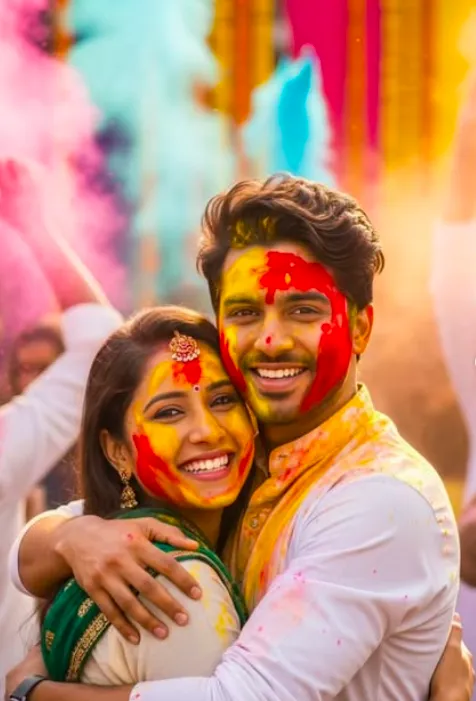
Golden Rang Embrace
Golden Rang Embrace ke liye Om Editing Top kya hai?
Om Editing Top style ka use karke aap ek simple photo ko festive, emotional aur cinematic Holi portrait mein convert kar sakte hain. Golden Rang Embrace jaisi look mein focus sirf rangon par nahi hota, balki expression, closeness, lighting aur natural realism par bhi hota hai. Is tarah ka edit un users ke liye best hai jo apni personal photo ko Indian festival vibe ke saath premium-looking social media image banana chahte hain.
Read Also: cinematic-style realistic portrait | 2026 New Year
Yeh style un logon ke liye useful hai jo couple portrait, Holi celebration photo, ya emotional festive scene create karna chahte hain. Agar aap chahte hain ki image mein warm sunlight, colorful gulal, aur soft cinematic background ek saath aaye, to Om Editing Top prompt style ek strong base deta hai. Isme face identity, natural skin texture aur realistic festival mood ka balance rakha jata hai, isliye result artificial nahi lagta.
Golden Rang Embrace ka overall impact ek joyful reunion jaisa hota hai—jahan hug, smile aur color clouds ek saath story banate hain. Is style ka sabse bada advantage yeh hai ki yeh emotional warmth ko vibrant Holi energy ke saath mix karta hai. Isi wajah se yeh editing style couple posts, festive reels cover, aur AI-generated portrait edits ke liye kaafi popular hai.
Is prompt style se aapko exactly kya result milta hai?
Om Editing Top based Holi edit mein output usually bright, soft aur highly realistic hota hai. Warm golden sunlight skin tones ko natural aur flattering banati hai, jabki gulal colors image mein festival energy add karte hain. Pink, yellow aur blue powder clouds background ko lively banate hain, aur subject ke around ek celebratory atmosphere create hota hai.
Composition aksar close portrait ya mid-shot jaisi feel deti hai, jahan hug aur face expressions clearly visible rehte hain. Shallow depth of field background crowd ko softly blur kar deti hai, jis se subject zyada prominent lagta hai. Yeh effect DSLR portrait photography jaisa feel deta hai, especially jab clothing texture aur skin detail ko properly preserve kiya jaye.
Is style ki sabse useful baat yeh hai ki yeh “festival photo” se aage nikal kar ek polished cinematic scene banata hai. Agar aap social media par standout image chahte hain, to yeh look aapko ye cheezein deta hai:
- Natural face identity aur realistic skin texture
- Warm golden-hour lighting
- Vibrant Holi powder clouds
- Soft background blur with crowd depth
- Traditional festive outfit feel
- Emotional and joyful couple composition
This Style photo ko mobile par kaise use karein?
Agar aap beginner hain, to is style ko use karna bahut easy hai. Mobile par kaam karte waqt sabse pehle apni best quality photo choose karein. Uske baad image upload karke edit prompt ya style apply karein. Dhyan rahe ki face clearly visible ho, kyunki identity consistency is type ke edit ka most important part hota hai.
Editing process mein aapko photo cropping, background fit, aur subject positioning ka dhyan rakhna chahiye. Holi style images mein composition tab sabse strong dikhti hai jab faces close hote hain aur hug ya interaction natural lagta hai. Agar app ya tool multiple variations deta hai, to warm lighting aur realistic texture wale version ko prefer karein.
Beginner-friendly step-by-step method:
- Apni clear photo select karein jisme face sharp ho aur expression natural ho.
- Photo ko AI edit tool ya image editor mein upload karein.
- Om Editing Top style ya similar festive portrait option choose karein.
- Prompt/style apply karke output generate karein.
- Result mein face match, hand placement, lighting aur colors check karein.
- Best version ko save karein aur zarurat ho to brightness ya crop adjust karein.
Mobile users ke liye ek practical tip yeh hai ki editing ke baad image ko over-edit na karein. Agar skin too smooth ho jaye ya colors too strong lagne lagen, to realism kam ho jata hai. Best output wahi hota hai jo festive bhi lage aur natural bhi.
Kaunsi photos This Style ke liye sabse achchi rehti hain?
Golden Rang Embrace style mein best result tab aata hai jab input photo high-quality ho aur face clearly visible ho. Front-facing ya slightly angled photo usually zyada achchi rehti hai, kyunki isme identity details clearly preserve hote hain. Aise images jinmein blur, low light ya heavy shadow ho, unse output utna strong nahi aata.
Lighting bhi bahut important role play karti hai. Agar original photo mein natural daylight ya soft indoor light ho, to AI edit usse festive golden look mein easily convert kar leta hai. Background simple ya uncluttered ho to aur bhi better hota hai, kyunki subject par focus bana rehta hai. Holi-style scenes mein busy background add hota hai, isliye input photo ka clean hona helpful hota hai.
Clothing selection bhi result ko impact karti hai. Traditional outfit, pastel kurta, saree, ya festive wear jaisi clothing photos mein texture aur color mapping better lagti hai. Best practical checklist:
- Face sharp aur clearly visible ho
- Photo high resolution ho, preferably well-lit
- Front or 3/4 angle sabse effective hota hai
- Background simple, plain, ya lightly detailed ho
- Natural smile ya calm expression ho
- Traditional ya festive clothing output ko aur authentic banati hai
- Aise photos avoid karein jahan face partially covered ho
Agar aap chahein ki Om Editing Top style mein Holi glow aur emotional embrace dono perfectly aayein, to input photo ka clarity level sabse pehle check karein. Jitni clean base image hogi, utna hi realistic aur premium final result milega.
Pro Tips for the Best Results with Om Editing Top
अगर आप Om Editing Top style images में सबसे natural और premium look चाहते हैं, तो reference photo को सही चुनना बहुत important होता है। ऐसी photo लें जिसमें face clearly visible हो, lighting balanced हो, और hair, skin tone, expression, और angle clean तरीके से दिख रहे हों। जितना better आपका base photo होगा, उतना ही output realistic लगेगा.
यह भी ध्यान रखें कि prompt में pose, mood, outfit, और background को clearly define करना चाहिए। Holi जैसे festive scene में warm sunlight, colorful powder, and realistic facial texture output को cinematic बनाते हैं। अगर आप upload quality और subject clarity पर ध्यान देंगे, तो this style results ज्यादा sharp, authentic, और social-media ready आएंगे.
- High-resolution face photo use करें ताकि identity details साफ रहें.
- Front-facing ya slightly angled portrait चुनें, जिससे face mapping accurate रहे.
- Background simple रखें, ताकि subject separation बेहतर हो.
- Festive outfits के लिए bright but natural colors select करें.
- Lighting conditions balanced रखें, overexposed या too dark images avoid करें.
- अगर realistic effect चाहिए, तो skin texture और shadows को preserve करने वाला input दें.
Best results के लिए prompt में mood words भी helpful होते हैं, जैसे warm glow, festive joy, natural skin texture, DSLR portrait, और shallow depth of field. ये details image को flat नहीं बनने देतीं, बल्कि उसे polished editorial feel देती हैं. इस तरह this prompt prompt से output ज्यादा expressive और premium दिखता है.
Common Mistakes to Avoid in This Edits
सबसे common mistake है low-quality या blurry face photo upload करना. जब input साफ नहीं होगा, तो face identity distort हो सकती है, और final image artificial लग सकती है. इसी तरह बहुत ज्यादा filters या beauty edits पहले से applied photo भी output की naturalness खराब कर सकती है.
दूसरी बड़ी mistake है prompt को overcomplicate करना. अगर आप एक ही prompt में बहुत सारे conflicting details डाल देंगे, तो model confused हो सकता है। Simple, clean, and precise directions हमेशा बेहतर काम करती हैं. this look style edits में balance बहुत जरूरी है — realistic look के लिए clarity, not overload.
- Blurry face photo: identity details weak हो जाते हैं और result less accurate दिखता है.
- Harsh lighting input: shadows face features को unbalanced बना सकते हैं.
- Too much background clutter: subject focus कम हो जाती है.
- Over-editing before upload: natural skin texture lose हो सकती है.
- Confusing prompt instructions: pose, clothes, और atmosphere inconsistent हो सकते हैं.
- Wrong aspect ratio: Instagram, thumbnail, या profile use के लिए framing awkward हो सकती है.
अगर आपका goal natural festive output है, तो face identity, pose, and lighting को priority दें. Extra effects बाद में add किए जा सकते हैं, लेकिन foundation हमेशा strong होना चाहिए. यही reason है कि yeh style workflow में clean input सबसे powerful step माना जाता है.
Best Use Cases and Creative Ideas for These Images
this edit style images का use सिर्फ एक festival edit तक limited नहीं है. इन्हें आप Instagram posts, profile pictures, festive story cards, reels covers, wedding-themed content, and portfolio highlights के लिए use कर सकते हैं. Holi vibe के साथ यह style instantly eye-catching बन जाता है, especially when the colors and expressions look authentic.
Creators और social media users के लिए ये visuals branding में भी useful होते हैं. अगर आप content pages, editing pages, or personal branding run करते हैं, तो ऐसे images seasonal campaigns में बहुत अच्छी performance दे सकते हैं. Warm lighting, colorful powder, and joyful expressions image को celebration-ready बनाते हैं, जिससे audience का attention जल्दी grab होता है.
- Instagram feed posts: festive and vibrant look के लिए.
- Profile pictures: clean, colorful, and identity-focused portrait के लिए.
- Thumbnails: bold colors की वजह से instant click appeal मिलती है.
- Reels covers: Holi, festival, or celebration content के लिए.
- Portfolios: AI photo editing samples show करने के लिए.
- Greeting cards: personalized festive wishes बनाने के लिए.
अगर आप किसी special occasion के लिए content बना रहे हैं, तो same base photo से multiple outputs भी try कर सकते हैं। एक version में more cinematic lighting, दूसरे में brighter festival colors, और तीसरे में softer romantic mood रखा जा सकता है. इस तरह this style edits multiple platforms पर reuse किए जा सकते हैं without feeling repetitive.
Variations You Can Try with This Style
एक ही concept को अलग-अलग moods में test करना बहुत useful होता है. अगर आप this prompt image को different styles में explore करेंगे, तो आपको पता चलेगा कि कौन-सा look आपकी audience या purpose के लिए best काम करता है. Mood, colour palette, season, and background बदलने से same face reference के साथ पूरी image story बदल सकती है.
For example, Holi scene को more vibrant celebration mode में रखा जा सकता है या slightly soft cinematic mode में. आप traditional festive wear को richer colours में try कर सकते हैं, या lighter natural tones के साथ elegant look बना सकते हैं. Background crowd, powder intensity, और sunlight direction को बदलकर भी output में variety लाई जा सकती है.
- Mood variations: joyful, romantic, cinematic, playful, or dreamy.
- Colour variations: pink-heavy, yellow-dominant, blue accents, or multi-color gulal.
- Setting variations: crowded festival scene, open field, street celebration, or temple-style backdrop.
- Season variations: bright summer Holi, golden evening glow, or soft cloudy daylight.
- Outfit variations: traditional kurta, festive saree, ethnic couple wear, or modern fusion styling.
- Camera style variations: close portrait, half-body embrace, or wide cinematic composition.
आप minor changes करके भी बहुत अलग results पा सकते हैं. जैसे अगर आप sunlight को warmer करेंगे, तो image more emotional लगेगी; अगर powder colors को stronger करेंगे, तो scene energetic लगेगा. यही flexibility this look concept को इतने useful बनाती है कि हर user अपने हिसाब से custom festive portrait बना सकता है.
Conclusion: Try This Style for a More Festive Look
अगर आप realistic, vibrant, and social-media-ready festival portraits बनाना चाहते हैं, तो yeh style एक strong creative direction है. सही reference photo, clean instructions, and balanced colours के साथ आप ऐसा output पा सकते हैं जो natural भी लगे और visually striking भी.
अब आप अलग-अलग moods, outfits, और backgrounds के साथ experiment कर सकते हैं और अपने लिए सबसे best version ढूंढ सकते हैं. this edit style images खास तौर पर तब बहुत अच्छे लगते हैं जब उनमें celebration, authenticity, and cinematic warmth का सही mix हो.
💬 Comments