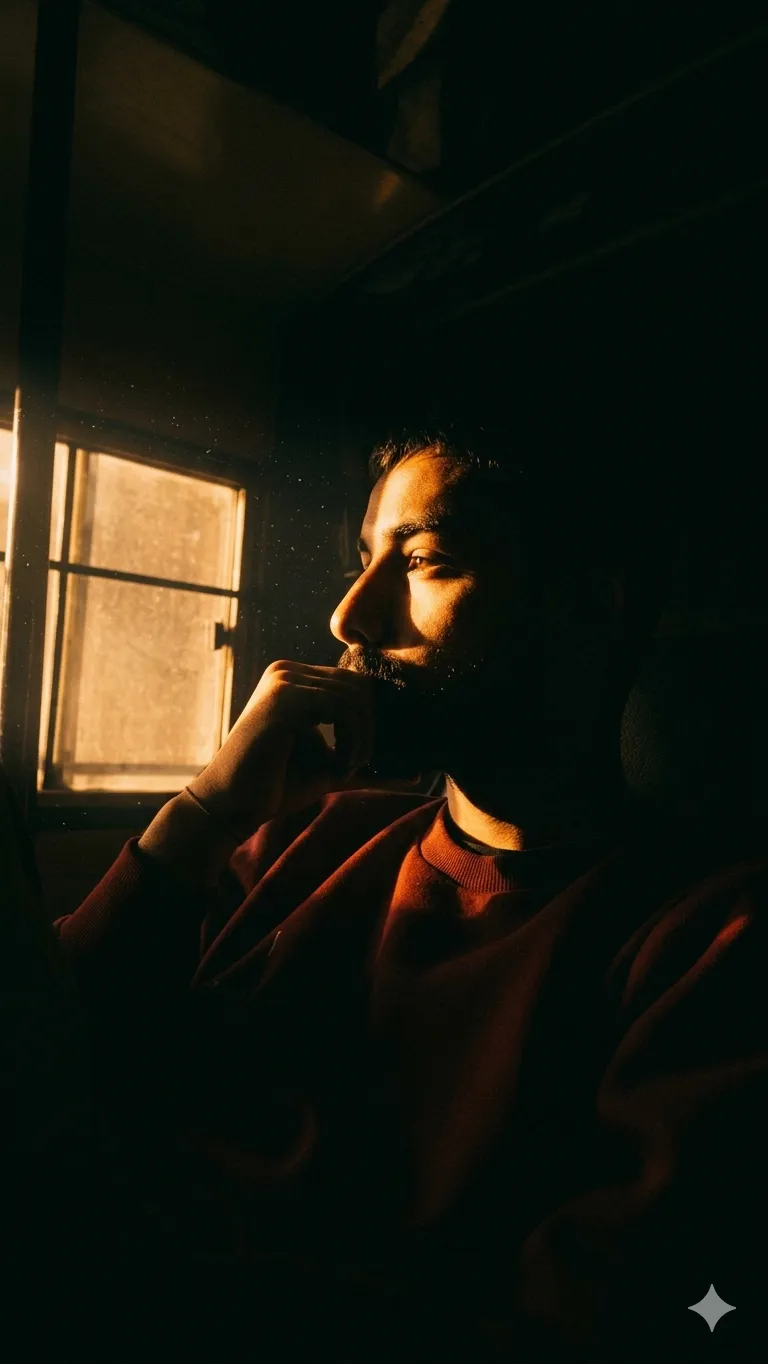
Low light colour grading
Low light colour grading ka matlab kya hota hai?
Low light colour grading ek aisa visual style hai jo dark, moody aur cinematic look create karta hai. Is type ka editing style un creators ke liye useful hota hai jo portrait photos, cinematic reels, poster-style images ya dramatic social media visuals banana chahte hain.
Read Also: cinematic-style realistic portrait | 2026 New Year
Is look mein light usually controlled hoti hai, shadows zyada deep hote hain, aur colours ko carefully tone karke image ko emotionally strong banaya jata hai. Agar aap low-light photography, moody portrait editing, ya cinematic photo enhancement seekh rahe hain, to yeh style aapke kaafi kaam aa sakta hai.
Low light colour grading sirf image ko dark karna nahi hota. Isme contrast, highlights, shadow detail, skin tone balance aur colour temperature ko is tarah adjust kiya jata hai ki photo natural bhi lage aur dramatic bhi. Isi wajah se yeh style Instagram, portfolio, thumbnail design aur creative poster work mein kaafi popular hai.
Ye photo style actually kya output deta hai?
Jab aap Om Editing Top type low light edit use karte ho, to image ka overall mood instantly change ho jata hai. Bright, flat photo ek cinematic frame mein convert ho sakti hai jisme warm tones, deep blacks aur strong side lighting ka feel aata hai. Yeh style viewer ki nazar seedha subject par le aata hai.
Is look ki sabse badi strength iska atmosphere hai. Light usually ek side se aa rahi hoti hai, jis se face ya subject par depth banti hai. Background zyada busy nahi lagta, aur subject zyada prominent dikhta hai. Is wajah se photo zyada professional, emotional aur storytelling-based feel karti hai.
Common visual traits jo aap expect kar sakte hain:
- Deep shadows aur controlled highlights
- Warm amber, golden, ya orange colour cast
- Moody, cinematic, and slightly mysterious vibe
- High contrast composition with subject separation
- Film-like grain ya textured finish
Agar aap chahte ho ki photo plain na lage aur usme ek dramatic story feel ho, to yeh style bahut effective hai. Especially portraits mein yeh face ke contours, jawline, eyes aur expression ko visually stronger banata hai.
Om Editing Top style ko mobile par kaise use karein: step-by-step guide
Is style ko use karna beginner-friendly ho sakta hai, bas aapko image selection aur editing flow sahi rakhna hoga. Mobile par bhi aap strong low-light color grading achieve kar sakte ho, chahe aap Lightroom, Snapseed, VSCO ya kisi aur editing app ka use kar rahe ho.
Sabse pehle apni photo ko samjho: subject kaha hai, light kis direction se aa rahi hai, aur background kaise behave kar raha hai. Low light edits tab best kaam karte hain jab image mein already thoda natural contrast ho. Bilkul flat ya overexposed photo par yeh style utna effective nahi hota.
Simple step-by-step process:
- Apni best photo select karo jisme subject clear ho aur face properly visible ho.
- Exposure ko thoda down karo agar image bahut bright hai.
- Contrast badhakar dark areas aur highlights ke beech difference create karo.
- Highlights reduce karo taaki bright spots controlled lagein.
- Shadows ko thoda adjust karo, but itna nahi ki depth khatam ho jaye.
- Temperature warm side par shift karo agar golden-orange cinematic feel chahiye.
- Black point ya curve adjustment se deeper blacks create karo.
- Clarity ya structure ko lightly enhance karo taaki subject crisp lage.
- Optional grain add karo for a film-style finish.
- Final export se pehle skin tone aur overall colour balance check karo.
Mobile users ke liye ek practical tip: ek hi baar mein zyada aggressive changes mat karo. Small edits karke preview dekho, phir next adjustment karo. Isse photo natural bhi lagegi aur over-edited bhi nahi dikhegi.
Which photos low light colour grading ke liye best hoti hain?
Sab photo is style ke liye suitable nahi hoti. Best results un images mein aate hain jahan subject ka face ya body form clearly readable ho, aur light ka direction already visible ho. Agar photo mein thoda mystery, silence, ya emotional tone ho, to ye look aur bhi strong ho jata hai.
Portraits is style mein sabse achha kaam karte hain, especially side-lit ya window-lit shots. Agar subject ek dark room, dim background, ya controlled indoor light mein ho, to grading se cinematic depth aur bhi increase ho sakti hai. Outdoor photos mein bhi yeh style kaam karta hai, but wahan source light aur background clutter ko manage karna padta hai.
Best photo selection checklist:
- Angle: 3/4 angle, side profile, ya slightly turned face zyada cinematic lagta hai
- Resolution: High-resolution image lo taaki grading ke baad details mushkil na hon
- Lighting: One-side light, window light, ya low ambient light best hoti hai
- Background: Clean, dark, or simple background subject ko isolate karta hai
- Clothing: Solid colours, dark tones, ya minimal patterns zyada suited hote hain
- Expression: Calm, serious, thoughtful, ya intense expression mood ko support karta hai
Agar aap close-up portrait use kar rahe ho, to eyes aur face ke highlights important hote hain. Wide shot mein subject aur background ka balance dekhna padta hai. Jo photo already moody ho, us par low light colour grading sabse naturally aur professional tarike se kaam karti hai.
Om Editing Top ke liye Pro Tips for Best Results
Low light colour grading mein sabse important cheez balance hoti hai. Agar highlights bahut zyada bright ho jaayein ya shadows completely crush ho jaayein, to image ka cinematic feel khatam ho sakta hai. Isliye Om Editing Top style output ke liye pehle exposure check karo, phir colour tones ko step by step refine karo.
Best results ke liye soft adjustments use karo aur ek hi time par sab kuch extreme mat karo. Warm tones, deep contrast aur controlled grain ka combination low light portraits ko premium look deta hai. Agar aap Instagram ya reel cover ke liye edit kar rahe ho, to face detail ko clear rakhna aur background ko moody banana sabse effective hota hai.
Yeh kuch practical do’s follow karo:
- Skin tones ko natural rakho, chahe overall grading warm ya dark ho.
- Contrast ko gradually increase karo taaki details lose na hon.
- Highlights ko control karo, especially window light ya lamp glow ke around.
- Shadows mein thoda depth do, but pure black clipping se bacho.
- Warm amber ya golden tint ko selective areas mein use karo for cinematic feel.
- Grain ko subtle rakho, taaki image film-like लगे but noisy na लगे.
Common Mistakes to Avoid in Om Editing Top Style Edits
Low light colour grading mein sabse common mistake over-editing hoti hai. Jab aap clarity, saturation, contrast aur sharpness sabko ek saath high kar dete ho, to output artificial lagne lagta hai. Om Editing Top type look ka real charm subtle control mein hota hai, not in overdone effects.
Ek aur mistake hai colour harmony ko ignore karna. Agar background cool hai aur skin tones too orange ho gaye, to portrait unbalanced dikh sakta hai. Isi tarah, shadows ko bahut zyada dark kar dene se eyes, hair detail, aur clothing texture hide ho jaati hai. Yeh chhoti mistakes final image ki quality ko directly hurt karti hain.
- Too much saturation: colours fake lagte hain aur cinematic mood break ho jata hai.
- Over-sharpening: skin texture harsh dikhti hai aur portrait natural nahi लगता.
- Pure black shadows: important details disappear ho jaati hain.
- Blown highlights: bright areas washed out ho kar image ko flat bana dete hain.
- Mixed colour temperatures: warm aur cool tones control ke bina clash karte hain.
- Too much grain: output messy lagta hai, especially social media preview mein.
Om Editing Top Images Ka Best Use Kahan Kaha Jaa Sakta Hai
Low light colour graded images ka use sirf portrait photography tak limited nahi hota. Om Editing Top style visuals Instagram posts, profile pictures, YouTube thumbnails, reels covers aur creative portfolios ke liye bahut strong option hote hain. Inka moody look attention grab karta hai aur feed ko premium feel deta hai.
Agar aap personal branding kar rahe ho, to aise edits profile image ya banner visuals mein bhi kaam aate hain. Photographers, editors, influencers aur artists apne portfolios mein in images ko use karke apni style language showcase kar sakte hain. Dark cinematic tones audience ko instantly notice karwa dete hain.
Some popular use cases:
- Instagram feed posts: moody aesthetic aur consistent theme ke liye.
- Profile pictures: dramatic lighting ke saath strong presence banane ke liye.
- YouTube thumbnails: emotional, serious ya cinematic content ko highlight karne ke liye.
- Reels covers: scroll-stopping visual impact ke liye.
- Creative portfolios: editing style aur colour grading skill show karne ke liye.
Om Editing Top Ke Saath Try Karne Wali Variations
Agar aap same low light concept ko alag moods mein experiment karna chahte ho, to colour palette aur lighting direction ke saath khelna best strategy hai. Om Editing Top style ko slightly warm, cooler, or more dramatic bana kar aap multiple looks generate kar sakte ho without losing the core cinematic feel.
Seasonal variations bhi kaafi effective hoti hain. Winter moods mein cooler shadows aur muted tones achhe lagte hain, jabki autumn ya evening vibe ke liye amber, orange, aur brown gradients zyada attractive dikhte hain. Indoor window light, neon reflections, aur soft side lighting har ek version ko unique bana sakte hain.
- Warm amber version: golden skin tones aur deep black background ke saath.
- Cool blue version: mysterious aur modern cinematic feel ke liye.
- Desaturated version: minimal, serious aur editorial look ke liye.
- Rainy mood version: reflective highlights aur darker ambience ke saath.
- Autumn tone version: earthy oranges, browns aur soft glow ke saath.
- High-contrast version: strong light/shadow separation ke liye.
Conclusion: Om Editing Top Style Ko Try Karke Dekho
Low light colour grading ka real power tab dikhta hai jab aap light, shadow aur colour ko carefully control karte ho. Om Editing Top style isi cinematic balance par based hai, jahan subject clear bhi hota hai aur mood bhi strong rehta hai. Agar aap apne portraits ko bold, dramatic aur professional banana chahte ho, to yeh approach definitely try karni chahiye.
Ab aap different tones, contrast levels aur lighting moods ke saath experiment karke apna perfect look bana sakte ho. Om Editing Top ke saath chhote changes bhi big impact de sakte hain, isliye settings ko slowly test karo aur apne style ke hisaab se refine karo.
💬 Comments