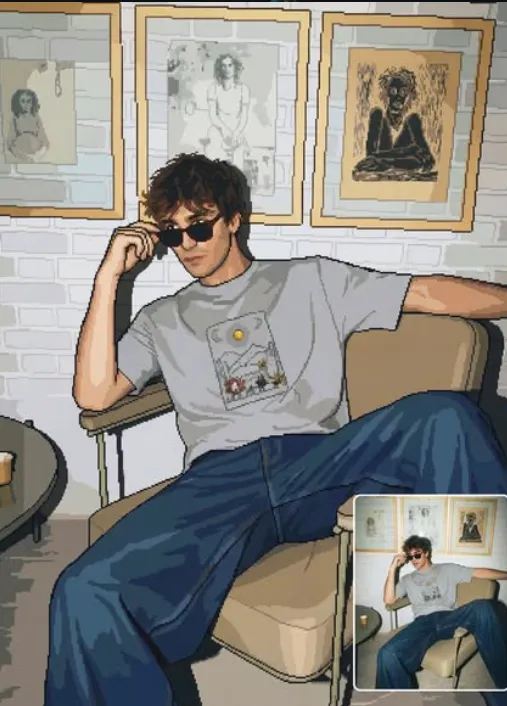
Retro Pixel Rebirth
Om Editing Top: Retro Pixel Rebirth ka matlab kya hai?
Om Editing Top style ka Retro Pixel Rebirth un logon ke liye hai jo apni normal photo ko old-school game art jaisa look dena chahte hain. Ye sirf “pixel effect” nahi hota, balki image ko aise transform karta hai ki wo clean, readable aur authentic retro sprite jaisi lage.
Read Also: cinematic-style realistic portrait | 2026 New Year
Is style ka main purpose hota hai original subject ko preserve karte hue usko 32-bit ya classic 8-bit game aesthetic me convert karna. Agar aap creator, designer, gamer, meme page owner, ya social media content maker ho, to ye look aapki profile, thumbnails, posts aur digital art projects ko instantly alag bana sakta hai.
Om Editing Top prompt style ka faida ye hai ki ye beginner-friendly bhi hota hai aur visually strong bhi. Aapko complicated editing seekhne ki zarurat nahi hoti, bas sahi photo choose karni hoti hai aur result me pixel-perfect, retro-inspired output milta hai jo vintage gaming nostalgia ko modern clarity ke saath combine karta hai.
Is prompt style se aapko kya output milta hai?
Retro Pixel Rebirth style ka output usually clean pixel blocks, hard edges aur simple shading ke saath aata hai. Image ke forms ko simplify kiya jata hai, lekin subject ki identity safe rehti hai. Iska matlab chehra, pose, outfit ya main object recognizable rehte hain, bas details ko retro game art ke hisaab se reduce kar diya jata hai.
Color palette generally limited hoti hai, jisme strong contrast aur clear separation dikhai deti hai. Shadows soft blur me nahi hote; unko flat tones me convert kiya jata hai. Isi wajah se image ek authentic classic game sprite jaisi feel deti hai—clean, old-school aur visually balanced.
Ye style especially un photos par achha lagta hai jahan subject clearly visible ho. Final image me aapko crisp outlines, uniform pixel size, aur grid-aligned finish milti hai. Agar prompt sahi tarike se use hua ho, to result noisy ya smudged nahi lagta, balki ek polished retro artwork jaisa dikhta hai.
- Clean pixel art look with sharp edges
- Limited retro-style color palette
- Flat shading and simplified lighting
- Recognizable subject and silhouette
- Classic NES-era sprite feel
This Style prompt ko mobile par kaise use karein?
Agar aap beginner ho, to sabse pehle image ko carefully select karo. Mobile par kaam karte waqt seedha gallery se ek clear photo choose karna best hota hai—jisme subject poora visible ho aur image over-edited na ho. Retro pixel style me clarity bahut important hoti hai, kyunki AI ko shapes ko simplify karke readable banana hota hai.
Uske baad copy box me diya gaya prompt use hota hai. Aapko prompt ka text manually edit ya change nahi karna chahiye agar aap exact style chahte ho. Bas photo upload karo, style apply karo, aur output generate hone do. Agar result me facial details ya object edges blur lag rahe ho, to better source photo try karna zyada useful hota hai than over-adjusting settings.
Mobile workflow ko simple rakhne ke liye ye steps follow karo:
- Apni best clear photo gallery se select karo.
- Image ko crop karo, lekin subject ka important part mat kaato.
- Prompt box me diya gaya style apply karo.
- Generate button dabao aur output wait karo.
- Result check karke compare karo ki silhouette clear hai ya nahi.
- Agar zarurat ho to dusri photo ke saath repeat karo.
Sabse achha result tab aata hai jab aap ek simple, direct subject wali image use karte ho. Complex background ya bahut zyada small details kabhi-kabhi pixel art conversion ko messy bana sakte hain. Isliye mobile users ke liye best approach hoti hai: simple photo, stable lighting, aur clear composition.
Kaunsi photos Retro Pixel Rebirth ke liye best kaam karti hain?
Is style ke liye best photos wo hoti hain jisme subject ka angle clear ho aur image me unnecessary clutter na ho. Front-facing ya slightly angled portraits achhe lagte hain, kyunki pixel art me recognizable silhouette bahut important hoti hai. Agar photo me body, face ya main object fully visible hai, to result zyada balanced aata hai.
Resolution bhi important hai. Bahut low-quality photo me AI ko detail samajhne me problem ho sakti hai, jabki over-sharp ya heavily filtered image sometimes unnatural pixel shapes bana deti hai. Ideal choice ek clean, well-lit image hoti hai jisme original details enough ho, but noise kam ho.
Lighting aur background bhi output ko directly affect karte hain. Soft daylight, even indoor lighting, ya clear studio-style light pixel conversion ke liye best hoti hai. Dark, blurry, ya busy background se retro output cluttered lag sakta hai. Simple clothing aur solid colors bhi better kaam karte hain kyunki AI ko forms ko blocky retro shapes me convert karna easy hota hai.
- Clear front or slight side angle photos
- Good resolution with visible subject details
- Soft, even lighting without harsh shadows
- Plain or low-clutter background
- Simple clothing, bold colors, minimal patterns
- Portraits, full-body shots, or single-object images
Best results ke liye aisi photo choose karo jo naturally readable ho. Agar image already too dark, too crowded, ya too blurry hai, to retro pixel style uski clarity aur reduce kar sakta hai. Isliye Om Editing Top ke saath success ka secret ye hai: simple input, strong subject, aur clean lighting.
Om Editing Top के लिए Pro Tips
अगर आप Om Editing Top style को genuinely clean, balanced और eye-catching बनाना चाहते हैं, तो सबसे पहले source image का structure समझना जरूरी है। Retro pixel look में हर detail same level पर important नहीं होती, इसलिए subject ke main shapes, face outline, hair mass, outfit blocks aur background separation ko prioritize करें. Is tarah output zyada readable aur game-sprite style ke close dikhega.
Best results tab aate hain jab input image already clear ho. Strong lighting, front-facing ya slightly angled pose, aur simple background pixel conversion ko aur smooth banाते hain. Agar image me too much clutter ho, to final art bhi busy lag sakti hai. Isliye composition ko clean rakhna aur subject ko frame ke center ya rule-of-thirds ke around place karna helpful hota hai.
- High-contrast photo choose karein, taaki important edges easily define ho saken.
- Background ko simple rakhein, especially agar aap portrait ya profile-style output chahte hain.
- Subject ke main colors ko preserve karein, but unnecessary micro-details ko reduce karein.
- Square ya vertical crop ka use karein, depending on Instagram post, reel cover, ya thumbnail need.
- Agar multiple versions test kar rahe hain, to same pose par different color palettes try karein.
Ek aur important tip ye hai ki retro pixel art me over-detailing se बचना चाहिए. Agar image me too many tiny accessories, textures, ya background objects hon, to final result noisy lag sakta hai. Simple shapes aur strong silhouette hi is style ko authentic banate hain. यही reason hai ki Om Editing Top prompts ke साथ clean composition aur limited palette sabse zyada effective hoti hai.
Common Mistakes to Avoid in This Style
Sabse common mistake hoti hai source image ko is style ke liye optimize kiye bina use karna. Agar original photo dark, blurry, ya low-resolution hai, to pixel conversion me edges aur face features mushkil se readable rahte hain. Iska result ek aisa output ho sakta hai jo retro ke बजाय messy lage. Isliye starting image jitni clear hogi, final image utni hi sharp aur balanced dikhegi.
Ek aur mistake hai too much color variation. Classic pixel art ka charm limited palette aur flat shading me hota hai. Agar output me gradients, soft blur, ya over-smooth transitions aa jayein, to authentic 8-bit ya 32-bit vibe lost ho jati hai. Isi tarah, anti-aliasing ya fuzzy edges bhi sprite-like crispness ko damage kar sakte hain.
- Very busy backgrounds use na karein, kyunki subject ka focus kam ho jata hai.
- Overly detailed clothing patterns avoid karein; pixel art me patterns ko blocky simplify karna better hota hai.
- Face ko too much compress na karein, warna expression unreadable ho sakta hai.
- Mixed lighting scenes se बचें, because pixel shading flat aur consistent rehni chahiye.
- Random noise or texture effects add na karein, because clean retro output ki authenticity kam ho jati hai.
Bahut log ye bhi galti karte hain ki composition ke original subject proportions ko ignore kar dete hain. Pixel art me simplification ka matlab distortion nahi hota. Subject ko recognizable rakhna zaroori hai, warna style toh retro lagega, lekin identity खो सकती hai. Isi liye Om Editing Top ke best versions me clarity, balance aur simplicity teenon ka sahi mix hota hai.
Best Use Cases for These Images
Om Editing Top style images ka use kaafi versatile hai, especially agar aap social media pe standout visual identity banana chahte hain. Retro pixel art profile pictures ke liye bahut strong option hai, kyunki ye instantly attention grab karta hai aur regular photo se alag lagta hai. Instagram feeds me bhi ye unique grid aesthetic create karta hai.
Thumbnails aur reels covers ke liye bhi ye style useful hai, kyunki bold shapes aur sharp contrast small screen par bhi clearly visible रहते हैं. Agar aap content creator, gamer, ya nostalgia-based brand ho, to pixel art visual aapke posts ko instantly recognizable bana sakta hai. Portfolio showcase me bhi ye fun experiment ki tarah kaam karta hai, especially jab aap apne creative style ko diversify karna chahte hain.
- Instagram posts: eye-catching retro aesthetic aur clean feed consistency ke liye.
- Profile pictures: simple silhouette aur readable face output ke liye.
- YouTube thumbnails: high-contrast small-size visibility ke liye.
- Reels covers: scroll-stopping pixel look create karne ke liye.
- Portfolios: creative editing skills aur style experimentation show karne ke liye.
Agar aap personal branding kar rahe hain, to is style ka use seasonal campaigns, gaming themes, ya retro-inspired announcement posts me bhi kar sakte hain. Om Editing Top visual format especially tab kaam aata hai jab aapko modern photo ko nostalgic digital-art piece me turn karna ho, without losing the core identity of the subject.
Variations You Can Try with This Style
Is style ki biggest strength ye hai ki aap same subject ko different moods me experiment kar sakte hain. Ek hi image ko warm sunset tones, cool neon palette, ya muted vintage colors me convert karke totally different vibe mil sakti hai. Isi flexibility ki wajah se this style multiple social media themes ke liye useful ban jata hai.
Season-based variations bhi kaafi interesting hote hain. Summer versions me bright blues, sandy beige aur sunny highlights achhe lagte hain. Winter mood ke liye cool grays, deep blues aur soft white accents ka effect strong hota hai. Autumn look ke liye oranges, browns aur gold tones retro feeling ko aur rich bana dete hain.
- Mood variations: happy, moody, dramatic, dreamy, or heroic look.
- Colour variations: neon cyber, warm vintage, pastel retro, or classic game tones.
- Setting variations: plain backdrop, city scene, room interior, or outdoor landscape.
- Seasonal variations: summer bright, monsoon cool, winter crisp, autumn earthy.
- Format variations: square profile version, tall portrait version, or wide thumbnail crop.
Aap subject ke expression aur camera angle ke saath bhi play kar sakte hain. Slightly confident pose, side profile, ya centered front pose — har option ka pixel-art impact alag hota hai. Agar aap experiment karna chahte hain, to same image ko multiple palettes aur lighting moods me test karein. this prompt ka charm isi me hai ki chhoti si change bhi output ko naya personality de sakti hai.
Conclusion: This Style Ko Try Karke Dekhein
Agar aapko clean retro vibe, strong silhouette aur authentic pixel-art feel chahiye, to this look ek great direction hai. Ye style simple bhi hai aur visually powerful bhi, especially jab aap subject ko readable aur balanced rakhte hain. Sahi image selection, limited palette aur crisp edges ke saath result kaafi polished lag sakta hai.
Ab aap different moods, colors aur use cases ke saath experiment karke apna perfect version bana sakte hain. चाहे Instagram post ho, profile picture ho ya thumbnail, yeh style aapke visuals ko retro identity aur unique personality dono de sakta hai. Try karke dekhein aur dekhein ki classic pixel look aapke content ko kaise naya life deta hai.
💬 Comments