Profile Portrait AI Prompt
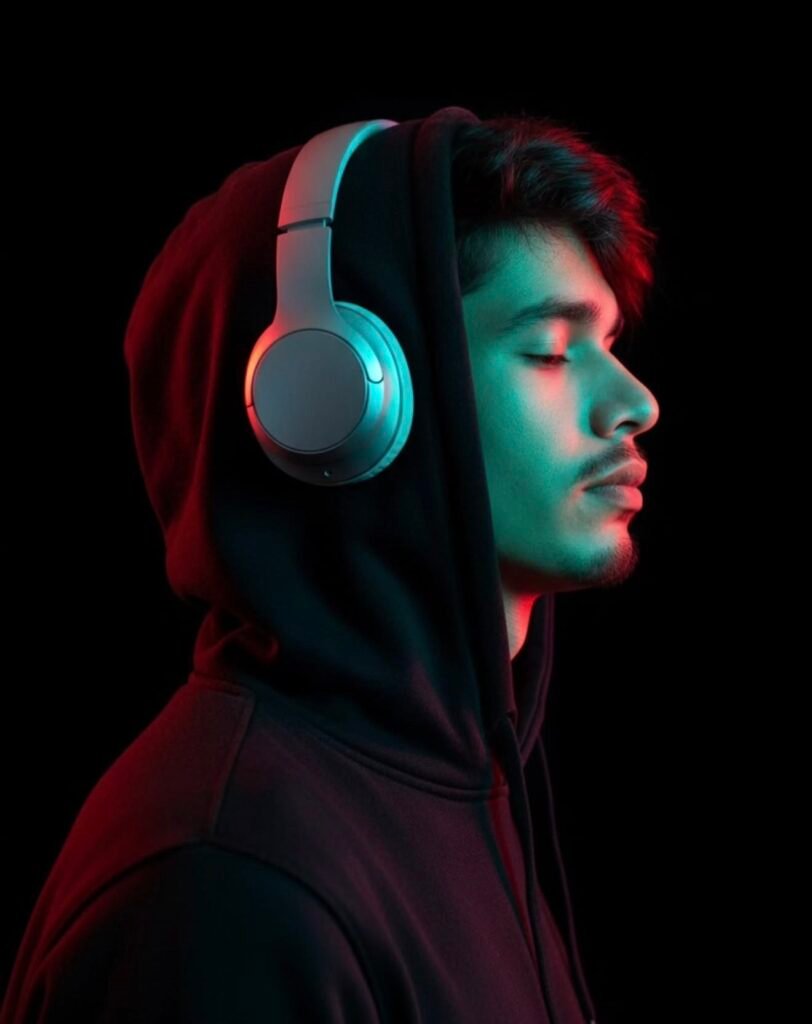
Profile Portrait AI Prompt: Clean Side-Profile Aesthetic
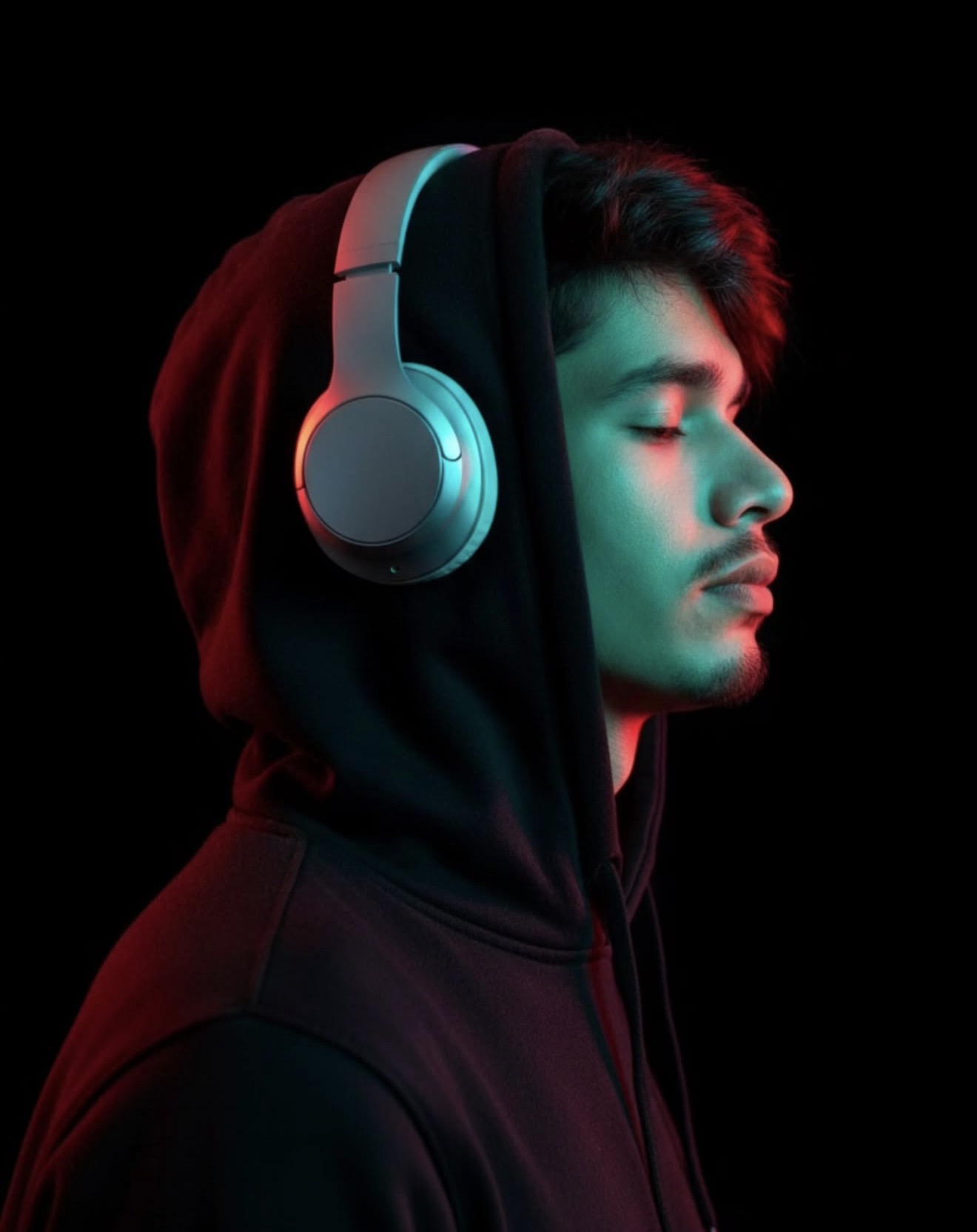
This profile portrait AI prompt creates a clean side-profile edit for social media and creative work. Dark background, neon rim lighting, headphones, and a calm closed-eye expression combine into a moody, cinematic, and premium visual identity.
Read Also: Cinematic Realistic Portrait AI Prompt
What This Style Delivers
The core of this look is a clean side profile with strong contrast between subject and background. Neon rim light traces the jawline, nose, and headphone edges, while a pure dark background keeps all the focus on the subject.
- Sharp side-profile silhouette
- Neon cyan/red rim lighting for a cinematic edge
- Calm, closed-eye or relaxed expression
- Pure black or very dark uncluttered background
- Natural skin texture with subtle retouching
- Headphones or minimal accessories as a signature detail
How to Use This Style: Step-by-Step
- Choose a clear side-profile photo with the background as simple as possible.
- Open the photo in your editing/upload tool.
- Crop so the subject sits centered or slightly off-center in the frame.
- Use a high-contrast editing option to match the lighting.
- Apply a dark background with neon-tone rim lighting.
- Preserve or add headphone/hoodie details for the signature look.
- Sharpen the final image and check the details.
If the first attempt doesn’t look perfect, adjust the angle and lighting and try again. Avoid low-quality source images — side-profile details and the rim-light effect only look clean when the source photo is sharp.
Which Photos Work Best
The best photos for this style have a clearly visible side angle. A pure front-facing photo doesn’t suit this look as well, since the core idea is a side profile with a calm expression. A slight side-turn photo makes the result more convincing.
- Angle: a clear side profile or 3/4 profile works best
- Resolution: sharp, high-quality image
- Lighting: even light or soft natural light
- Background: simple, plain, distraction-free
- Clothing: hoodie, plain t-shirt, or minimal streetwear
- Expression: calm, relaxed, natural
The cleaner and more focused your original photo, the stronger the final “profile portrait” result. This edit is especially good for anyone who wants to add a cinematic mood and a high-end visual identity to their image.
Pro Tips for the Best Results
Keep the face outline, headphone reflections, and hoodie edges sharp so the subject stays clearly separated from the background. Input photo clarity matters a lot — the source image directly affects how clean the neon contrast and skin retouch look.
- Choose a side-profile photo where the jawline and nose contour are clearly visible.
- Keep outfit plain and accessories minimal so focus stays on the face and headphones.
- Keep the background uncluttered, ideally pure black or a very dark tone.
- Use high-contrast lighting while preserving skin detail.
- Keep rim light subtle so it highlights headphone edges and hair outline without overpowering the face.
- Keep retouching natural — avoid making the skin overly smooth.
If you’re creating multiple images in this style, keep the same mood, angle, and color palette for a cohesive, professional series — useful for personal branding.
Common Mistakes to Avoid
- Overexposed neon lights: wash out face details and make the image feel harsh.
- Busy background: breaks the pure-black mood and distracts attention.
- Unnatural skin retouch: an overly smooth face looks fake.
- Wrong angle: an unclear side profile weakens the whole concept.
- Excessive blur: shallow depth of field should stay subtle, not soften the subject itself.
- Mismatched clothing: random outfits break the urban-cinematic theme.
Inconsistent lighting direction is another issue — key light and rim light should feel intentional so the red-cyan contrast looks elegant and the silhouette stays strong.
Best Use Cases and Creative Ideas
This style’s biggest strength is its versatility — use it as a profile picture, gaming avatar, artist branding, or premium social media display image. The dark background and neon accents make it stand out even at thumbnail size.
- Instagram profile picture: minimal, stylish, instantly recognizable.
- YouTube thumbnail: a dramatic portrait element for strong branding.
- Reel cover: the neon contrast is scroll-stopping.
- Portfolio banner: a polished identity visual for creative professionals.
- Gaming or music profile: a dark, cinematic tone that fits genre-based branding.
- Wallpaper or lock screen: a moody, premium personal aesthetic.
Variations You Can Try
- Moody black-and-red: high drama, intense portrait feel.
- Cool cyan aesthetic: cleaner, futuristic, sleek look.
- Purple neon mix: artistic and modern social media vibe.
- Soft cinematic version: lower contrast, subtle beauty-retouch feel.
- Night street style: a city-inspired variant with deeper shadows.
- Minimal luxury look: less glow, more polished profile aesthetic.
Conclusion: Try This Style for a Premium Profile Portrait
If you want a portrait that’s simple, cinematic, and instantly premium-feeling, this style is a strong choice. Side profile, closed eyes, neon lighting, and a black background come together into a clean visual identity that performs well on social platforms.
FAQ: Profile Portrait
How do I use the "Profile Portrait" prompt?
Copy the prompt above, open Gemini or ChatGPT, upload a clear photo of yourself and paste the prompt. Generate the image and adjust the outfit or background if you want a variation.
Is this prompt free?
Yes. This prompt is free to copy and use for Instagram, reels, WhatsApp DP and profile pictures.
Which photo works best?
A sharp, front-facing, well-lit photo with no filter. A clear face helps the AI keep your identity in the final image.
Last updated: 10 September 2026
💬 Comments