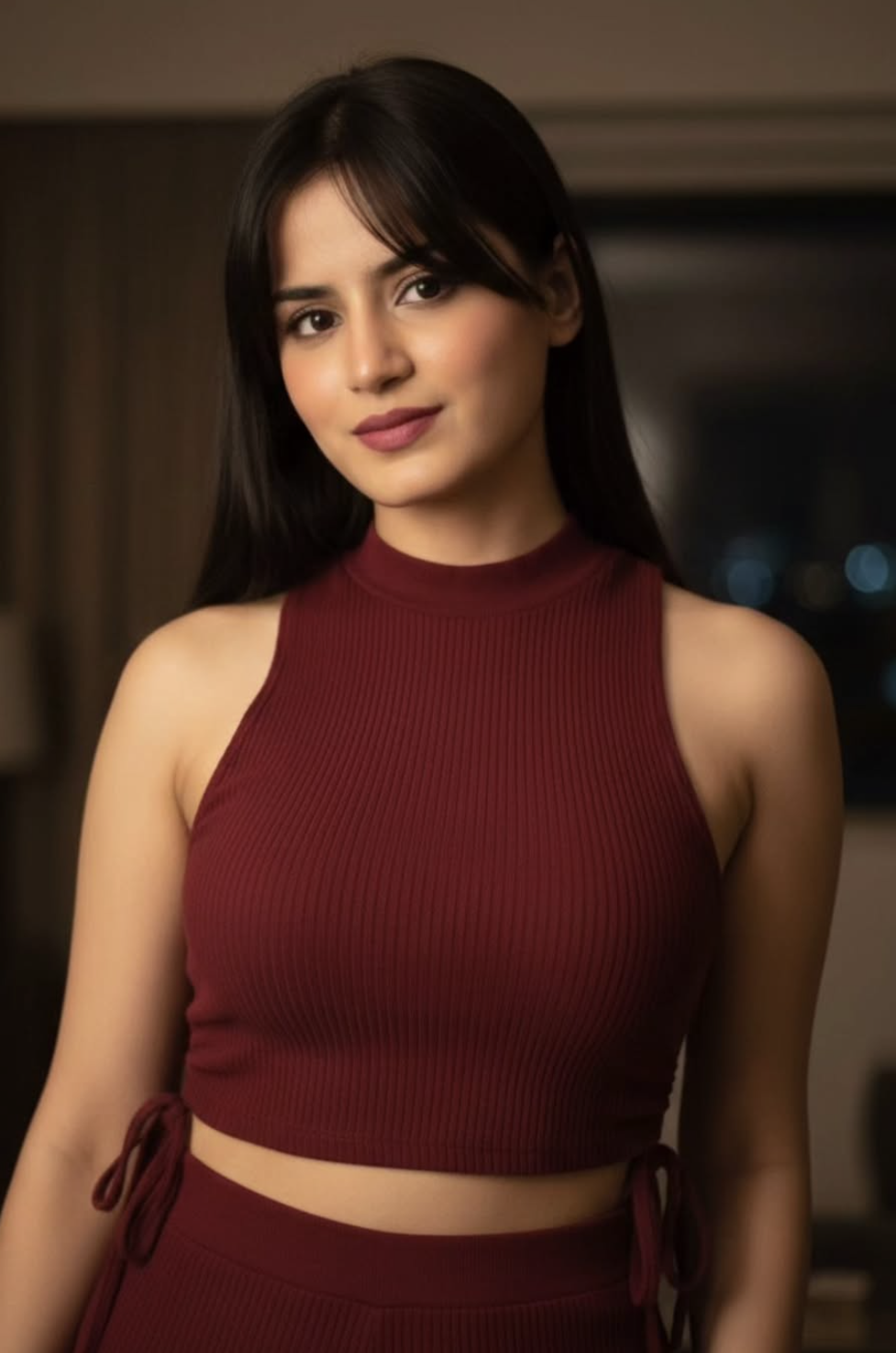
Red Wear Beauty Girl
Om Editing Top: Red Wear Beauty Girl Style ko Samjhein
Om Editing Top style ka yeh prompt un creators ke liye hai jo ek simple uploaded photo ko dramatic, polished aur fashion-forward portrait mein transform karna chahte hain. Iska main focus ek close-up beauty look hai jisme face natural rahe, skin glowing lage, aur outfit deep red ya burgundy tone mein elegant dikhe. Yeh style especially un logo ke liye useful hai jo Instagram, Pinterest, reels thumbnails, profile pictures ya AI photo edits ke liye ek refined and premium visual chahte hain.
Read Also: cinematic-style realistic portrait | 2026 New Year
Is prompt ka biggest advantage yeh hai ki yeh subject ki original identity ko preserve karke usko cinematic mood deta hai. Matlab face same rehta hai, but lighting, colour palette aur overall composition photo ko zyada stylish bana dete hain. Agar aap beginner hain aur mobile se AI editing try kar rahe hain, toh Om Editing Top style aapko aisa result de sakta hai jo soft, modern aur realistic lagta hai.
Yeh look un users ke liye bhi perfect hai jo fashion portrait, beauty edit, dark-room aesthetic, ya close-up portrait photography vibe create karna chahte hain. Simple shabdon mein, yeh ek aisa prompt style hai jo plain photo ko premium editorial look mein badal deta hai.
This Style Photo Mein Kya Milta Hai
Is style ki sabse strong baat iska visual mood hai. Dimly lit room, soft ambient light, natural makeup aur deep red/burgundy outfit milkar ek rich, moody aur luxurious effect create karte hain. Skin tone glowing lagti hai, face features clear rehte hain, aur hair details soft yet defined dikhte hain. Overall photo me ek calm but attractive nighttime feel aati hai.
Composition usually close-up portrait hota hai, isliye focus face aur upper body par rehta hai. One-sided bangs, long straight hair aur subtle expression image ko aur bhi elegant banate hain. Deep pink lips aur ribbed knit texture outfit ko visually interesting banate hain, especially tab jab background simple aur low-light ho. Yeh combination photo ko busy banaye bina impactful banata hai.
Agar aap comparison karein, toh ye style normal selfie se kaafi different hota hai. Selfie me light aur background random ho sakte hain, lekin Om Editing Top style me aapko controlled lighting, soft shadows, rich colour balance aur polished editorial feel milti hai. Isi wajah se yeh fashion edits, portrait enhancement aur AI-generated beauty results ke liye popular ho sakta hai.
- Lighting: soft, ambient, low-light cinematic look
- Mood: calm, elegant, slightly mysterious
- Colours: deep red, burgundy, dark neutral background
- Composition: close-up portrait with face-first focus
- Realism: natural makeup aur original face details preserved
This Style Prompt Ko Mobile Par Kaise Use Karein
Agar aap beginner hain, toh is style ko use karna bahut simple hai. Sabse pehle apni best photo select karein jisme face clearly visible ho aur lighting theek ho. Uske baad image editor ya AI tool me photo upload karein. Yahan focus is baat par rakhein ki aap close-up portrait result chahte hain, kyunki ye style face aur outfit details ko highlight karta hai.
Next step me prompt ya style option ko carefully apply karein. Agar tool aapse text input mangta hai, toh aapko bas reference style choose karna hota hai, lekin output ko natural rakhna important hai. Mobile par edit karte waqt zoom karke check karein ki face distort na ho, hair shape sahi rahe aur red outfit clean dikhe. Agar result over-bright ya over-smoothed lage, toh strength thodi kam kar dein.
Best practice yeh hai ki aap ek hi time par multiple variations generate karein. Isse aap compare kar sakte hain ki kaunsa version zyada realistic, stylish aur social-media ready lag raha hai. Beginner users ke liye yeh approach zyada useful hoti hai kyunki har photo ka lighting response alag hota hai.
- Apni clear portrait photo select karein.
- Photo editor ya AI image tool open karein.
- Image upload karke close-up portrait mode choose karein.
- Om Editing Top style ya similar beauty-fashion look apply karein.
- Output preview karein aur face, skin tone, aur outfit details check karein.
- Final image ko save karne se pehle brightness aur contrast verify karein.
Kaunsi Photos Is Style Ke Liye Best Kaam Karti Hain
Is prompt style me har photo equally achha result nahi deti. Sabse better wo photos hoti hain jisme subject ka face front ya slightly side angle se visible ho. Agar aapki photo me facial features clear hain, toh AI edit zyada natural lagega. Soft expression aur stable pose bhi is look ke liye helpful hote hain, kyunki close-up portrait me micro details important hoti hain.
Resolution bhi matter karta hai. High-quality image se better skin detail, hair detail aur fabric texture milta hai. Low-resolution ya blurred photo me output soft toh ho sakta hai, lekin face clarity kam ho sakti hai. Background simple ho toh aur bhi acha, especially agar room-like dim setting chahiye. Busy background AI output ko confuse kar sakta hai aur aesthetic tone weak ho sakti hai.
Clothing aur lighting ke case me bhi practical choices result ko improve karti hain. Agar original photo me outfit simple hai, toh bhi AI style use karke red-burgundy fashion look create kiya ja sakta hai. Lekin agar base image me strong shadows, harsh flash, ya overexposed areas hain, toh final result uneven aa sakta hai. Isliye aisi photo choose karein jisme face par soft light ho aur body posture clean ho.
- Angle: front-facing ya slight side close-up
- Resolution: high-quality, sharp, non-blurry image
- Lighting: soft indoor light ya naturally diffused light
- Background: plain, dark, uncluttered, bedroom/room vibe
- Clothing: simple outfit jo red fashion edit me convert ho sake
Pro Tips for Best Results with Om Editing Top
Om Editing Top ko use karte waqt sabse achha output tab milta hai jab aap reference image ko clean aur clear rakhein. Face details, hair shape, aur pose jitni zyada readable hogi, final edit utna hi natural lagega. Agar aap close-up portrait banana chahte hain, to composition ko tightly frame karna useful hota hai, kyunki isse skin texture, makeup, aur outfit details aur crisp dikhte hain.
Lighting bhi bahut matter karti hai. Dimly lit room ya soft ambient setup mein editing karte waqt shadows ko balanced rakhna chahiye, taaki subject ka face dull na lage. Deep red ya burgundy tones ko enhance karte hue skin ka glow maintain karna important hai, warna result over-edited lag sakta hai. Om Editing Top ke saath color harmony par dhyan dena output ko premium bana deta hai.
Best results ke liye aap ye practical points follow kar sakte hain:
- Clear face reference use karein taaki facial features same aur sharp rahen.
- Outfit ke fabric details ko preserve karein, especially ribbed knit texture.
- Natural skin glow ko maintain rakhein, excessive smoothing se bachें.
- Deep red, burgundy, aur pink lip tones ke beech balance banayein.
- Background ko soft aur uncluttered rakhein taaki focus subject par rahe.
- Portrait framing ko close-up रखें, especially 4:5 format ke liye.
Common Mistakes to Avoid in This Style
Ek common mistake hoti hai subject ke face ko too much alter kar dena. Jab face shape, eyes, lips, ya bangs change ho jaate hain, to portrait ka natural feel khatam ho jata hai. Om Editing Top style me identity consistency sabse important hai, isliye face features ko preserve karna zaroori hai.
Dusri galti hoti hai outfit aur scene ko over-style kar dena. Agar lighting bahut harsh ho, colors too saturated ho jayein, ya background unnecessary clutter se bhar jaye, to final image ka elegance kam ho jata hai. Iske alawa, make-up ko too heavy karne se natural beauty lose ho sakti hai, jabki is type ke portrait mein subtle glam hi better lagta hai.
- Face ko change karna: identity mismatch ho sakta hai aur result artificial lagega.
- Too much smoothing: skin plastic-like dikhegi, glow natural nahi लगेगा.
- Over-saturated red tones: burgundy outfit ka classy feel dull ho sakta hai.
- Poor framing: close-up portrait ka impact kam ho jayega.
- Background noise: subject se attention hat sakti hai.
Best Use Cases and Creative Ideas for This Style
This style style images ka use Instagram posts ke liye bahut achha hota hai, especially jab aap bold yet elegant portrait share karna chahte hain. Is tarah ki close-up beauty photo profile picture ke liye bhi strong option ho sakti hai, kyunki face clearly visible hota hai aur overall vibe polished lagti hai.
Creators in images ko thumbnails, reels covers, aur digital portfolios mein bhi use kar sakte hain. Agar aap fashion, beauty, ya portrait editing niche mein kaam karte hain, to yeh look ek premium visual identity build karne mein help karta hai. Dim-light aesthetic aur deep red outfit combination reels cover par instantly eye-catching lagta hai.
Kuch practical use ideas:
- Instagram feed: classy portrait post ya aesthetic carousel cover.
- Profile picture: clean close-up image with strong facial focus.
- YouTube thumbnail: beauty, fashion, ya transformation content ke liye.
- Reels cover: bold red-toned visual for high click appeal.
- Portfolio showcase: editing skills aur portrait consistency display karne ke liye.
Variations You Can Try with This Style
Agar aap experiment karna chahte hain, to this prompt ke base look ko alag moods aur seasons ke hisaab se twist kar sakte hain. For example, same close-up portrait ko warm golden indoor lighting me convert karke softer and romantic vibe di ja sakti hai. Ya phir cooler tones use karke more cinematic night portrait feel create ki ja sakti hai.
Color variations bhi kaafi interesting results deti hain. Burgundy outfit ko maroon, wine red, ya dark cherry shade me explore kiya ja sakta hai, jabki lip color ko deep pink se rose, berry, ya muted plum me shift karke different expressions milte hain. Background me subtle changes, jaise window light, neon glow, ya soft lamp lighting, portrait ko ek fresh personality de sakte hain.
Try karne layak variations:
- Mood shift: romantic, cinematic, moody, or soft glam look.
- Colour changes: burgundy, maroon, wine, cherry red, or plum accents.
- Seasonal feel: winter cozy, rainy night, autumn warm tones, or summer soft light.
- Setting changes: bedroom glow, window-side light, or studio-style dim room.
- Accessory tweaks: minimal jewelry, natural hair flow, or cleaner fashion styling.
Conclusion: Try This Style for a Stylish Portrait Look
This look is a great choice when you want a close-up portrait that feels stylish, natural, and visually rich at the same time. The combination of glowing skin, deep red outfit tones, subtle makeup, and soft night lighting creates a polished beauty edit that stands out without looking overdone.
Agar aap apne portrait edits ko more elegant aur social-media ready banana chahte hain, to yeh style style ko zaroor try karein. Thodi si attention to detail ke saath aap ek simple photo ko bhi premium, aesthetic, aur eye-catching image mein transform kar sakte hain.
💬 Comments